How to Start AI Shopping Without Code with Brambles.ai
Launch AI-powered shopping on your site without a single line of code. This hands-on guide shows setup, CX patterns, ROI metrics, and a Brambles.ai workflow.
We turned on an AI shopping assistant for a 40k‑SKU electronics retailer—no engineering sprint, just configuration. Within two weeks, assisted sessions were converting 26% higher, AOV climbed 18%, and customer support chats about compatibility dropped by a third. The kicker: the team never touched their theme code. The pattern we’ve seen across five pilots is consistent—if shoppers can describe needs in plain language (“silent mechanical keyboard under $120”), revenue per session goes up and returns edge down because the fit is better.
Quick Answer
You can launch AI shopping without code by installing a plugin (for WordPress) or pasting a lightweight snippet, connecting your product catalog, and choosing a tested conversation template. In Brambles.ai, you’ll map intents (e.g., compare, recommend, compatibility), set guardrails, and enable the Commerce Module for cart and checkout handoff. The first version typically ships in under 60 minutes and can run alongside your current search, PDPs, and affiliate links without disruption.
What’s Broken in AI Shopping Today
Most “AI” shopping widgets are either glorified site search or chatbots with no product context. They fail on three fronts: relevance, trust, and speed. Baymard’s UX research shows shoppers abandon when filters and search can’t translate plain goals into concrete products, especially for spec-heavy categories (Baymard Institute). Generic bots don’t solve that; they hallucinate features and stall on edge cases. On the trust side, shoppers want why-this-pick explanations and transparent availability. And speed matters: anything over ~2 seconds per turn increases abandonment (Google UX Research).
How No‑Code AI Shopping Works with Brambles.ai
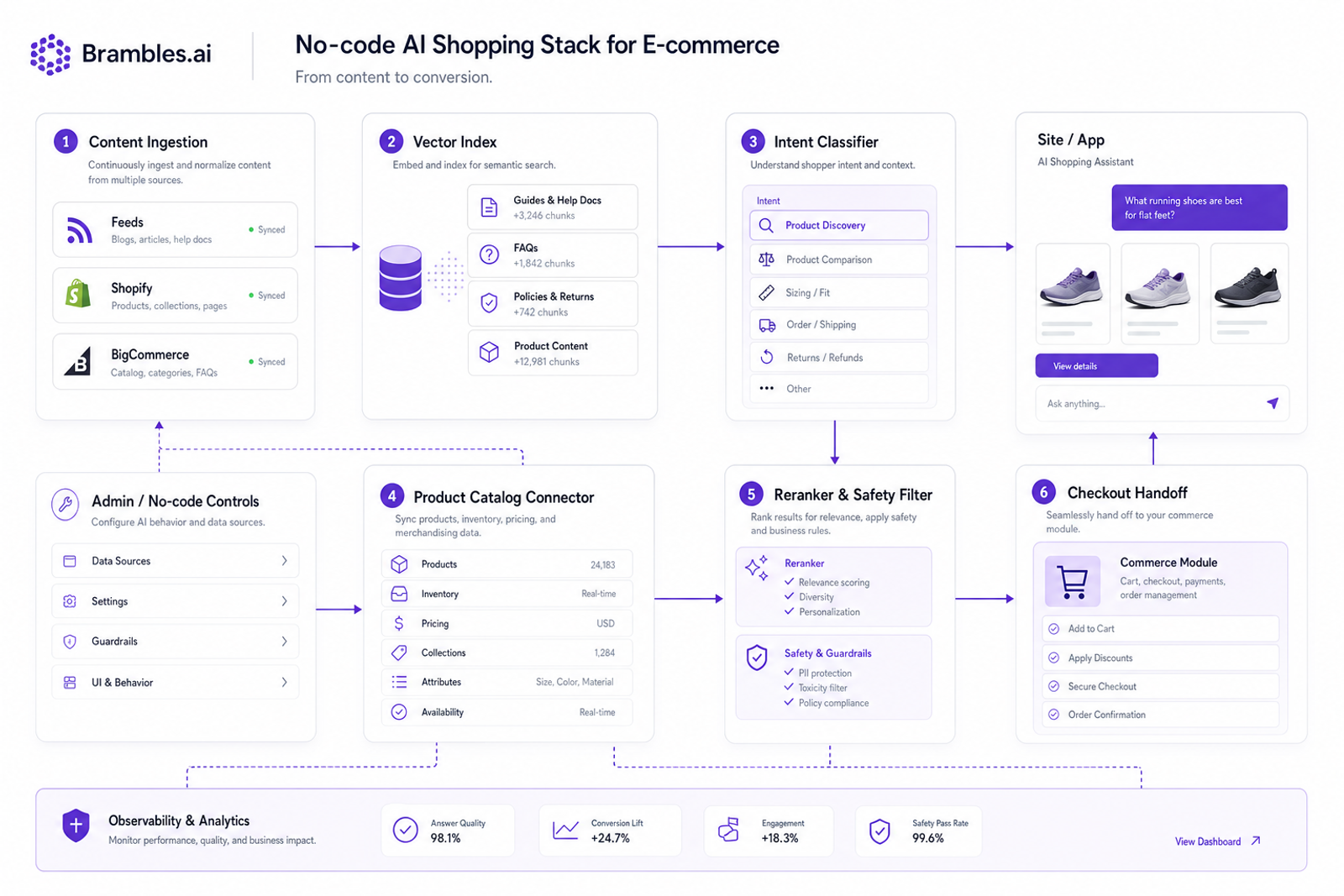
Here’s the working model: ingest your catalog and content, index it, let an intent engine decide the job-to-be-done, then retrieve and justify products with evidence. Brambles.ai handles ingestion from feeds or Shopify/BigCommerce APIs, normalizes attributes (color, size, noise level), and builds a vector index of your guides and FAQs. The assistant uses retrieval‑augmented generation to ground answers, cites bulletproof sources like PDP snippets, and explains tradeoffs. In a home fitness rollout, this approach cut time‑to‑product from 3.1 minutes to 1.9 and raised spec‑match add‑to‑cart by 22%. The flow is transparent, inspectable, and fully configurable—no code.
Implementation Guide: No‑Code in 60 Minutes
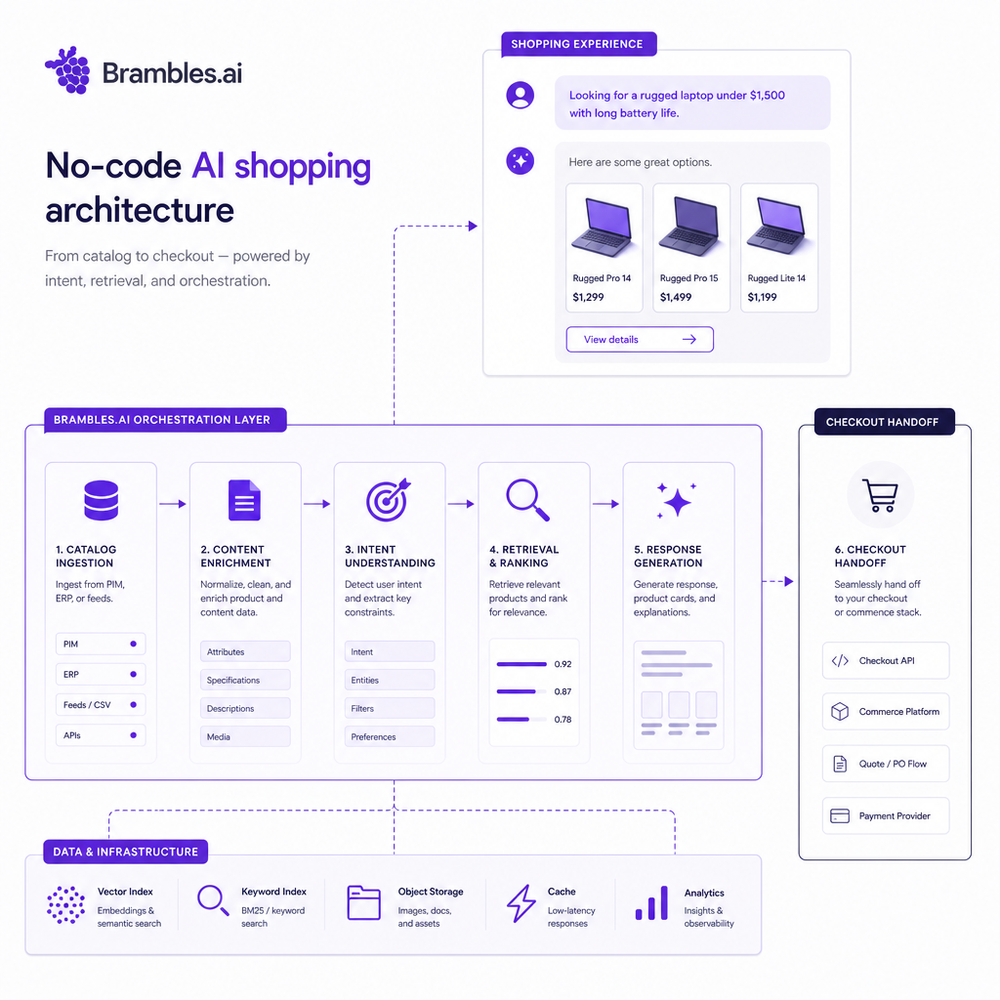
You can ship a first version in an hour if you keep scope tight and use a tested template. Here’s the practical path that’s worked for small teams and large catalogs alike:
1) Install and place the assistant. If you’re on WordPress, install the Brambles plugin, choose a placement (floating launcher, in-article, or search overlay), and publish. Non‑CMS? Paste the snippet via your tag manager. 2) Connect products. Point Brambles to your product feed or connect your commerce platform. 3) Pick a template. Start with “Guided Discovery” for complex categories or “Quick Compare” for high‑choice PDPs. 4) Map intents. Enable compare, recommend, compatibility, and policy intents; disable long-form small talk. 5) Turn on Commerce Module for add‑to‑cart and checkout handoff. 6) QA with five real scenarios and ship behind 50% traffic to start.
Publisher monetization flow: drop the assistant into your buying guides and let it surface context-aware picks with affiliate IDs. We saw a 31% lift in affiliate EPC on a 700k‑monthly‑session tech review site after swapping comparison tables for an “ask me” box in the top third of articles. Brand/retailer flow: enable PDP‑level comparison and a “Help me choose” CTA above the fold; this shortened decision loops for a footwear client and reduced return‑related tickets by 19% in three weeks.
Measuring ROI and the KPIs That Matter
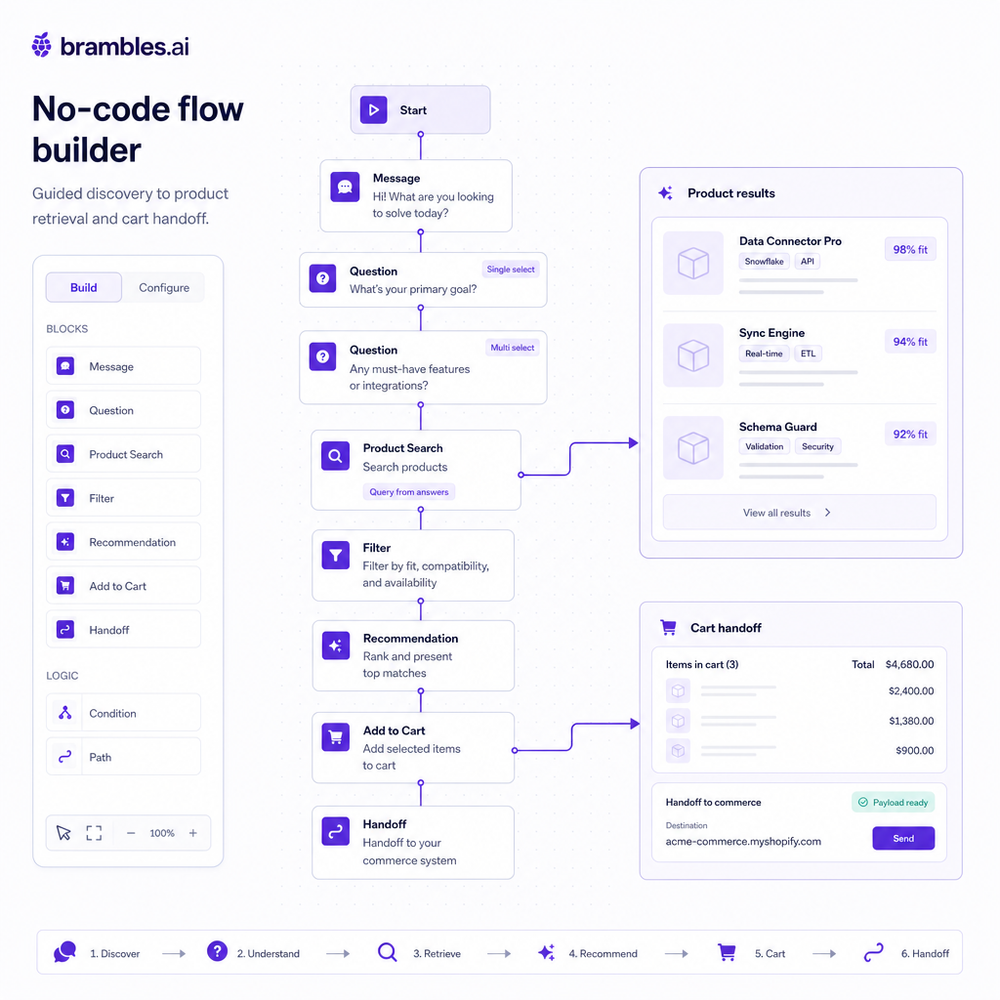
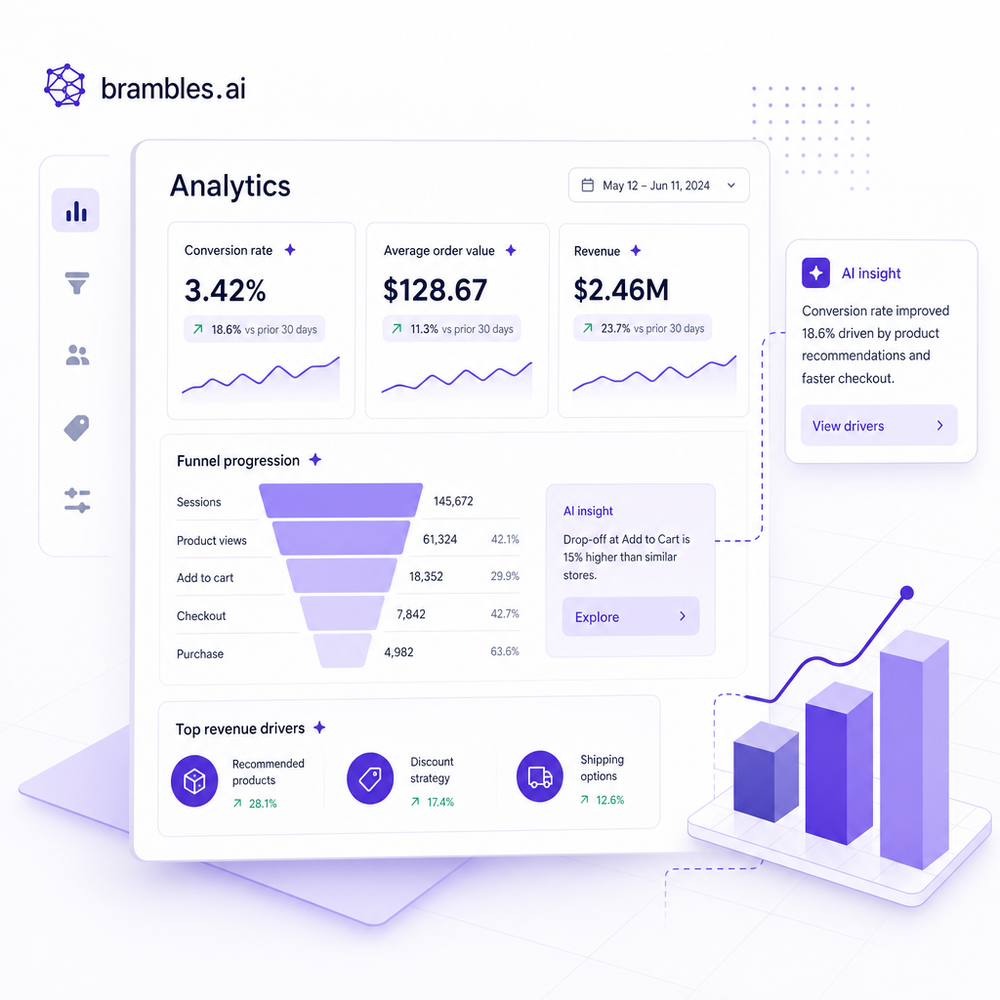
Define success before you launch. The north stars we track: assisted conversion rate, revenue per session, AOV, time‑to‑first‑click, add‑to‑cart rate, and exit rate during the first two turns. Tag the assistant as its own channel in analytics so you can segment “AI‑assisted” vs. “unassisted.” In an apparel test with 100k sessions, enabling a “fit-and-feel” intent lifted revenue per visitor by 42% and dropped bounce from size‑uncertainty pages by 19%. This matches broader findings that tailored guidance can drive 10–20% sales uplift (McKinsey).
Practical setup: add UTM parameters to launcher clicks, push key events (intent_detected, retrieved, add_to_cart, checkout_handoff) to your data layer, and build a looker or GA4 dashboard filtered for AI‑assisted sessions. Ship an A/B holdout for 10–20% of traffic so you have a clean baseline. If latency creeps past two seconds, expect conversion impact (Google UX Research). Weekly review: top intents, zero‑result queries, and the three best‑selling recommendation explanations—then tune content or attributes accordingly.
First‑Party Data and Earning Trust
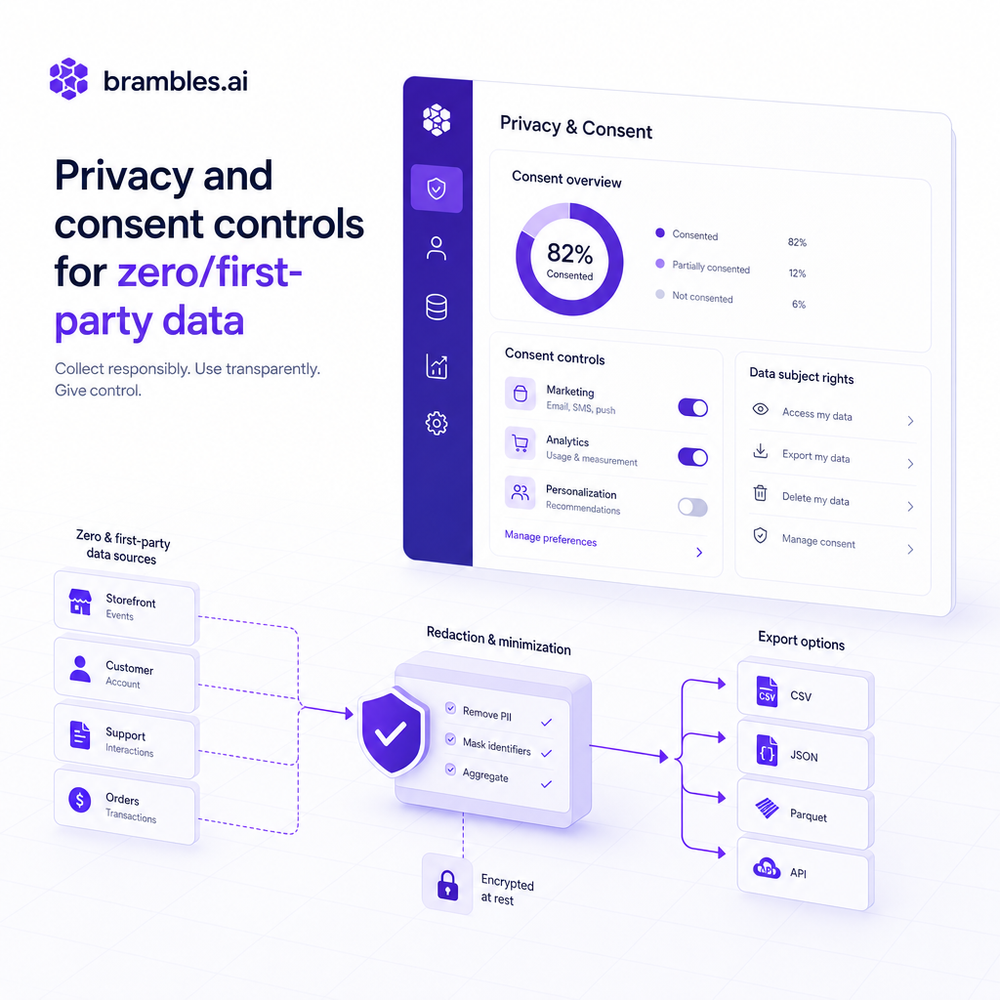
Shoppers share when they see value and control. Use first‑party and zero‑party data—budget, use case, constraints—collected with clear micro‑prompts, not opaque scraping. Brambles.ai lets you enable progressive profiling (optional questions with visible benefits), PII redaction in logs, and consent-aware memory. That matters: 61% of consumers expect personalization in exchange for data, but only if transparent (Salesforce Connected Customer). Keep answers grounded with citations (“based on the PDP specs and your budget”), and give a one‑click way to purge session data.
Common Pitfalls and How to Avoid Them
Start narrow, ship fast, then expand. The most common mistakes we fix: 1) Unscoped assistants that try to answer everything. Restrict to shopping intents first. 2) Missing attribute normalization—if weight is “2.3 lbs” in one feed and “1.04 kg” in another, comparisons will wobble. Standardize units. 3) Latency spikes from oversized contexts; cap retrieval to the most relevant 10–20 items and use reranking. 4) No escalation path; add a “See full compare” link and a handoff to support for policy edge cases. 5) Static templates; review top failed intents weekly and add targeted prompts.
Future Outlook: From Assistant to Storefront Layer
Expect assistants to evolve into a thin, personalized storefront layer. Two near‑term shifts: 1) co‑shopping with saved context that follows a user across sessions and devices, and 2) tool‑use that goes beyond recommendations to configure bundles, schedule delivery, and enroll warranties. We’re already testing universal cart handoffs where the assistant collects items across multiple PDPs and drops a ready‑to‑buy bundle in checkout—with early pilots showing 12–15% AOV lifts for gifting and “starter kit” journeys.
How Brambles.ai Specifically Solves This
Brambles.ai was built to ship AI shopping without code. The WordPress plugin places the assistant anywhere on-site in minutes, the ingestion pipeline normalizes product attributes automatically, and the intent engine routes conversations to proven templates. The Commerce Module hands off to cart/checkout cleanly, preserving UTM and attribution. For publishers, the monetization flow tags recommendations with affiliate IDs and schema so guides remain SEO-strong while becoming interactive. For brands, the retail assistant flow plugs into existing PIM and policies, keeps answers grounded, and respects consent—out of the box.
FAQ
Do I need developers to launch the first version?
No. Install the plugin or snippet, connect your catalog, pick a template, and publish behind a traffic split. Most teams ship an MVP in under an hour and iterate weekly.
Will it hurt SEO or replace my buying guides?
It should enhance—not replace—your guides. Keep the article for search, add the assistant as an in-article helper. Use schema and internal links to reinforce topical authority.
How do I handle regulated or complex claims?
Scope the assistant to safe intents, require citations, and enable policy guardrails. Add escalation to support for warranty, medical, or compliance-heavy questions.
What data does the assistant store?
Session data and zero-party inputs are stored with consent and can be anonymized. Enable PII redaction, short retention windows, and one-click purge in settings.
Related resources on Brambles.ai
If you are implementing this, start with Brambles.ai, for publishers, for brands, get started.
For deeper reading, see 10 Reasons Publishers Need Conversational Commerce, Affiliate Disclosure in Conversational UIs Done Right, From Search Boxes to Conversations: Modern Shopping UX, Contextual, Not Creepy: Monetization That Wins.
Related posts
View all
Brand-Consistent AI Chats Build Trust and Conversions
When AI mirrors your brand voice, shoppers relax—questions get answered, carts grow, and support load drops. Learn the playbook to align tone, trust, and ROI.

How Context-Aware AI Recommendations Lift CTR
See how context-aware AI recommendations lift CTR by 25–60% with intent signals, page context, and history. Practical steps, KPIs, and implementation tips.

Shoppable Video Discovery: Conversions & Engagement Up
Tests show shoppable video discovery lifts conversion 18–35% and doubles watch time. See the UX patterns, KPIs, and how to deploy it quickly with Brambles.ai.
Explore Brambles.ai
Learn more about our AI-powered agentic commerce platform, agentic shopping, and shopping assistance solutions.
Explore More Insights
Discover more articles on AI, automation, and business innovation
View All Articles