Built for the story. Ready for the reader.
An AI unit that lives inside your articles. It reads the story, brings up the products and questions it raises, and lets readers ask, explore and shop right there, in the slot where a static ad used to sit.
- Lives in the article
- Reads the story
- Answers in place
- Earns in context

Swap a static slot for one that reads the story.
The middle of an article is where readers pay the most attention, and most sites fill it with the same placement on every page. The Adaptive Inline Unit is built from the article itself, so what readers see matches what they came to read.
Before
A static placement
- The same creative on every story
- Blind to what the article is about
- One job: serve an impression
- Readers learn to scroll straight past
After
The Adaptive Inline Unit
- Changes with every story
- Built from the article's products, photos and questions
- Readers ask, explore and shop without leaving
- Earns from discovery, not just impressions
It reads. Then it responds.
Every article gets its own version of the unit, prepared in the background and ready when the reader arrives.
Every story gets its own unit.
Same slot, same script. What readers see depends on what the article is about.
The beauty edit
Skin, simplified.

From the story
The daily cleanse trio
Morrow & Moss
Explore productsDiscover · Ask · Explore
Products from the story
When an article names a product, the unit finds it and shows readers where to buy it.
Style notes
The art of layering.
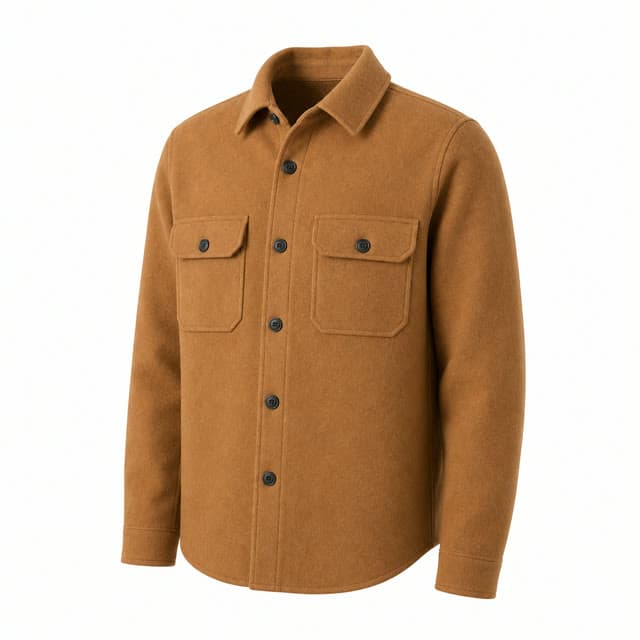
Inspired by the story
Find a similar look
Camel overshirt
Shop the lookSimilar styles, not an exact item match.
Discover · Ask · Explore
Shop the look
In style stories it reads the photos and suggests similar pieces, labelled as similar and never passed off as the exact item.
The listening room
Albums on repeat.
From the album list
Find your next record
Blue Hour · Luna Vale
Find the recordDiscover · Ask · Explore
Find the records
Album and artist coverage turns into editions readers can actually buy, from vinyl to CD.
More than a chat.
One unit, three layers, each one yours to shape.
- The Edit AIPowered by brambles.ai
Brand
Your publication's name, logo, colours and fonts on top, with Brambles quietly underneath.
From the story
The daily cleanse trio
Morrow & Moss
Explore productsDiscovery
Products, looks, records and sponsored picks drawn from the article, rotating on your schedule.
- Questions about this storyShop the storyAsk about this story…
Questions
Suggested questions and an always-open text box that turns curiosity into a conversation.
Your site. Your rules.
Everything is set from the Brambles dashboard. After the first script tag, nothing needs another code change.
Automatic placement
The unit places itself after the intro, in the middle or at the end of each article. Or pin it to an exact spot with one line of HTML, and keep it off any section of your site.
Sized for your layout
Auto, Compact and Spacious presets or exact dimensions, with a narrow-column layout for mobile web.
Your brand on top
Your colours, fonts and logo, your opening prompts, and your own wording on commission and sponsored labels.
Editorial review
Prepare an article ahead of time, then approve or reject what the unit will show on it.
Brand safety built in
Sensitive and hard-news stories get questions only: no products, no sponsors. Restricted categories are filtered out, and campaigns must match the article.
Measured card by card
Cards shown, viewable impressions (half on screen for a full second), engagements, questions asked, shopping clicks and attributed commission, updated daily in your dashboard.
Discovery can earn.
Three ways to earn from the same slot, all clearly labelled for readers.
Affiliate commerce
Shopping clicks earn commission. Free and Pro publishers keep 70% of what Brambles monetization earns; Enterprise publishers can use their own affiliate IDs.
Your sponsored campaigns
Sell sponsored placements to your brand partners. They appear only on relevant articles and bill per viewable impression.
Programmatic demand
Fill the slot with native ads and CPC offers from Brambles demand partners, where your traffic is eligible.
Paid picks are always labelled, and the unit never shows ads on their own.
Live in three steps.
One script tag on your site. Everything else happens in the dashboard.
Add one script
Paste the Brambles loader once, site-wide.
Turn on Inline
Switch on AI Chat (Inline) in your dashboard. Automatic placement is on from the start.
Preview and fine-tune
Preview the placement on any real article, then adjust size, position and what the unit shows.
<!-- Once, site-wide -->
<script
  src="https://widget.brambles.ai/brambles-loader.js"
  data-api-key="YOUR_API_KEY"
></script>

<!-- Optional: pin the unit to an exact spot -->
<div data-brambles-inline></div>
Already running Brambles? Turn on Inline in your dashboard; no new code needed.
Questions, answered
What is the Adaptive Inline Unit?
An AI unit that sits inside your articles. It reads each story, shows readers the products, looks and questions it raises, and lets them ask follow-ups and shop without leaving the page.
How is it different from a static ad slot?
A static placement shows the same thing on every page. The Adaptive Inline Unit is built from the article itself, from the products it names to the photos it runs and the questions it raises, and readers can talk to it.
Where does it appear on the page?
On article pages with enough text, it places itself after the intro, in the middle or at the end, whichever you choose. You can also pin it to an exact spot with <div data-brambles-inline></div>. Home, archive, search and paywalled pages are skipped.
Does it work on every article right away?
The first visit to a new article starts preparing it in the background, so the earliest readers may see questions before products arrive. Sensitive news gets questions only, and matches below our confidence bar wait for your review.
Does it show the exact products from the article?
When an article names a product, the unit looks for that product by name. For photos, Shop the look suggests similar items and labels them as similar. It never claims an exact match, or that someone wore an item.
How do publishers earn from it?
Shopping clicks earn affiliate commission on every plan. Enterprise publishers can also sell their own sponsored placements and add programmatic demand where eligible. Paid content is always labelled, and the unit never shows ads on their own.
Does it work on mobile and in apps?
On mobile web the unit switches to a layout built for narrow columns. In native apps, the same Brambles assistant can open as a full-screen view through our in-app SDK; the inline unit itself is designed for web articles.
Which languages does it support?
The interface is available in English, Italian, Spanish, French, German, Portuguese and Hindi. AI-written card text is currently available in English, Italian and Hindi.
Make every story actionable.
Put the Adaptive Inline Unit in your articles with one script tag, and keep your brand on top.
- Free for publishers, no card
- One script tag
- Your brand on top