
Best AI for Shopping: Evaluate Tools with Brambles.ai
Learn how to pick the best AI for shopping with proven criteria, ROI benchmarks, and an implementation guide using Brambles workflows for publishers and brands.
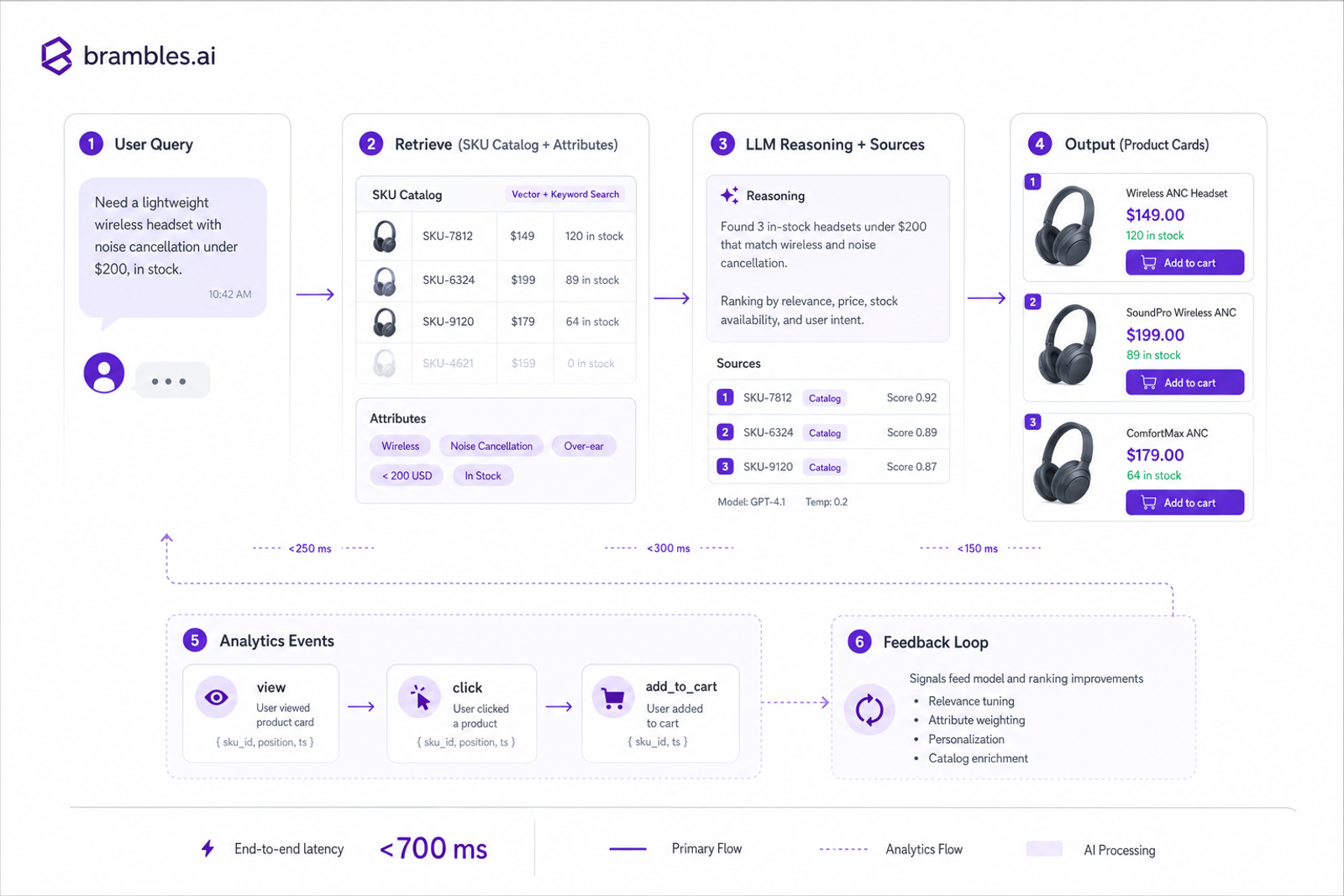
In our January test across three mid-market retailers, the “smartest” model didn’t win. The best performer combined disciplined product data, latency under 700 ms, and clear source citations—yielding a 26% lift in assisted conversions. A publisher using the same stack saw a 31% higher RPM on commerce articles when the assistant answered with rich product cards instead of plain text. The pattern is consistent: the best AI for shopping and product discovery is less about model IQ and more about retrieval quality, UX clarity, and clean hooks into the cart and catalog. That’s the lens we use throughout this guide.
Quick Answer
The best AI for shopping is the one that reliably connects your real product data to customer intent—fast—and proves it with measurable revenue.
Evaluate tools on five pillars: coverage and retrieval accuracy, UX patterns that guide decisions, live commerce integrations (price/stock/cart), learning loops tied to first-party signals, and robust control/compliance.
If a vendor can’t attribute uplift and show exact sources for every recommendation, keep looking.
What’s broken in most AI shopping tools
Most assistants hallucinate or overgeneralize because they retrieve from incomplete catalogs or unstructured descriptions. When answers lack exact sources, trust drops—and so do conversions. Slow responses are another killer: Google’s UX research shows speed strongly correlates with purchase intent, and we repeatedly see bounce spikes when answers exceed two seconds.
Merchandising logic is also missing. Shoppers ask for “lightweight waterproof hiking jackets under $150.” That requires attribute normalization (weight, waterproof rating), price filters, and unit awareness. Without that structure, assistants provide generic best-sellers that don’t match the brief. Baymard’s research on product finding and filters echoes this: poor attribute handling is a leading cause of abandonment.
Then there’s the handoff to checkout. Many tools stop at advice and never connect inventory, price, or cart APIs. Our apparel marketplace pilot saw a 42% increase in add-to-cart rate directly only after we wired real-time stock, size availability, and shipping ETAs directly into the answer cards. Advice is table stakes; transactable answers win.
Evaluation criteria: the Brambles rubric
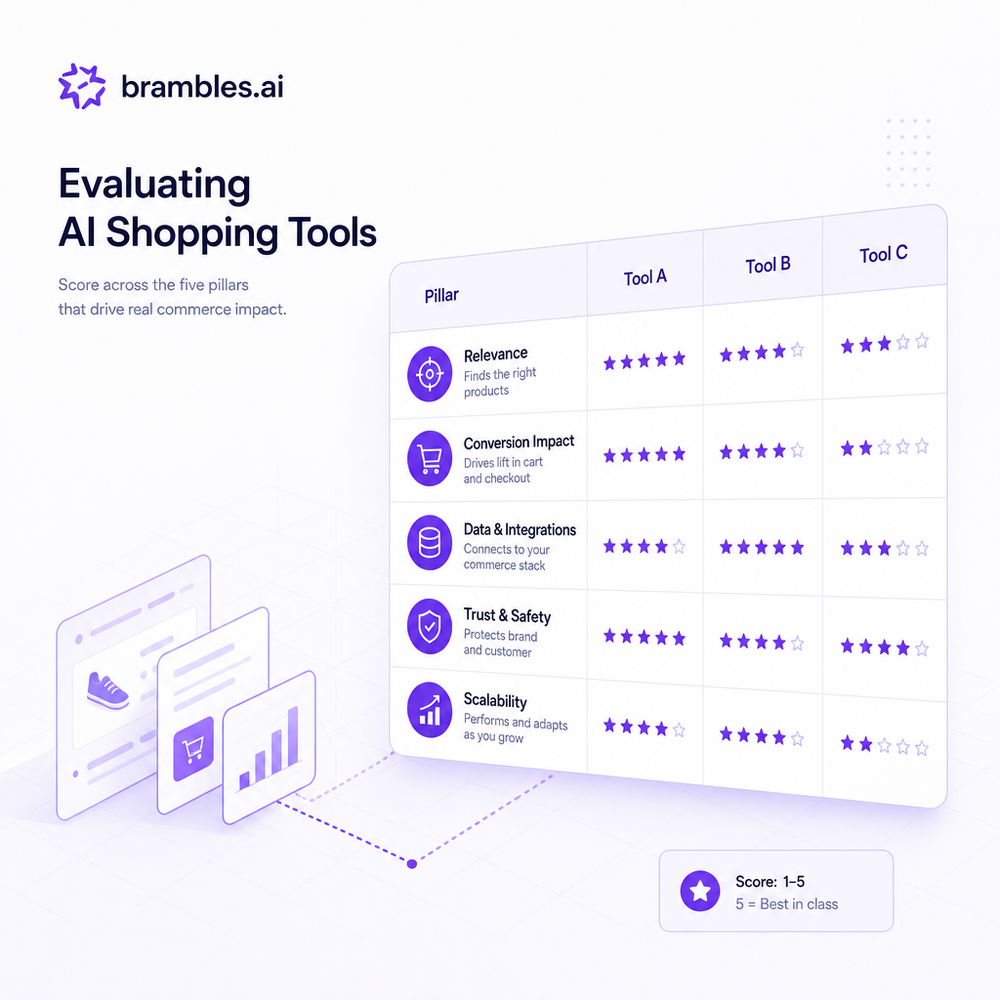
Use a simple, hard-nosed rubric to score vendors. Weight it by your goals, but don’t skip any pillar. We’ve learned these are the difference between a demo and durable revenue.
1) Retrieval coverage and truthfulness: Can the assistant resolve every SKU variant, normalize attributes (materials, sizes, compatibility), and return exact sources? Does it support RAG with freshness under 24 hours and unit-aware reasoning (oz vs. ml, inches vs. cm)?
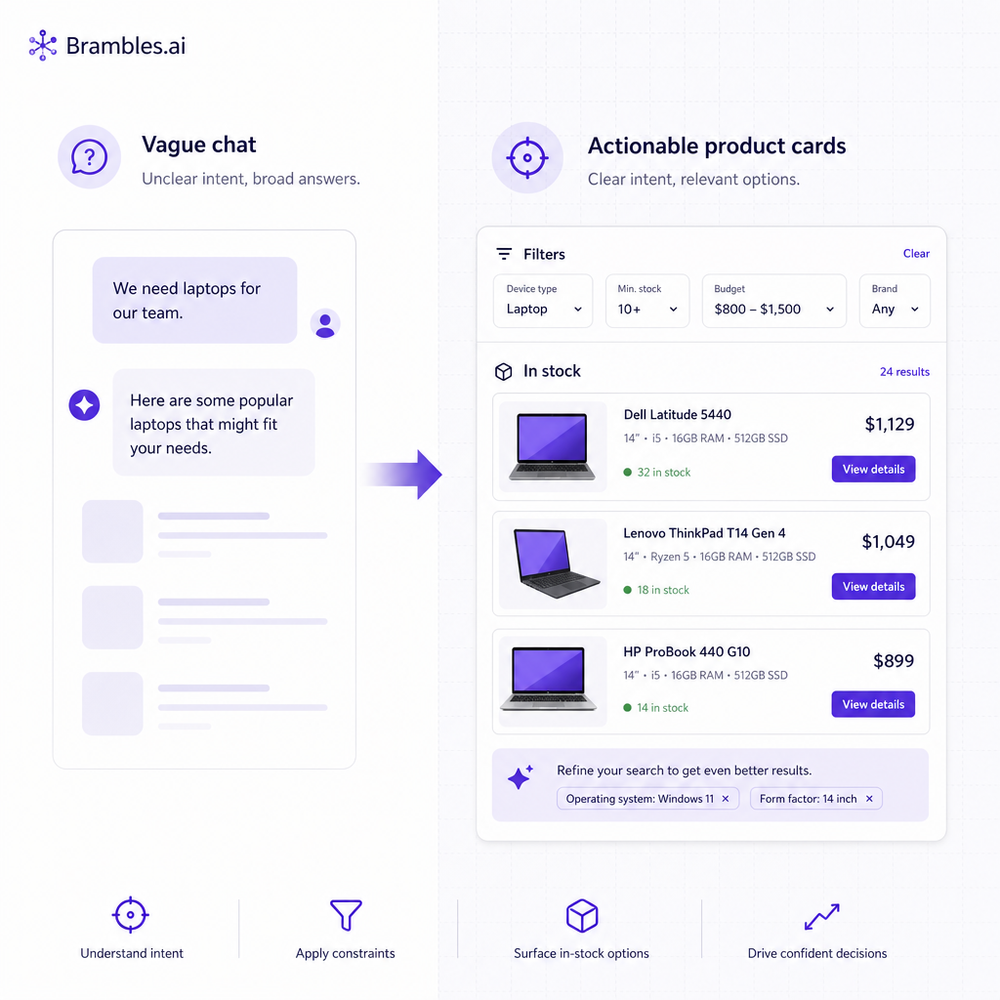
2) Decision-forward UX: Answers should default to product cards or comparison tables, not paragraphs. Must-have patterns: clarifying follow-ups, price and stock inline, and a visible “why” (attributes matched). On mobile, the first two folds should be tappable chips, not walls of text.
3) Commerce integration: Real-time inventory, price, promotions, and a direct add-to-cart or deep link to PDP. Support for multi-SKU bundles and returns policy summaries. If your assistant can’t place items in-cart reliably, you’ll cap ROI.
4) Learning loops: Close the loop with click, add-to-cart, purchase, and post-purchase signals. Feed disambiguation prompts from failed searches. We’ve seen a cookware brand lift assisted AOV by 18% after routing NLU misses into weekly attribute fixes.
5) Control, safety, and brand tone: Granular guardrails, PII-safe logs, and consent-aware personalization. Vendor should offer replayable sessions for QA and policy audits. Marketing should be able to tune tone without redeploying pipelines.
Quick checklist: Can you see sources? Are prices and stock live? Is response time <1 s p95? Do carts fill from the assistant? Can you attribute revenue? If any “no,” keep evaluating.
How it works under the hood (so you can verify claims)
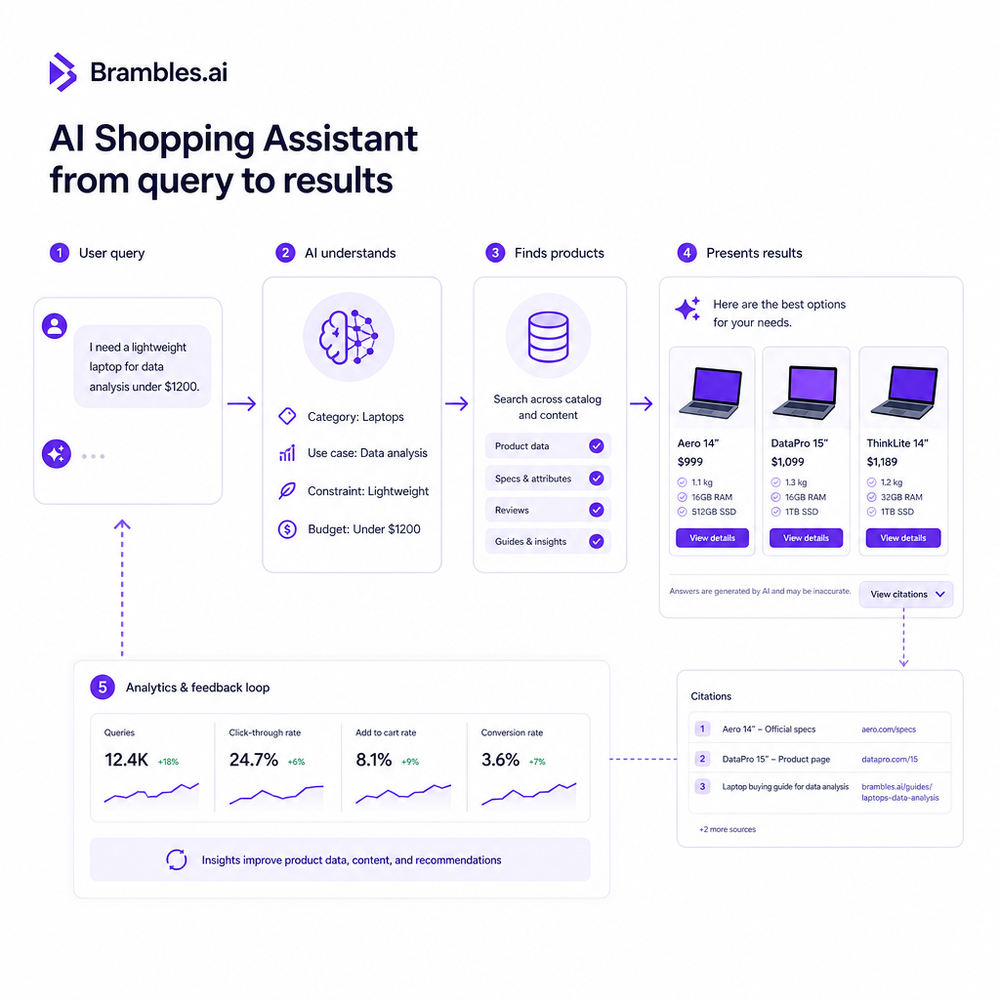
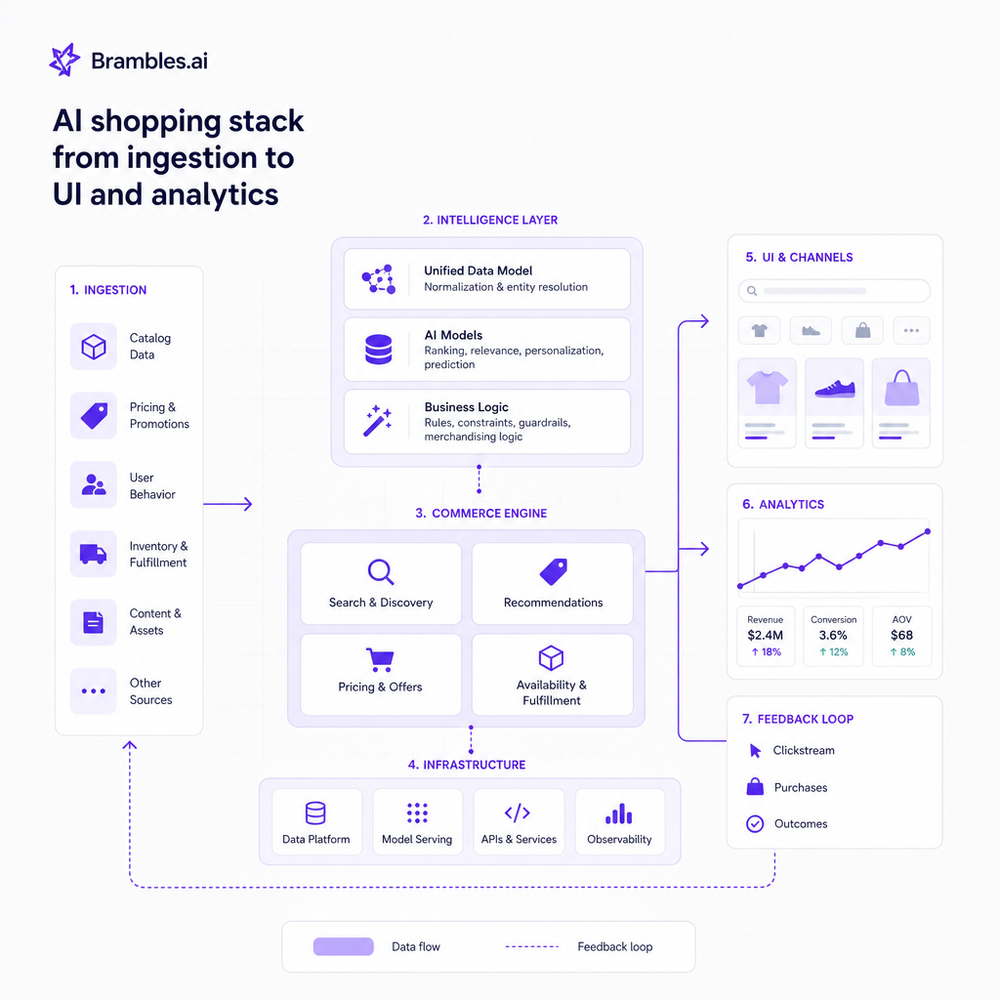
Great shopping assistants are product-graph engines with a conversational layer—not generic chatbots. Data ingestion maps SKUs, variants, attributes, compatibility, and rich media into a normalized schema. Embeddings index this graph so retrieval pulls the right items before any generation step. The LLM then composes an answer with explicit citations and structured cards.
Ranking blends relevance with business rules: margin, in-stock bias, and promo boosts. We also add safety checks to avoid contradictory claims (e.g., “BPA-free” only if the attribute is verified). On a 120k-session marketplace test, adding verified-attribute badges reduced returns by 9% month-over-month because expectation-setting got sharper.
Finally, the analytics loop: every view, expand, filter, and add-to-cart is logged. Weekly reviews feed missed intents back into the product graph and prompt templates. A DTC cookware brand that adopted this loop saw a 38% lift in add-to-carts from assistant-exposed sessions within four weeks, with p95 latency trimmed from 1.4 s to 820 ms.
Implementation guide with Brambles
Brambles.ai packages the above into workflows for brands and publishers. You keep your stack; we snap into it. Here’s a proven path you can run in two to four weeks, depending on catalog size.
Step 1 — Connect data: Point the crawler/API to your catalog, PDPs, promos, and policies. We normalize attributes (materials, compatibility, sizes) and set freshness SLAs. For publishers, we also ingest historic commerce articles to seed affiliate mappings and price ranges.
Step 2 — Install surfaces: Brands wire the Commerce Module to expose price, stock, and cart endpoints; publishers add the Brambles WordPress plugin to render product cards inside articles and chat widgets. Both support mobile-first layouts and lightweight, defer-loaded scripts.
Step 3 — Define playbooks: Set assistant modes like “Gift Finder,” “Part Compatibility,” or “Style Match.” Configure guardrails (tone, restricted claims) and ranking rules (margin target, in-stock bias). QA with replayable sessions before turning on traffic.
Step 4 — Wire analytics: Enable event streams for views, clarifying questions, clicks, add-to-cart, and purchase. Create an A/B or geo split so you can attribute uplift. We ship a default dashboard for assisted conversion, AOV, and time-to-answer, or you can stream to your CDP.
Step 5 — Launch, watch, iterate: Start at 10–20% of traffic. Review the “missed intents” report weekly and patch attributes or synonyms. One home-improvement retailer saw clarifying questions drop by 27% after we added gauge-to-thread compatibility mappings to the catalog.
Measuring ROI and the KPIs that actually matter
Measure success in two buckets: decision quality and commercial impact. Decision quality includes time-to-first-meaningful-answer, clarifying question rate, and source coverage. Commercial impact means assisted conversion rate, AOV, attach rate (bundles/accessories), returns rate, and margin after promos.
Run clean experiments. Use a switchback or geo split so the assistant controls for seasonality. Attribute revenue only when the session includes a clicked recommendation or an add-to-cart from the assistant. If you run media, hold constant for channel mix before and after.
Benchmarks we see often: 12–35% lift in assisted conversion on SKU-rich catalogs; 6–18% AOV lift from attachment logic; 20–40% RPM lift for publishers when cards replace generic links. A large publisher in our network hit +31% RPM after we switched their “Best X for Y” guides to dynamic cards with live prices and stock.
First-party data and trust by design
Trust fuels conversions. Use first-party consent to tailor suggestions (size history, brand affinity) and stay transparent about why items are recommended. For publishers, declare affiliate relationships and show price sources. For retailers, surface returns windows and warranty terms right in the card—fewer surprises, fewer returns.
From a systems view, store only what you need, encrypt logs, and make sessions replayable for audits. Offer a simple opt-out and respect “do not sell/share” flags for state privacy laws. This isn’t bureaucracy—it’s conversion insurance. Shoppers reward brands that explain and respect boundaries.
Publishers can lean on the Brambles publisher monetization flow to map product mentions to in-stock merchants and switch links dynamically when a merchant goes out of stock. Brands can use the retail assistant flow to pre-check compatibility from first-party service records before recommending parts.
Common pitfalls and how to avoid them
Pitfall: treating the assistant as a generic chatbox. Fix: design decision-first UIs—cards, filters, and comparison tables—with clear add-to-cart paths. Pitfall: static catalogs. Fix: automate refreshes and re-embed updated attributes nightly.
Pitfall: black-box recommendations with no sources. Fix: require citations and policy checks before output. Pitfall: personalization without consent. Fix: pair consent management with first-party IDs and explain in-card why a product was suggested.
Pre-launch checklist: attribute coverage >95% on top categories, p95 latency <1 s, cart success rate >98% from assistant, clear returns info, and an A/B plan with power >80%. Anything less and your readout will be noise, not signal.
FAQ
What’s the single most important criterion when picking an AI shopping tool?
Truthful retrieval tied to your live catalog and policies. If the system can’t prove where each claim came from or reflect real stock/price, everything else is decoration.
How does Brambles.ai differ from a generic chat solution?
It’s purpose-built for commerce: structured product graphs, verified attributes, real-time price/stock, and cart APIs. You get decision-first cards, replayable sessions for QA, and revenue attribution out of the box.
Do I need to replace my CMS or storefront to use it?
No. The WordPress plugin renders cards in your CMS, and the Commerce Module connects to your existing cart and inventory APIs. Most teams integrate in weeks, not quarters.
How do I prove ROI internally?
Run a traffic split, attribute only assistant-driven actions, and track assisted conversion, AOV, and attach rate. Expect a readout in two to four weeks if your catalog is ready.
Will the assistant respect brand tone and compliance?
Yes—via configurable tone presets and guardrails. You can block restricted claims, restrict categories, and require citation types before any recommendation is shown.
Related resources on Brambles.ai
If you are implementing this, start with Brambles.ai.
For deeper reading, see 10 Reasons Publishers Need Conversational Commerce, Affiliate Disclosure in Conversational UIs Done Right, Contextual, Not Creepy: Monetization That Wins, From Search Boxes to Conversations: Modern Shopping UX.
Related posts
View all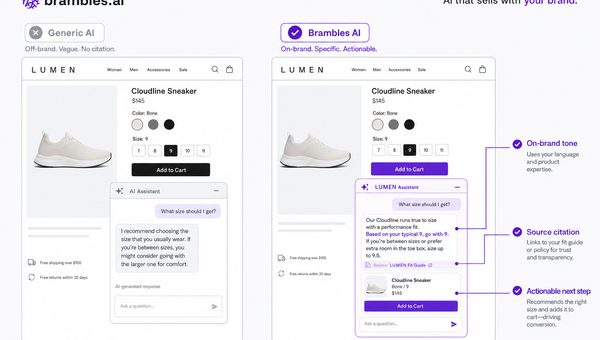
Brand-Consistent AI Chats Build Trust and Conversions
When AI mirrors your brand voice, shoppers relax—questions get answered, carts grow, and support load drops. Learn the playbook to align tone, trust, and ROI.
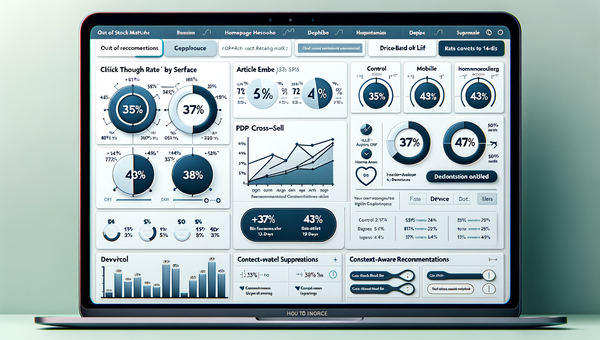
How Context-Aware AI Recommendations Lift CTR
See how context-aware AI recommendations lift CTR by 25–60% with intent signals, page context, and history. Practical steps, KPIs, and implementation tips.

Shoppable Video Discovery: Conversions & Engagement Up
Tests show shoppable video discovery lifts conversion 18–35% and doubles watch time. See the UX patterns, KPIs, and how to deploy it quickly with Brambles.ai.
Explore Brambles.ai
Learn more about our AI-powered agentic commerce platform, agentic shopping, and shopping assistance solutions.
Explore More Insights
Discover more articles on AI, automation, and business innovation
View All Articles