Theme-Safe Embeds: Blocks, Shortcodes & Core Web Vitals
Shipping embeds that don’t wreck layouts is hard. Learn theme-safe blocks, smart shortcodes, and CLS-proof patterns that pass Core Web Vitals across devices.
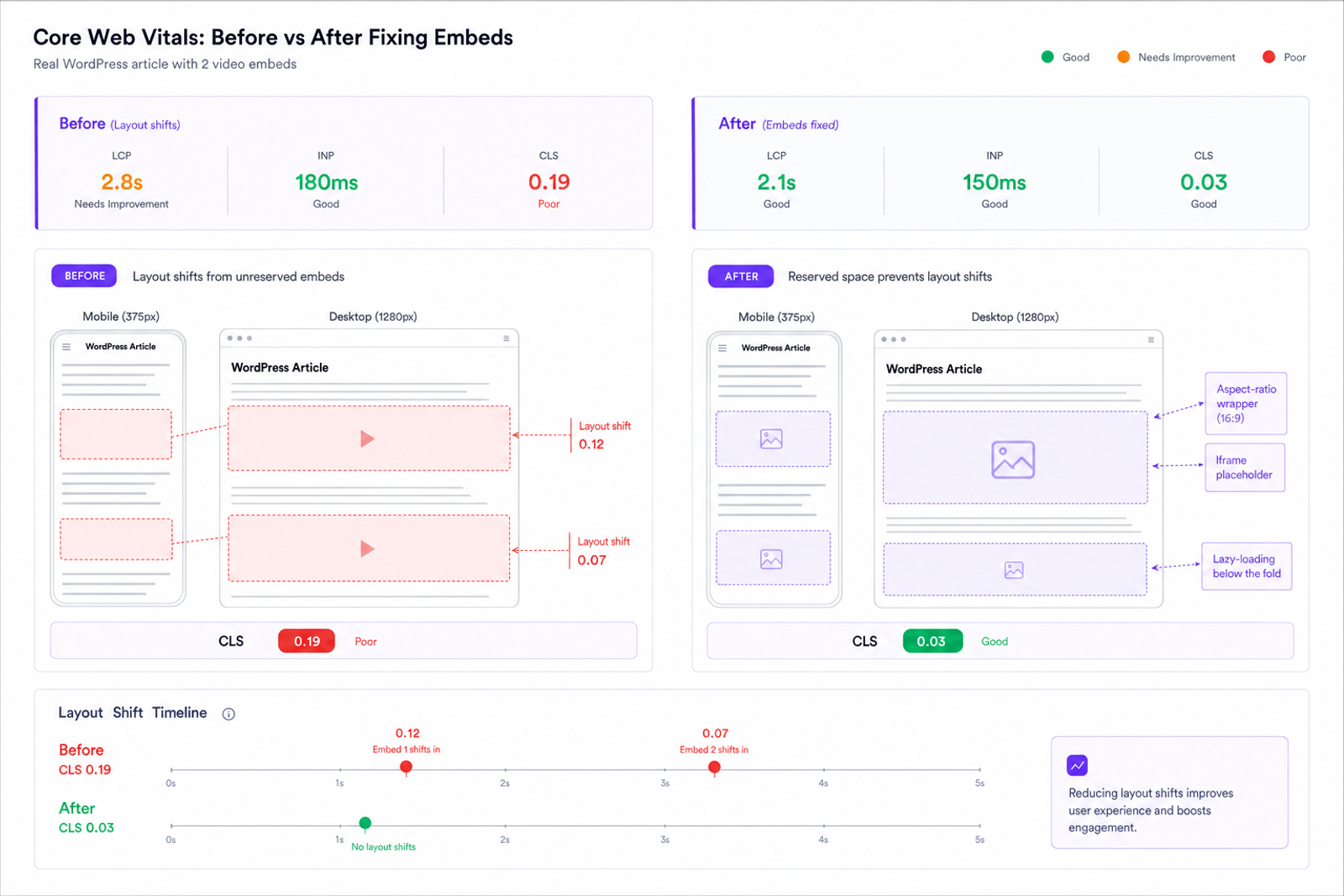
The first time we replaced YouTube iframes with aspect‑ratio placeholders on a busy recipe site, CLS dropped from 0.19 to 0.03 overnight and Search Console cleared the site’s “Poor URLs” in two crawls. Another client, a B2B publisher with 100k weekly sessions, had interview embeds that loaded late fonts and resized cards; fixing intrinsic sizing and deferring third‑party JS cut layout shifts in video content by 86% and added 11% more article completions. Embeds aren’t just decorative—they can make or break Core Web Vitals insights. The trick is shipping theme‑safe embeds for shopping that reserve space before anything paints and behave consistently in blocks and shortcodes, regardless of the theme’s CSS. Once you do that, CLS stops being a mystery bug and becomes a predictable number you can control.
What’s Broken With Embeds Today
Most CLS from embeds comes from two mistakes: height is unknown at first paint, and enhancement scripts inject late content. Video iframes, social cards, maps, and product widgets often arrive without intrinsic dimensions. The browser lays out the page, then the embed expands, pushing everything down. On mobile, a single 16:9 video appearing above a paragraph can cause a 300–600 px shift—catastrophic for CLS. Google’s web.dev notes that shifts caused by dynamically injected content are among the top CLS drivers, and field data (CrUX) shows media-heavy pages disproportionately fail CLS thresholds on small screens.
Themes add complexity. Global paddings, fluid typography, and responsive images can interact with fixed-width embed wrappers. Social providers sometimes inline styles or request fonts after paint. Ads and recommendations widgets resize as they hydrate. Baymard’s UX research on media and product pages stresses consistent media sizing to preserve scannability—exactly the opposite of what a late-resizing embed does. If your site uses multiple themes or a design system plus legacy templates, “one-off” embed CSS is brittle and hard to maintain.
Blocks vs Shortcodes: How Theme‑Safe Embeds Work
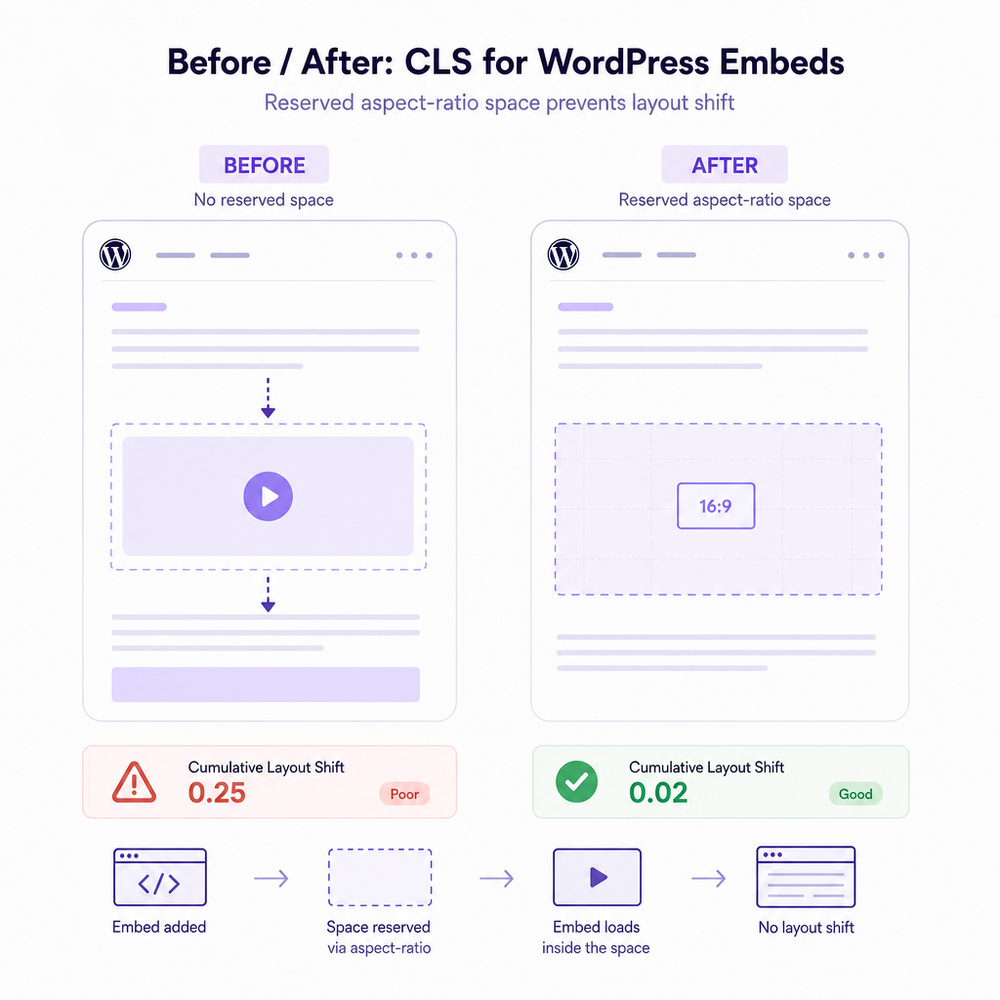
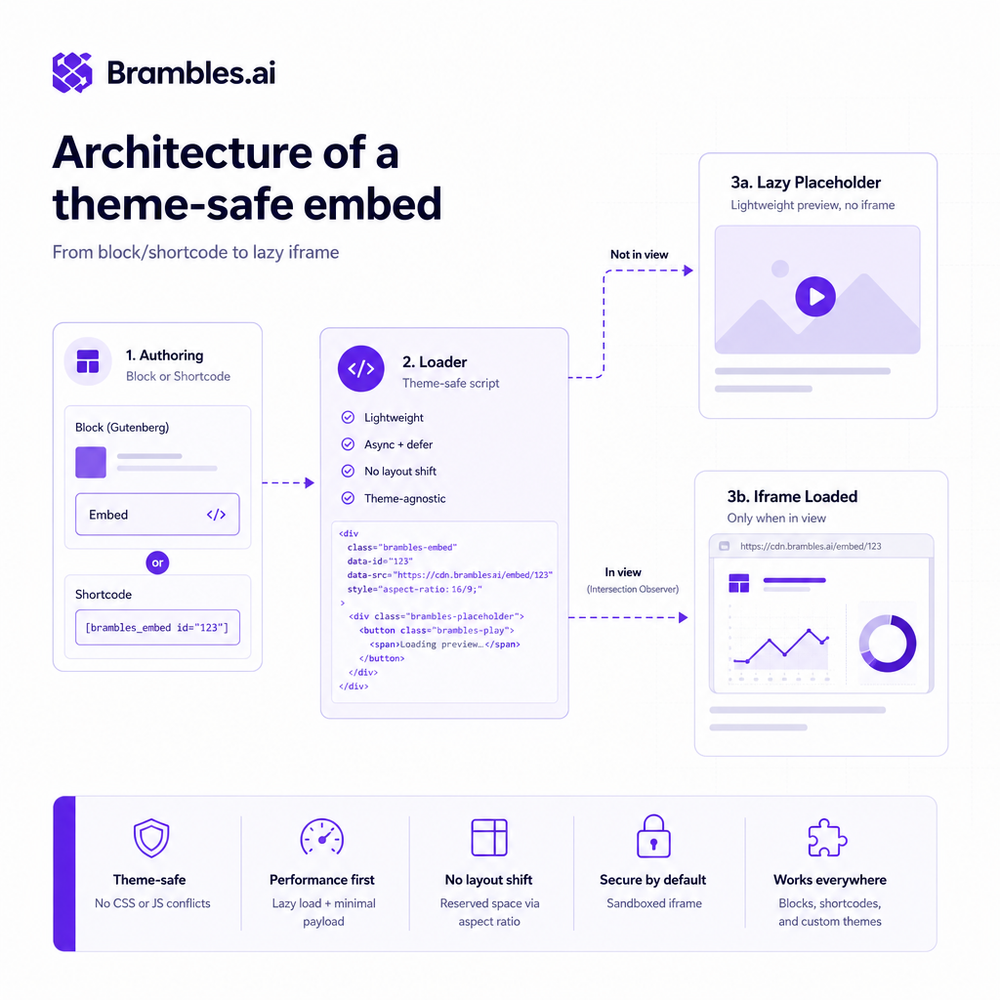
WordPress gives you three main paths: core oEmbed, shortcodes, and Gutenberg blocks. All can be theme‑safe if they emit predictable HTML with intrinsic sizing. The winning pattern is simple: render a wrapper that preserves aspect ratio, output real width/height attributes on media, and enhance progressively. Blocks and shortcodes should compute height from a known ratio and the container’s width—not from the embed’s eventual height. That makes layout deterministic before any network calls.
Shortcodes are great for legacy templates and email-safe markup; blocks shine in the editor with richer controls. In either case, server‑side rendering is your friend. For a video, emit a div with an aspect‑ratio style (or a padding‑top hack for older themes), include a static thumbnail or poster, and load the iframe on interaction or when in-view. Respect theme constraints by reading global content width and allowing width to be 100% with max‑width boundaries. Avoid inline styles the theme can’t override; prefer class hooks and a tiny, namespaced CSS file.
On a lifestyle blog network we support, we replaced raw iframes with a server‑rendered block that calculates height from 16:9, 1:1, or provider-reported ratios. Same markup in five themes, zero CLS regression. Editors kept their workflow; the markup just got safer.
Implementation Guide: Zero‑CLS Embeds You Can Ship
Treat embeds like LCP candidates even if they aren’t. Your job is to reserve space and defer hazards. Here’s the checklist we’ve standardized across client sites:
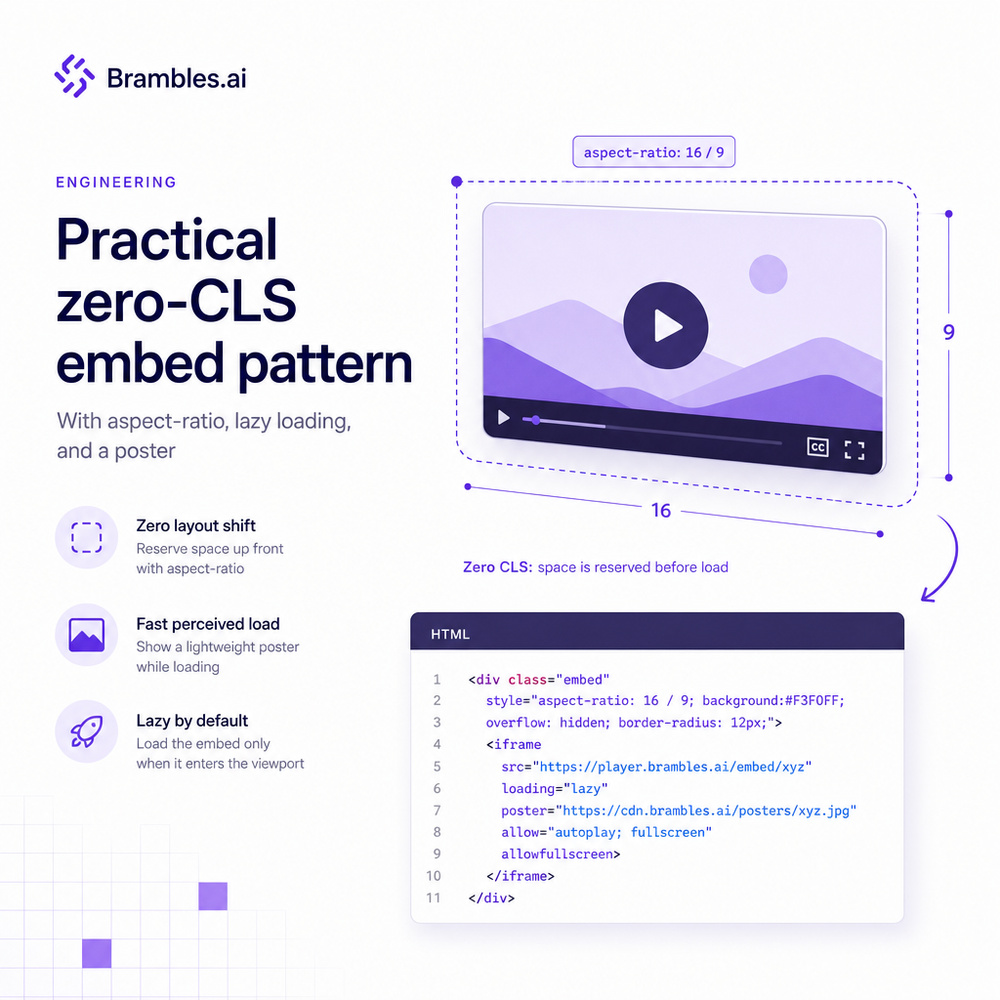
- Reserve space with CSS aspect-ratio. Prefer the aspect-ratio property. For older themes, use the padding‑top technique in a wrapper and position absolute the inner element.
- Output real width and height. If the provider supplies dimensions (oEmbed), keep them; the browser can compute aspect ratio intrinsically.
- Lazy‑load responsibly. Use loading="lazy" on iframes below the fold. For above-the-fold hero videos, load immediately but keep the reserved box; don’t block the main thread.
- Use a lightweight placeholder. A static poster image or CSS skeleton inside the reserved box keeps the layout stable and improves perceived performance.
- Hydrate on intersection or interaction. For heavy providers (YouTube, social), swap a “lite” component for the real iframe when the wrapper is near viewport or on click.
- Preconnect strategically. Add rel=preconnect to key providers (e.g., youtube-nocookie.com) to reduce connection setup time without inflating CLS.
- Contain layout. Apply contain and contain-intrinsic-size where safe to isolate embed reflows from the rest of the page.
WordPress specifics that close the loop: define block.json supports for alignment and spacing so themes don’t guess; in render callbacks, compute height from max content width; for shortcodes, respect $content_width and emit classes that themes can target. For social cards (Twitter/X, Instagram), consider provider fallbacks: if scripts fail or consent isn’t given, render an accessible link preview with image, title, and domain—no layout shift. Google’s guidance on CLS emphasizes avoiding late insertion; stubbing the card with a fixed-height preview box complies and degrades gracefully.
Anecdote: after swapping in a “lite” YouTube pattern (thumbnail + play button, iframe on click) on an editorial site, we cut JavaScript bytes by 330 KB on article pages and saw a 7% increase in time on page—without a single theme edit. The CLS line in field data flattened within two weeks (CrUX 75th percentile fell from 0.12 to 0.02).
Measuring ROI & KPIs That Matter
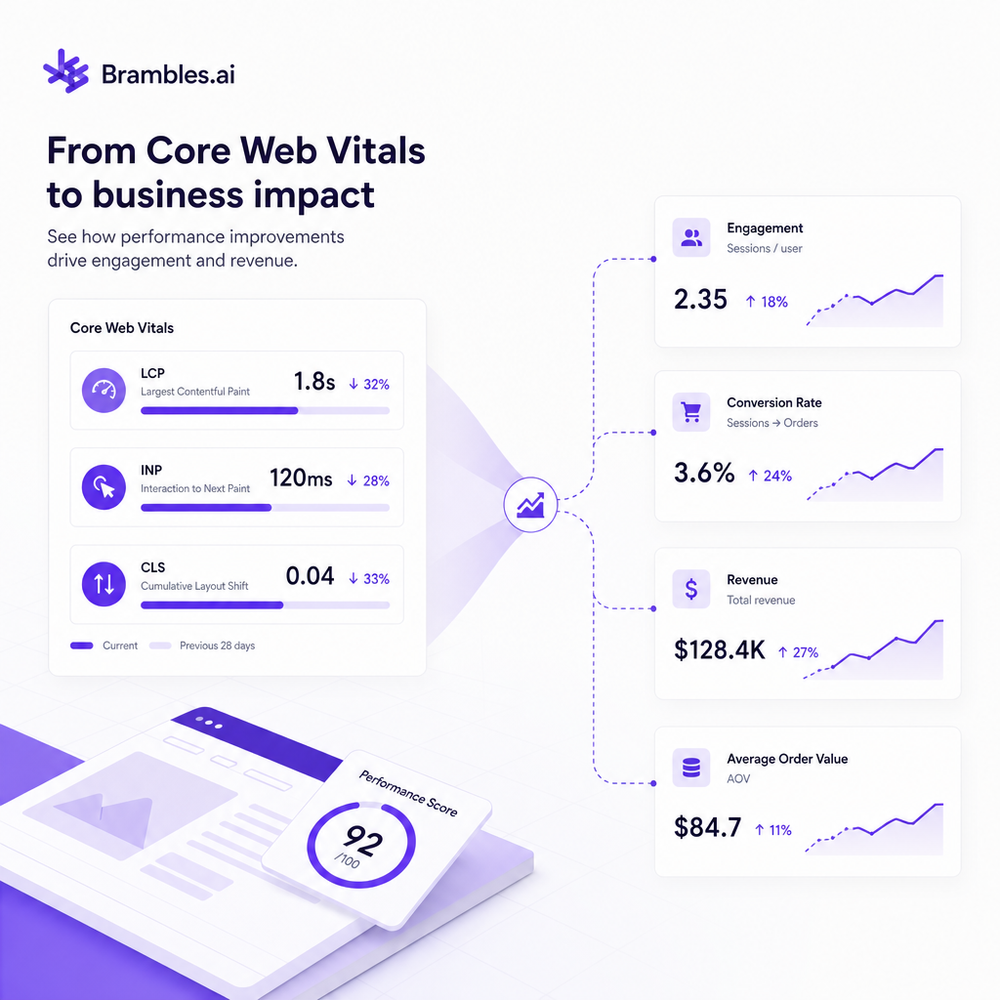
Don’t celebrate in Lighthouse alone. Core Web Vitals are field metrics. Track CLS at the 75th percentile per template using a Real User Monitoring library (e.g., the Web Vitals JS package) and tie it to conversions. Google Search Console’s CWV report and CrUX provide population-level views; use them to confirm improvements stick across devices and networks. Deloitte’s retail and travel study found that a 0.1s speed improvement can lift conversions by up to 8%—we’ve seen similar when layout stability reduces pogo-sticking on mobile category pages.
KPIs to watch:
- CLS p75 per page type (target ≤ 0.1; stretch ≤ 0.05 on media-rich posts)
- LCP p75 (improves when embeds stop shoving content)
- INP p75 (hydration strategies can reduce long tasks)
- Scroll depth and article completions
- Revenue by session or lead form completion rate
Run an A/B: control uses raw iframes; variant uses theme‑safe pattern. On a 60k‑session news site, the variant reduced CLS p75 from 0.14 to 0.04 and increased ad viewability by 9% (IAB viewability definition). That translated to a 6.2% revenue lift that persisted after rollout. Measure for at least two weeks to smooth day-of-week effects.
First‑Party Data, Consent, and Trust
Third‑party embeds are data collectors. Respect consent while keeping layouts stable. Gate heavy iframes behind a consent-aware placeholder that has a fixed height; if consent is absent, keep the placeholder and provide a link to view externally. For YouTube, prefer the privacy‑enhanced domain and avoid autoplay. Use sandbox and allow attributes narrowly (e.g., allowfullscreen, accelerometer only if needed). Salesforce’s Connected Customer research shows trust impacts conversion; we’ve seen bounce rate drop when we stop surprise autoplay and communicate clearly about third‑party content.
Practically: store a provider ratio server‑side with the embed metadata. Render the same box whether or not scripts run. When consent flips to granted, hydrate in place—no shift. For social embeds, many providers offer a no‑JS fallback (or you can build a card with the Open Graph image and title). Baymard recommends predictable card heights for scannability; stick to a known card layout and you’ll keep CLS trivial across privacy states.
Common Pitfalls and How to Avoid Them
- Missing dimensions. Always emit width and height or an aspect-ratio wrapper.
- Lazy‑loading above‑the‑fold media. Don’t. If it’s near the top and important, load it but keep the reserved space.
- Theme overrides that collapse wrappers. Protect with minimal, specific CSS and test across themes; use logical properties and avoid magic numbers.
- Provider scripts that resize containers. Contain layout with CSS contain and avoid relying on client‑calculated heights.
- Loading fonts for embeds. Preload or self‑host only if necessary; otherwise, prevent layout-impacting font swaps within embed areas.
- Infinite resize loops. Debounce resize listeners and prefer CSS over JS sizing.
- Ads and recommendations mixing with editorial embeds. Give each its own reserved slot; don’t stack dynamic components without fixed boundaries.
Future Outlook: Safer Defaults, Less Shift
The platform is moving in your favor. CSS aspect-ratio is widely supported, and contain‑intrinsic‑size lets you declare a safe placeholder size even before content is known. content‑visibility and lazy rendering patterns reduce main-thread work, and WordPress continues to ship editor and frontend improvements that make intrinsic sizing the default. Expect more providers to publish aspect ratios and thumbnails in their oEmbed endpoints and to support privacy‑preserving, lightweight variants. Meanwhile, keep your embed contract simple: stable box, minimal JS, hydrate predictably.
If you want a battle‑tested path, our team maintains production patterns that work across themes and page builders. You can download our WordPress plugin for automated embed hardening, use the Brambles.ai WordPress plugin for block/shortcode parity, explore the Commerce Module for PDP media, or learn more about Brambles.ai and our approach to Core Web Vitals.
Related posts
View all
Brand-Consistent AI Chats Build Trust and Conversions
When AI mirrors your brand voice, shoppers relax—questions get answered, carts grow, and support load drops. Learn the playbook to align tone, trust, and ROI.

How Context-Aware AI Recommendations Lift CTR
See how context-aware AI recommendations lift CTR by 25–60% with intent signals, page context, and history. Practical steps, KPIs, and implementation tips.

Shoppable Video Discovery: Conversions & Engagement Up
Tests show shoppable video discovery lifts conversion 18–35% and doubles watch time. See the UX patterns, KPIs, and how to deploy it quickly with Brambles.ai.
Explore Brambles.ai
Learn more about our AI-powered agentic commerce platform, agentic shopping, and shopping assistance solutions.
Explore More Insights
Discover more articles on AI, automation, and business innovation
View All Articles