Place AI Commerce Widgets by Page Type with Brambles.ai
Proven tactics for placing AI commerce widgets by page type—home, category, article, and PDP—with a step-by-step Brambles.ai setup and a crisp KPI checklist.
On a 380k-session news site, simply moving a “Readers Also Buy” widget from the article header to a mid-article break—and swapping the offer to match the subtopic—raised revenue per visit by 27% in 10 days. A niche electronics retailer saw the opposite: a homepage hero widget underperformed until we split it by category intent. The pattern is consistent—widget performance hinges on page type and intent, not just design polish. That’s why page-type placement is the lever most teams underuse. If you’ve ever wondered why PDP add-to-carts pop while article RPMs stagnate, this guide maps placements that actually convert, and shows how to set them up in Brambles.ai without a replatform.
Quick Answer
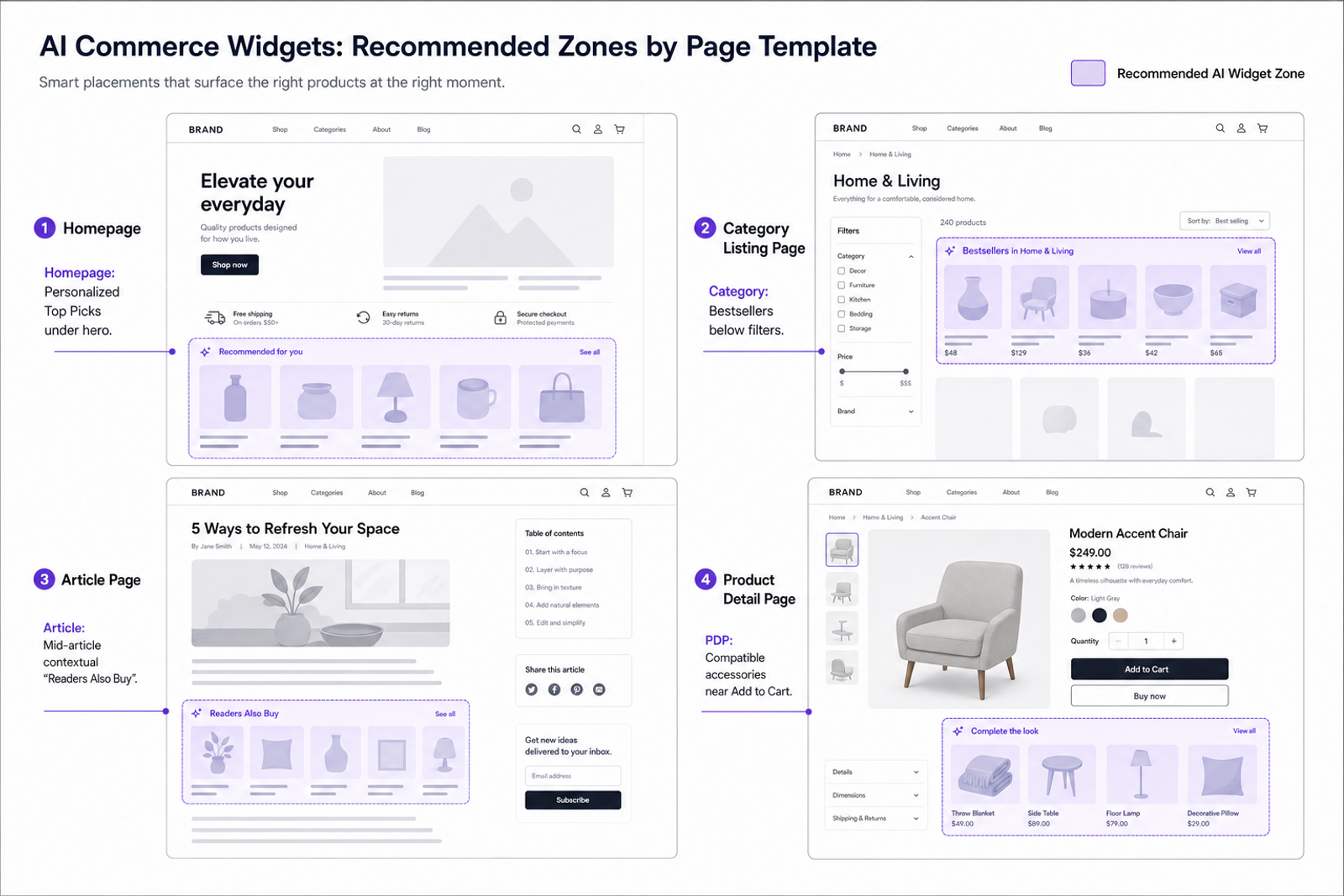
Match widget type and placement to page intent. Use discovery widgets (Top Picks, Category Bestsellers) on home and category pages; educational or contextual bundles mid-article; compatibility or cross-sell widgets near add-to-cart on PDPs.
Control it with product discovery, first-party signals, and a product feed. With Brambles.ai, you assign placements per template (home, category, article, PDP) and measure CTR, Add-to-Cart, and RPV by page type to iterate weekly.
What’s Broken with Widget Placement Today
Most sites treat commerce widgets as one-size-fits-all. The result is intent mismatch: recommendation blocks pushing accessories on top-of-funnel articles, or generic grids crowding PDPs where compatibility matters more than discovery. Baymard’s research on product lists and filtering shows that users rely heavily on contextual cues to find relevant items; misaligned modules increase pogo-sticking and choice paralysis (Baymard Institute, Product Lists & Filtering UX). Add performance drag and you compound the problem—Google found that when load time increases from 1 to 3 seconds, bounce probability jumps 32% (Google/SOASTA). If you can’t target by page type, you ship diluted relevance across the board. Fixing that starts with correctly mapping intent to layout zones.
How Page-Type Targeting Works
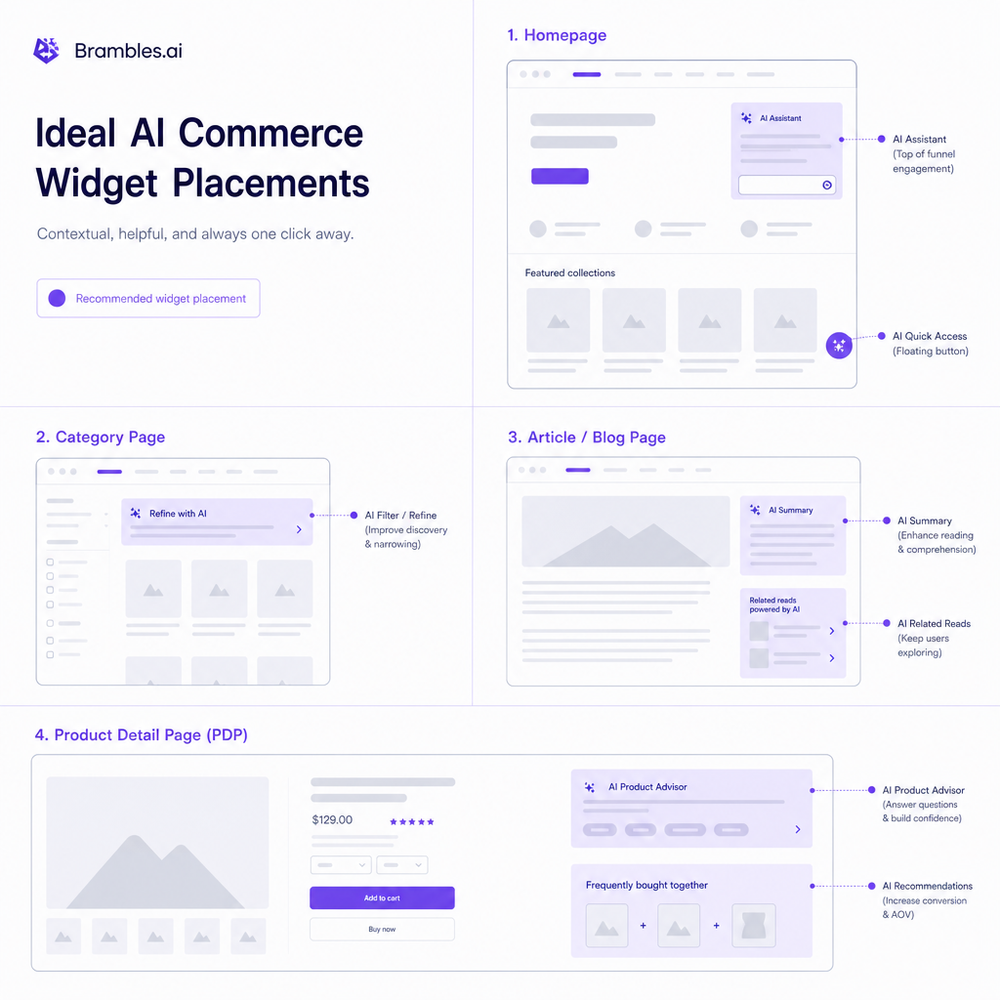
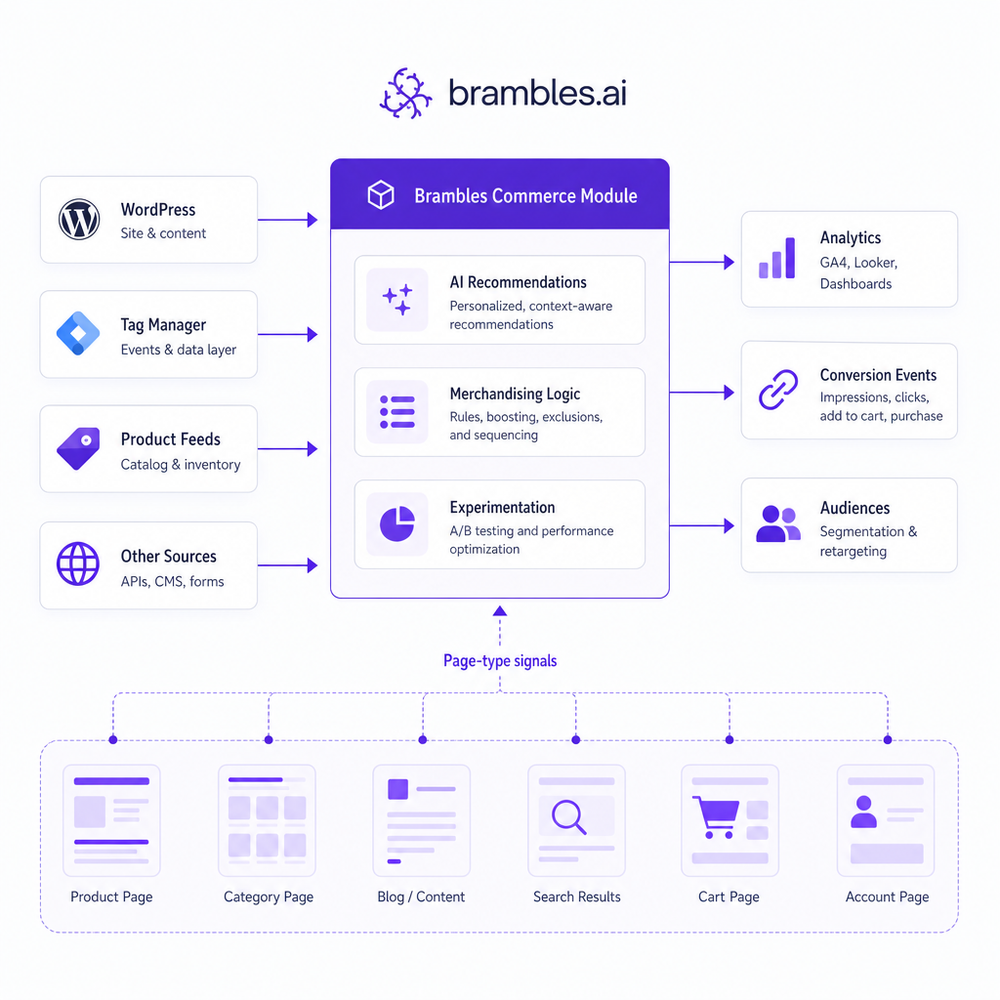
Page-type targeting ties widget logic to templates and signals. Think of it as a routing layer: if template = article, serve contextual picks keyed to topic entities; if template = PDP, prioritize compatibility, bundles, and alternatives. Signals can include URL patterns, CMS template names, breadcrumbs, product taxonomy, and on-page entities extracted from headings. proactive engagement refines the outputs (e.g., known brand affinity, price sensitivity), but you can start purely context-based. Technically, you render a lightweight placeholder and hydrate it with a client call or server-side include that passes page-type + context. This keeps layout stable and performance tight. The goal: every block earns its pixel by being the most helpful item for that moment.
Implementation Guide: Brambles.ai Commerce Widgets
You can deploy page-type widgets in under a day. Here’s a tight path that works on WordPress or headless stacks, with or without a tag manager.
Step 1 — Connect your catalog. Feed SKUs, titles, prices, images, and categories. For publishers, map merchants and affiliate parameters. Keep category depth and attributes (brand, compatibility) clean; this powers PDP logic later.
Step 2 — Install entry point. On WordPress, activate the Brambles WordPress plugin, place the shortcode or block in your template, and toggle page-type rules per template. On headless, drop a script tag and add server-side includes for critical PDP zones.
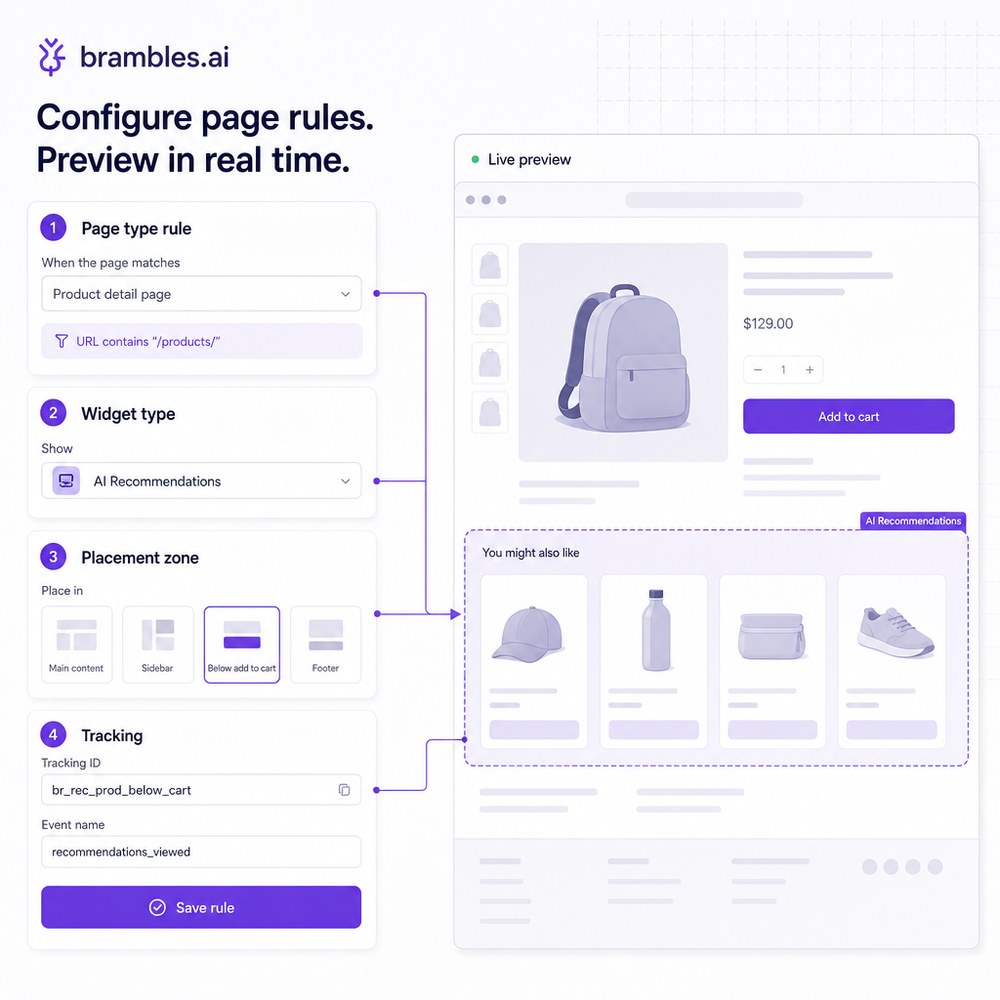
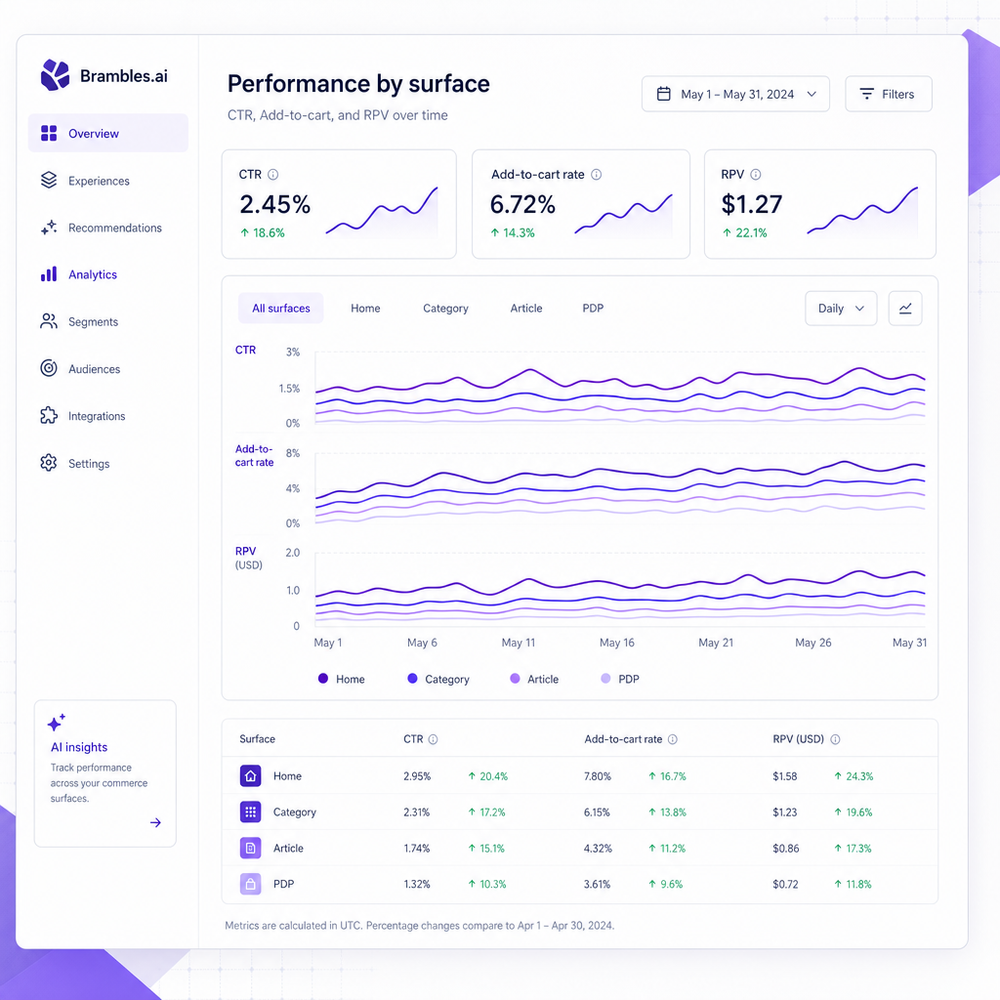
Step 3 — Define page-type rules. Examples: Homepage → Personalized Top Picks (recent views + trending); Category → Bestsellers + filter-aware refinements; Article → Topic-matched picks mid-article; PDP → Compatibility, bundles, and alternatives next to Add to Cart. Use display caps (e.g., 8 items) and set a fallback list per type.
Step 4 — Wire tracking. Send impression, click, add-to-cart, and revenue events with a page-type dimension. Use a consistent widget_id naming scheme like “article_mid_contextual” or “pdp_compat_right_rail.” This unlocks tidy dashboards by page type and zone.
Step 5 — Launch in two waves. Wave A: ship PDP and category (fast ROI). Wave B: ship homepage and article variants with conservative ranks. Iterate weekly on CTR and RPV deltas. If you run affiliate links, test Merchant-of-Record vs. standard affiliate routing to stabilize payout and stock coverage.
Where Brambles.ai fits: use the Commerce Module’s page-type rules, product-graph enrichment, and publisher monetization flow to set placements once and iterate centrally.
Brands can leverage the retail assistant flow to surface compatible accessories on PDPs automatically, while publishers keep article widgets context-pure without hardcoding.
In practice, this consolidates your experiments to one console and cuts release cycles to minutes.
Measuring ROI & KPIs by Page Type
The scoreboard is page-type segmented. For category and homepage, prioritize CTR, Clicks per Session, and downstream Add-to-Cart Rate. For articles, track RPM/RPV and exit rate from the widget. For PDPs, measure Attach Rate (accessories per order), Compatibility Click-Through, and incremental conversion versus control. affiliate revenue routinely lifts revenue 10–15% when executed well (McKinsey, Next in Personalization 2021). Speed remains a multiplier—shaving a second can be the difference between a great test and noise (Google/SOASTA).
Two snapshots from recent work: a DTC cosmetics brand moved its PDP cross-sell directly under Add to Cart and saw a +19% attach rate within a week; on a hobbyist blog (120k sessions), swapping a generic article footer grid for a mid-article, subtopic-matched widget lifted RPM 22% with no hit to scroll depth.
The common thread: page-type alignment plus precise placement outweighs adding “more” widgets.
First-Party Data, Context, and Trust
Start with context; layer first-party data where consented. Article widgets should key off entities and categories; PDP widgets lean on attributes like model and compatibility. When users opt in, blend recent views, price bands, or brand affinities for an extra lift. Customers expect relevance—73% say companies should understand their unique needs (Salesforce, State of the Connected Customer). Keep it transparent: show why items are recommended, respect regional pricing, and honor inventory. Brambles.ai handles consent-aware signals and maintains explainability tags you can surface in UI (e.g., “Picked because it fits your X100”).
Common Pitfalls and a Pre-Launch Checklist
Three pitfalls show up again and again: too many widgets per page, misaligned titles, and burying PDP compatibility below the fold. On one tech review site, an above-the-fold article widget spiked early clicks but reduced scroll and ad viewability; moving it below the first subhead balanced engagement and raised RPM 18%. Keep the frame simple, fast, and on-intent.
Pre-launch checklist:
- Map your templates (Home, Category, Article, PDP) and define one primary widget per page type.
- Title each widget for intent clarity (e.g., “Compatible with Your X100”).
- Set a fallback feed per page type (bestsellers, evergreen picks).
- Cap items (6–8) and lazy-load non-critical blocks.
- Track impression → click → add-to-cart → revenue with a page_type dimension.
- QA on slow networks and small screens; target TTI under 2s for widget load.
- Schedule a two-week read with holdout zones for clean lift math.
- Document widget_id naming; don’t reuse IDs across page types.
FAQ
How does Brambles.ai decide which products to show?
It blends page-type rules, on-page entities (topic, category, product attributes), and optionally first-party preferences. The product graph and merchant data ensure stock, price, and compatibility are current. You choose the widget type per template; the system ranks items for relevance and margin.
Do I need developers to launch page-type widgets?
Minimal. WordPress sites can deploy via plugin and blocks. Headless sites can add a small script and server-side include for PDP-critical zones. Most teams ship initial placements in a day, then iterate from the console without code pushes.
What KPIs should I monitor first?
By page type: Homepage/Category → CTR and Clicks per Session; Article → RPM/RPV and exit rate; PDP → Attach Rate and incremental conversion versus control. Always segment by widget_id and page_type for clean diagnostics.
Will this work for affiliate publishers and DTC brands?
Yes. Publishers can use the monetization flow to route to merchants and track RPM; brands and retailers can use the assistant flow for PDP compatibility, bundles, and alternatives. The page-type logic is identical—only the checkout path differs.
Related resources on Brambles.ai
If you are implementing this, start with Brambles.ai, for publishers, for brands, get started.
For deeper reading, see 10 Reasons Publishers Need Conversational Commerce, Affiliate Disclosure in Conversational UIs Done Right, From Search Boxes to Conversations: Modern Shopping UX, Contextual, Not Creepy: Monetization That Wins.
Related posts
View all
Brand-Consistent AI Chats Build Trust and Conversions
When AI mirrors your brand voice, shoppers relax—questions get answered, carts grow, and support load drops. Learn the playbook to align tone, trust, and ROI.

How Context-Aware AI Recommendations Lift CTR
See how context-aware AI recommendations lift CTR by 25–60% with intent signals, page context, and history. Practical steps, KPIs, and implementation tips.

Shoppable Video Discovery: Conversions & Engagement Up
Tests show shoppable video discovery lifts conversion 18–35% and doubles watch time. See the UX patterns, KPIs, and how to deploy it quickly with Brambles.ai.
Explore Brambles.ai
Learn more about our AI-powered agentic commerce platform, agentic shopping, and shopping assistance solutions.
Explore More Insights
Discover more articles on AI, automation, and business innovation
View All Articles