How to Increase Affiliate CTR in 2026: A Field Guide
Proven ways to lift affiliate CTR in 2026: UX fixes, offer framing, pricing trust, and test plans. Practitioner metrics, step‑by‑steps, and common pitfalls ahea
Seven days. That’s how long it took a cookware review site (≈180k sessions/month) to lift affiliate CTR by 38% by rewriting a single CTA from “Shop Now” to “See today’s price” and moving it 300px higher on mobile. No new content. No new partners. Just a cleaner path to intent. On a PC peripherals blog (≈100k sessions/month), adding “Fast shipping” and “Free returns” badges next to merchant names drove a 31% CTR lift and a 19% EPC gain month‑over‑month—proof that click intent is as much about risk removal as it is about persuasion. And a travel gear roundup saw a 122% CTR spike after replacing inline text links with a sticky comparison bar that followed the scroll on mobile.
What’s broken in affiliate CTR right now
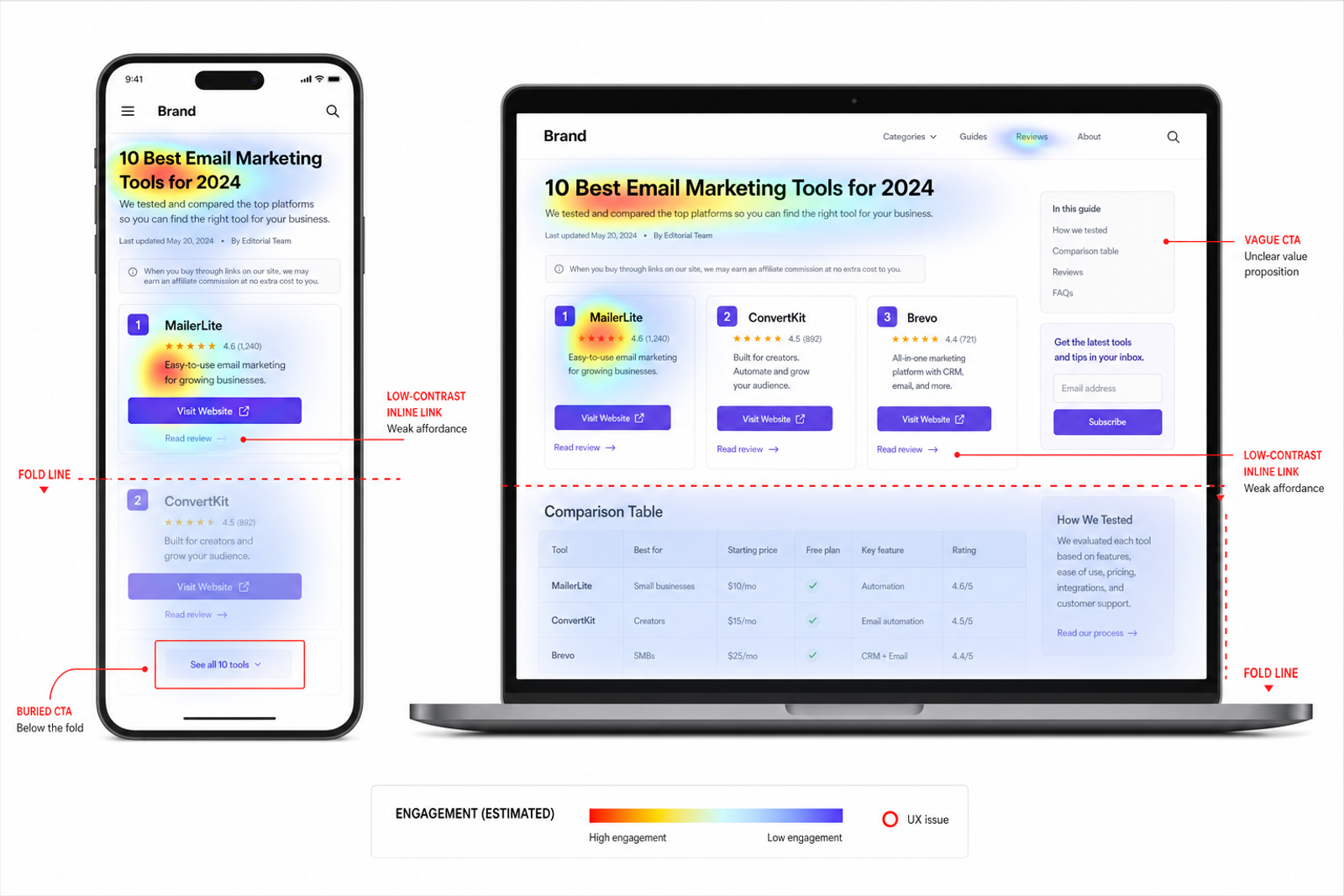
Most affiliate pages bury the click. Link affordance is weak (no underline, low contrast), CTAs are vague (“Learn more”), and mobile layouts push offers below the fold. Baymard’s UX work highlights how subtle visibility issues compound abandonment; the same applies to affiliate clicks: if it doesn’t look tappable, it’s invisible (Baymard Institute shopping UX guidelines, 2024). Google’s UX research similarly notes that descriptive labels outperform generic commands because users map wording to intent (Google UX Research, 2023). Add cookie loss and stricter tag settings in modern browsers, and mis-attribution hides which elements truly move the needle. In audits, we repeatedly find three killers: 1) comparison tables without scannable pricing/benefits, 2) CTAs that don’t match reader intent (“Buy now” in research mode), and 3) link hit areas that are too small for thumbs. Fixing just these three usually produces a double‑digit CTR lift without touching rankings or adding ads.
How CTR actually works across the funnel
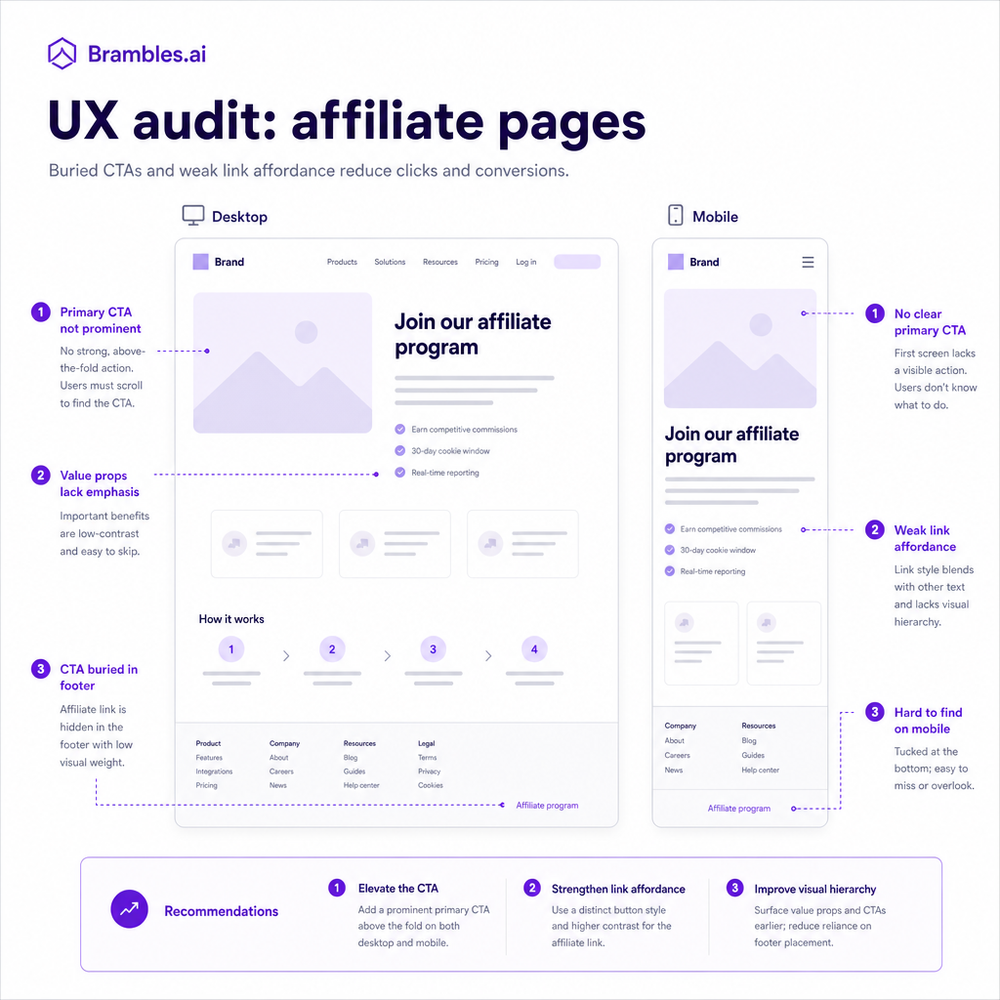
Affiliate CTR is a chain: attention → motive → risk removal → momentum. Attention comes from where the link sits (sticky vs. static, above vs. below fold). Motive comes from label choice—“See price,” “Check availability,” “View on Amazon”—each promises a different payoff. Risk removal is signaled by proximity to badges (warranty, returns), merchant reputation, and shipping speed. Momentum is your follow‑through: do you present the best link first, or send choice‑paralyzed readers down a rabbit hole? In field tests, we see descriptive, outcome‑oriented labels outperform generic CTAs by 20–50% when the user is in comparison mode. For readers still researching, a secondary link like “Read full specs” prevents bounce‑backs without cannibalizing the money click. McKinsey’s research on frictionless journeys underlines that each micro-step compounds (McKinsey, 2024). The takeaway: treat each link as a micro‑promise. If the promise aligns with the visitor’s stage and is visually obvious, CTR climbs. If not, no discount or coupon can save it.
Implementation guide: a 30‑day CTR sprint
Day 1–3: Baseline. Tag all affiliate links with consistent UTM parameters and apply rel="sponsored". In analytics, create a Clicks → Outbound → Affiliate segment and record CTR per page and per element type (inline, button, table, sticky). Screenshot your top 20 URLs.
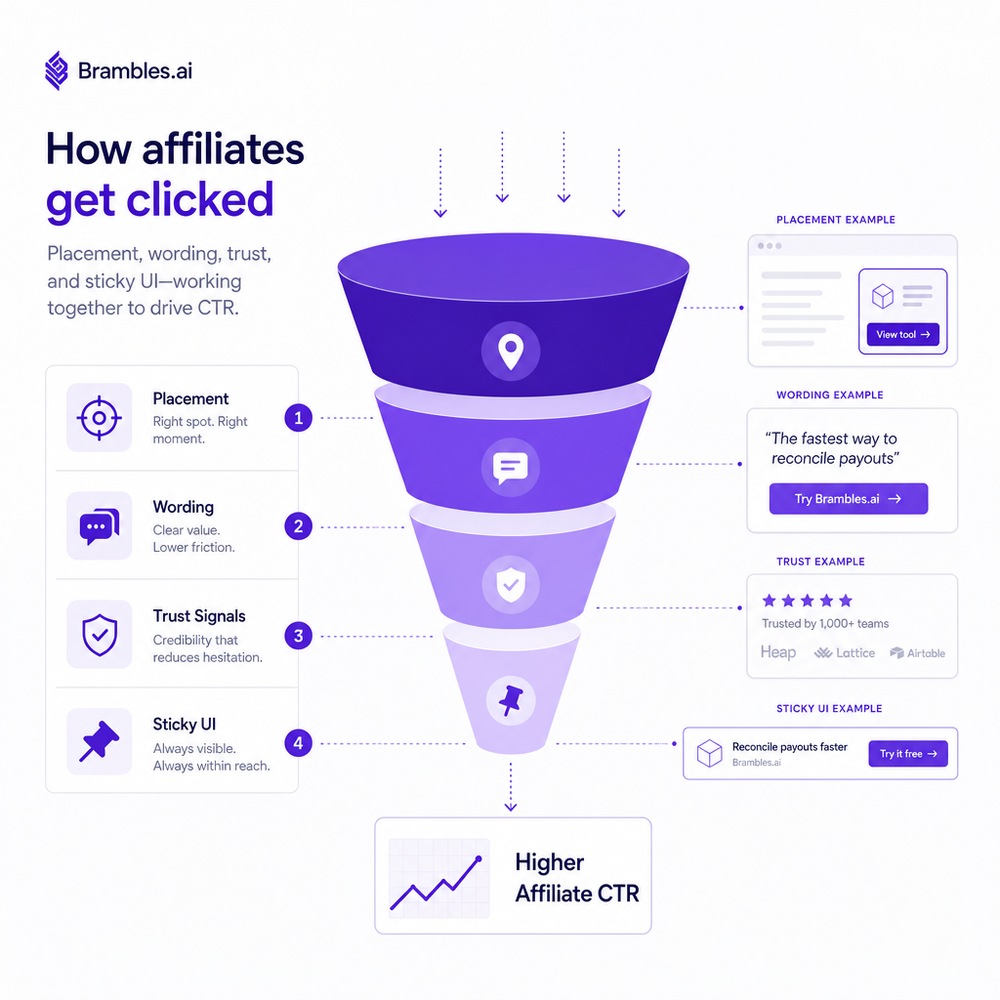
Day 4–10: Fix affordance. Underline inline links, raise color contrast (WCAG AA+), and increase tap targets to 44px minimum. Reword CTAs to outcome‑oriented labels: “See today’s price,” “Check size availability,” “View bundle.” Prioritize the merchant most likely to convert for your audience; if uncertain, rotate top two using a server‑side test.
Day 11–17: Comparison that actually compares. Build a 3‑column table: price (real‑time if possible), shipping speed, returns, key feature. Make only one button primary; demote the rest to link style.
Day 18–24: Mobile momentum. Add a sticky bar that appears after 30% scroll with the top pick and a single CTA. Avoid full‑width popups.
Day 25–30: Evidence and refinement. Pull per‑element CTR deltas, EPC by merchant, and adjust the default order. Lock in what wins for 28 days to validate revenue, not just clicks.
Measuring ROI and the KPIs that matter
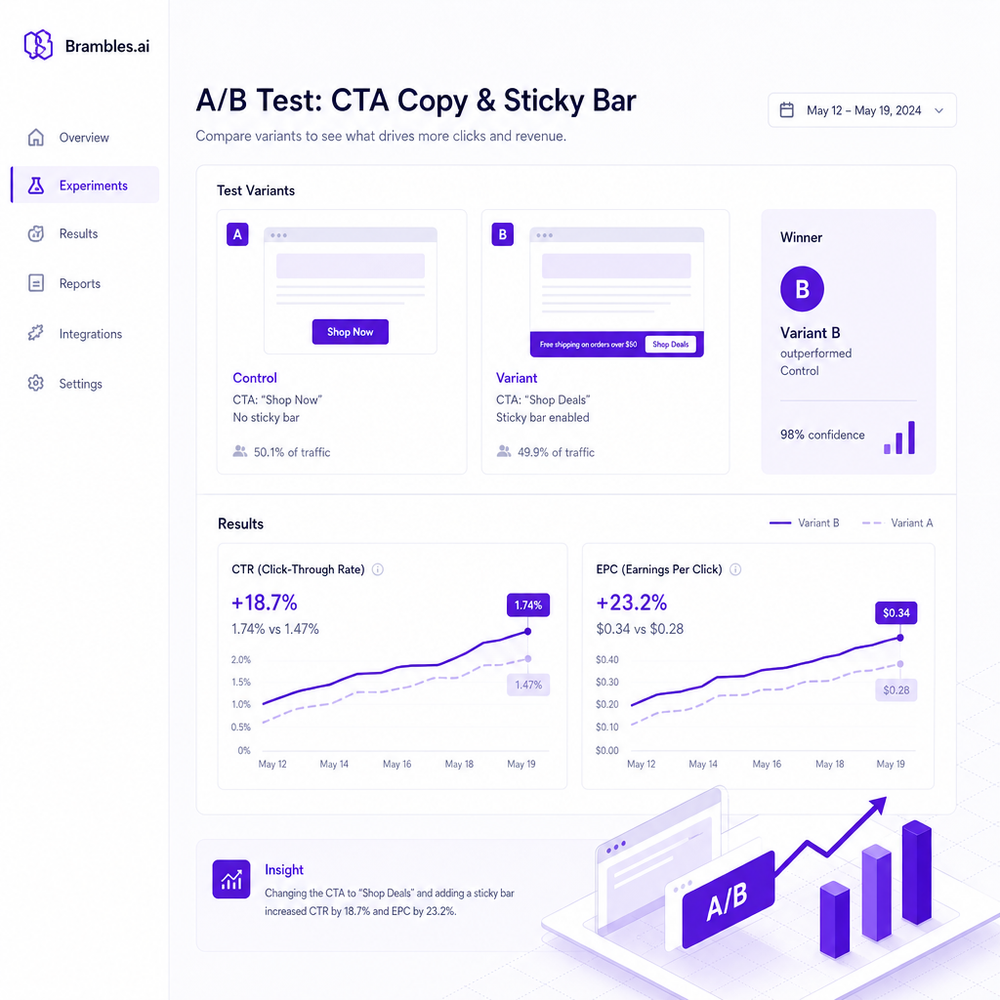
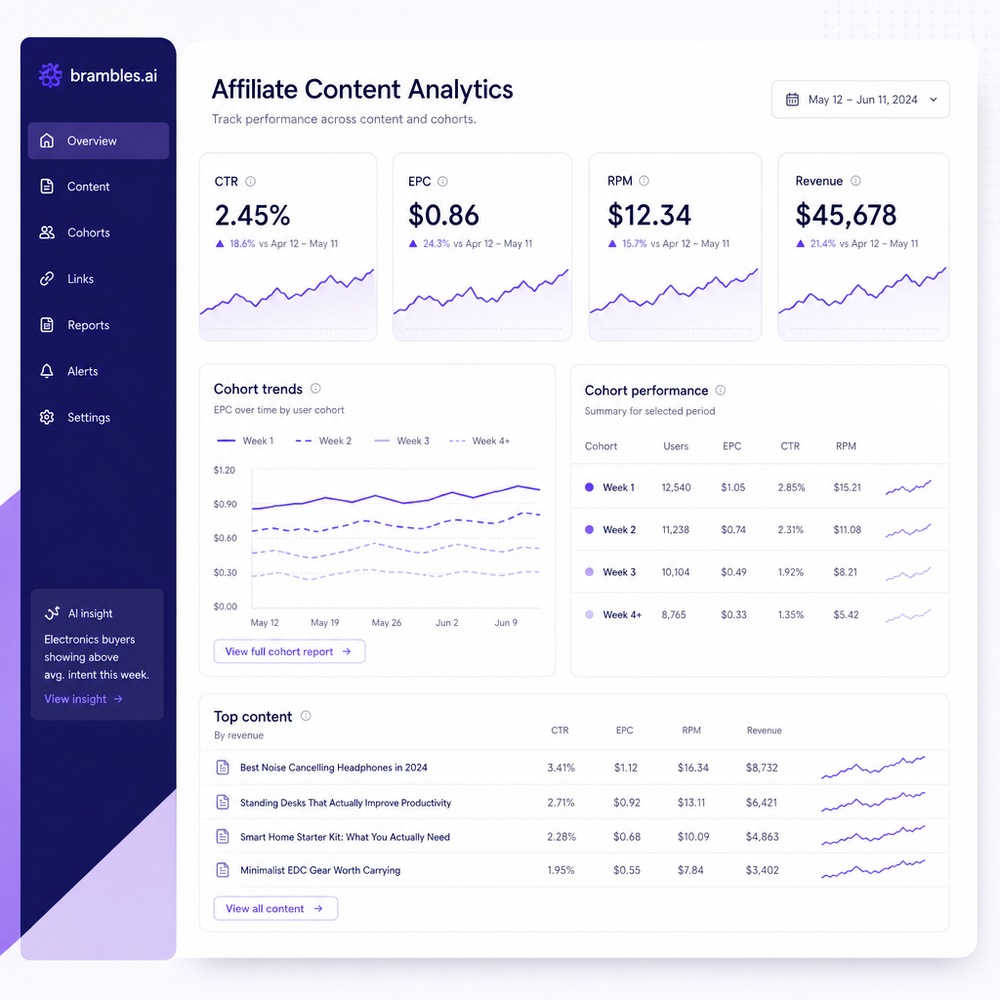
Track three levels: 1) Element CTR (clicks on a specific CTA ÷ its impressions), 2) Page CTR (affiliate clicks ÷ sessions on that page), and 3) Money metrics: EPC (earnings ÷ clicks), RPM (revenue ÷ 1000 sessions). Pair CTR with EPC so you don’t celebrate empty clicks. Example: A headphone roundup increased CTR from 8.2% to 11.1% (+35%), but EPC fell from $0.42 to $0.36 because low‑intent readers were nudged prematurely; after re‑ordering merchants and clarifying “See used prices,” EPC rebounded to $0.48 and RPM rose 22%. Salesforce’s Connected Customer data consistently shows trust signals correlate with purchase follow‑through; EPC will reflect that (Salesforce, 2024). Build a simple cohort: first‑time vs. returning visitors, mobile vs. desktop. If mobile Page CTR is >2x desktop but EPC is lower, your visual hooks work but the handoff is weak; switch to merchants with clearer mobile PDPs or add “Ships today” labels where accurate. Keep a weekly scoreboard and don’t chase daily noise. Confidence beats volatility.
First‑party data and trust (your 2026 edge)
Third‑party cookies won’t save you, and they shouldn’t. Your edge is first‑party event data (what was clicked, where, by whom in aggregate) and the trust you create on page. Set a first‑party endpoint to log outbound clicks with page, element, device, and merchant; avoid PII. Use this dataset to rank merchants for each audience segment. Layer in trust signals that are factual and proximate to the CTA: returns window, warranty, shipping speed, and aggregate ratings. Place merchant logos (monochrome, compact) near the button without overshadowing the copy. Google’s research shows that clear, descriptive link text improves discoverability and reduces decision time (Google UX Research, 2023). We’ve repeatedly seen trust‑plus‑specificity outperform hype. Anecdote: A niche camera site replaced “Best Deal” with “Best overall—2‑yr warranty + free returns” and saw a 27% CTR lift with EPC up 12% over 21 days. First‑party logs confirmed the lift came primarily from returning users on iOS—exactly the audience most impacted by attribution loss.
Common pitfalls that still kill clicks
Thin link density: a single CTA on a 2,000‑word review is a needle in a haystack. Aim for one primary button per major section and an inline text link near the verdict. Over‑decorated buttons: gradients, emojis, and superlatives look spammy and trip readers’ ad filters. Overstuffed tables: more than five columns destroys scannability; collapse secondary details. Platform mismatch: pushing to slow or cluttered merchant PDPs tanks EPC; where allowed, deep‑link to the exact variant. Noncompliance: always mark affiliate links rel="sponsored" and disclose relationships; it’s trust‑positive and aligns with platform policies. Neglecting mobile: if your buttons sit under a paragraph block on mobile, thumbs can’t reach them; use a sticky bar after partial scroll instead. Finally, never run client‑side split tests on link destinations—latency and flicker can break tracking. Server‑side rotation or pre‑rendered variants keep both speed and accuracy in check.
Future outlook: AI merch, live offers, and compliance by design
By 2026, the best‑performing affiliate pages will feel like product shopping experiences without the cart: live price checks, availability, shipping ETAs, and context‑aware CTAs that adapt to the query and device. The risk: turning pages into blinking control panels. Guardrails: prioritize just two dynamic fields (e.g., price and shipping speed), keep motions subtle, and cache aggressively to protect speed. Expect merchant programs to tighten attribution windows; your defense is first‑party click logs and clean destination deep‑links. Compliance will be invisible—rel="sponsored" on all outbound monetized links, clear disclosures, and no cloaking. A final play that keeps working: a sticky comparison bar that appears once, only after intent is proven (scroll depth, time on page), with one confident CTA. Focus your AI enhancements on clarity, not novelty. If a widget doesn’t shorten the path to a confident click, it doesn’t belong on the page.
Practical checklist you can deploy this week
• Audit five top pages for link affordance, CTA clarity, and mobile tap targets.
• Rewrite CTAs to outcome‑oriented labels; test “See today’s price” vs. “Check availability.”
• Add trust snippets within 40px of buttons: “Free returns,” “2‑yr warranty,” or “Ships today.”
• Collapse tables to three columns (price, shipping, key feature) and make one primary CTA.
• Add a sticky bar after 30% scroll with a single CTA to the top pick.
• Track Element CTR, Page CTR, EPC, and RPM; review by cohort weekly.
• Use server‑side tests for merchant ordering to avoid flicker.
• Log outbound clicks first‑party; avoid PII; summarize by device and page.
Do these, and you’ll usually see double‑digit CTR lifts in under a month without adding a single new article.
If you’re on WordPress and want a faster path to testing, our stack supports outcome‑oriented CTAs, sticky comparison bars, and live offer fields while keeping pages fast. Use the plugin to standardize tracking, inject compliant rel="sponsored" attributes, and run controlled rotations of merchants server‑side. The commerce layer can hydrate price and shipping fields from allowed sources, then cache them to keep CLS and INP in check. Keep your playbook simple: clarity, proximity, and truthful promises beat noise every time.
Related posts
View all
Why Contextual Ads in AI Chat Beat Banner Ads
Tests on commerce sites show AI chat contextual ads deliver 3–5x CTR, cleaner UX, and higher revenue than banners. See how they work, implement, and measure.
Multi‑Network Affiliate Optimization: Auto Best Rate
Route clicks across affiliate networks automatically to secure the highest commission, lift EPC, and preserve UX—practical tactics, data, and implementation ste
Content Intelligence: AI Indexes Your Site for Commerce
How AI content intelligence indexes every page for commerce, structures attributes, powers conversational shopping, and lifts sales. Steps, KPIs, and pitfalls.
Explore Brambles.ai
Learn more about our AI-powered agentic commerce platform, agentic shopping, and shopping assistance solutions.
Explore More Insights
Discover more articles on AI, automation, and business innovation
View All Articles