Turn Blogs into Revenue with AI Shopping Assistants
We turned high-intent blog traffic into carts with AI shopping assistants. Learn UX patterns, KPIs, and a field-tested setup that converts content into revenue.
Turn Blogs into Revenue with AI Shopping Assistants
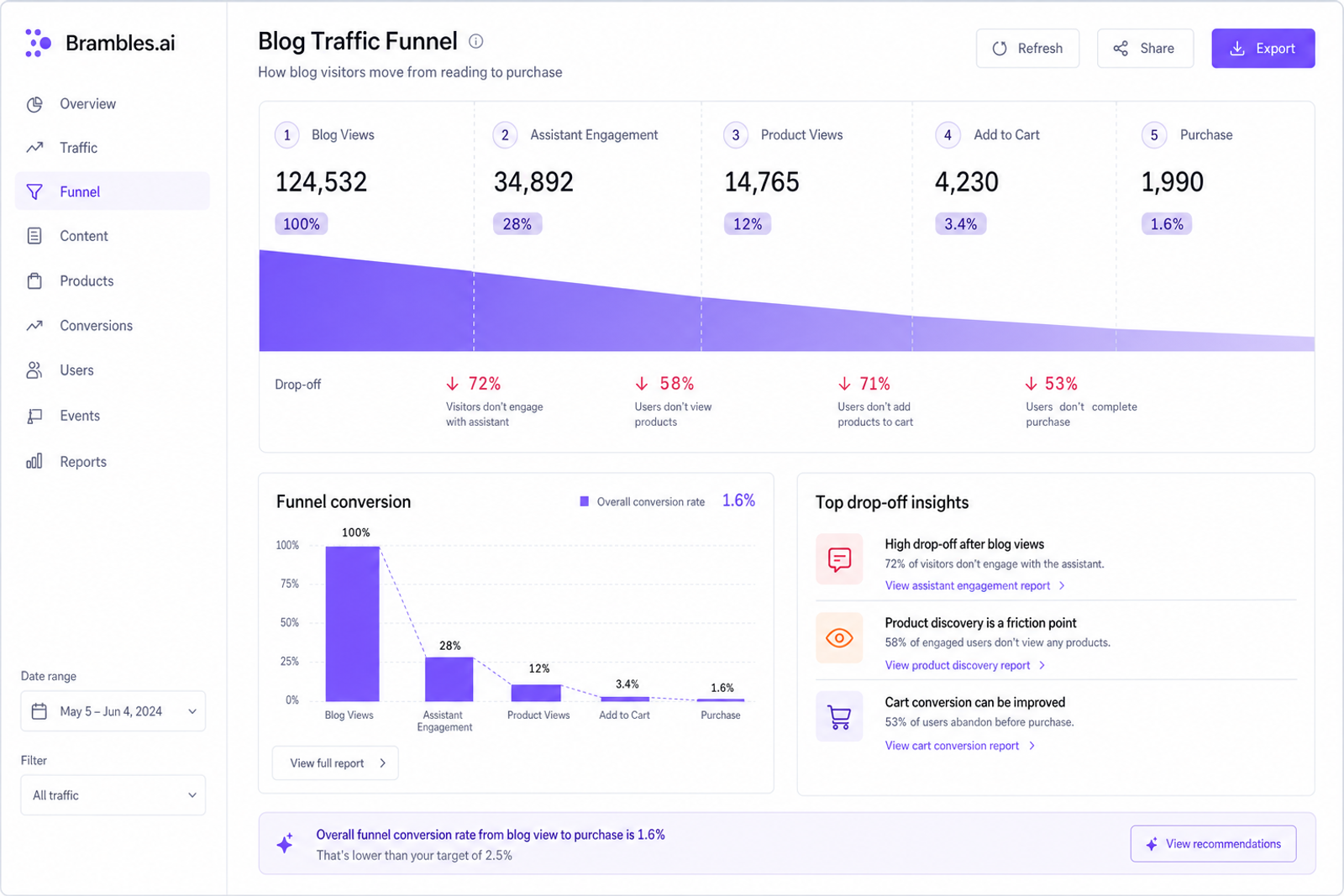
Last quarter, we embedded an AI shopping assistant on three evergreen how-to posts for a home fitness publisher. The pages already ranked top three and drew 180k sessions/month—but contributed almost no direct revenue. After launch, assisted add-to-cart rate from those posts rose from 0.6% to 2.1% and average order value ticked up 14%. The assistant didn’t hard sell; it simply recognized the intent in the article (“build a budget garage gym”), surfaced two tailored bundles, and answered sizing questions inline. The lift surprised the editor, not because readers didn’t want to buy, but because they finally had a clear, trustworthy path to act without leaving the article.
What’s broken with content-to-commerce today
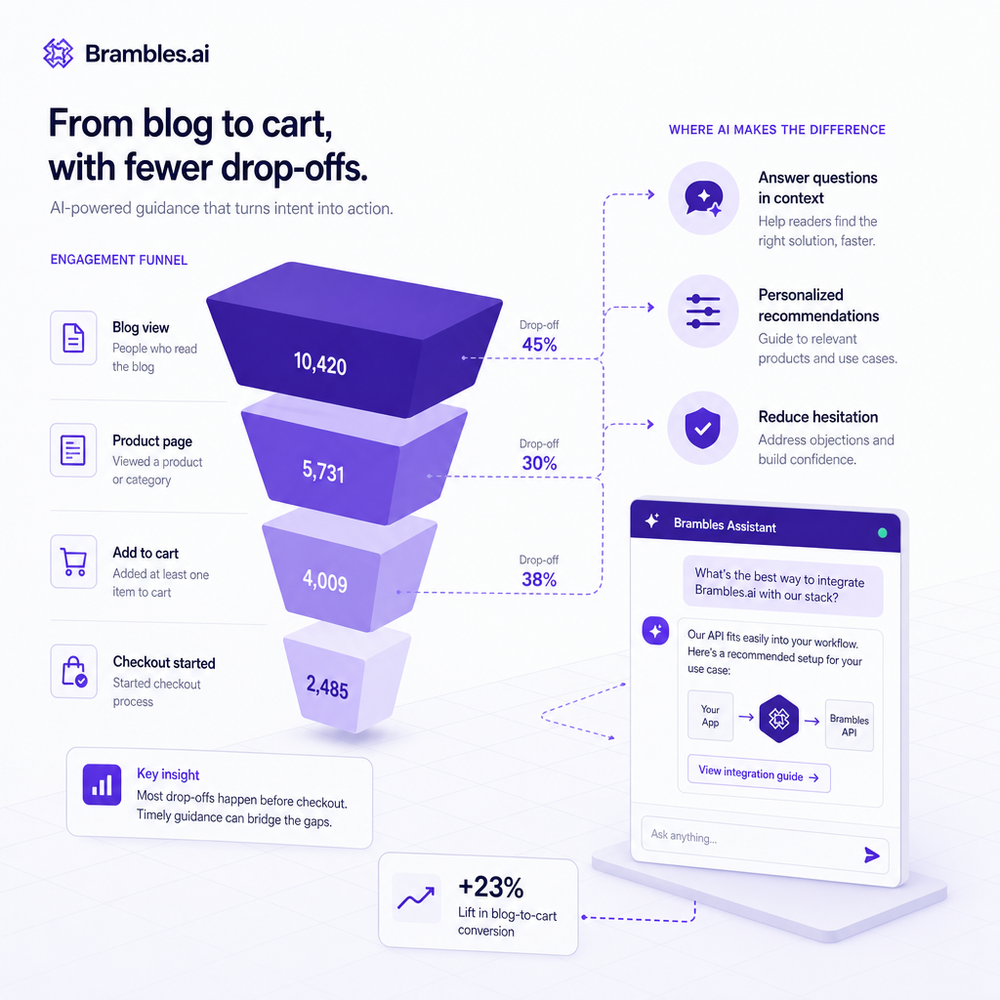
Most informational posts were never wired for buying. They answer questions but strand motivated readers in a corridor of dead-end links—author bios, related articles, a generic banner to “Shop Now.” That pattern assumes shoppers want to jump to a product listing page and start over. They don’t. Baymard Institute’s research on information scent shows that when users can’t map content context to a specific next step, they backtrack or bounce. We also see misaligned recommendations: a ceramic pan review linked to a category page with 400 pans; a gardening guide pitched winter gloves in July because a static slot couldn’t adapt to seasonality. The biggest leak, though, is friction. If readers must open a new tab, scan filters, and hunt for variations, intent decays. In our audits, time-to-first-cart from blog traffic often exceeds three minutes; anything past 90 seconds correlates with drop-offs. The fix isn’t “more links.” It’s contextual help that understands the article and the reader’s task, then compresses the decision path.
How AI shopping assistants actually work on content
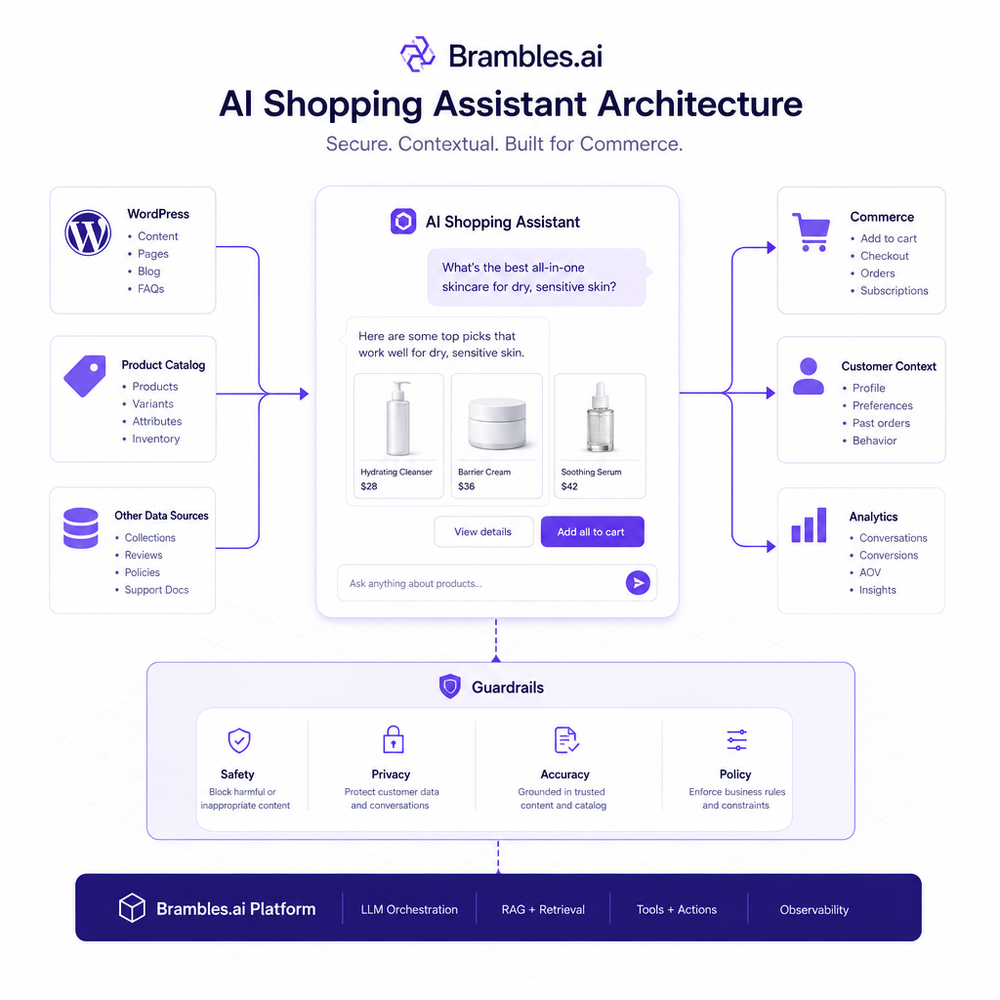
Effective assistants don’t behave like site search. They parse the article’s entities (tasks, constraints, brands, measurements), marry that with real-time catalog data, and produce a small set of shoppable recommendations appropriate to the moment. Under the hood, we use a lightweight content parser to extract intent (“apartment-friendly, under $500, low-noise rower”), a product-ranking layer that aligns SKUs using structured attributes and embeddings, then a response composer that renders options in human-readable snippets (pros/cons, compatibility, what to buy first vs later). The front end can be a sticky inline module, a floating chat, or a native-looking comparison block. Crucially, it’s not a black box: editors approve templates, pin must-include picks, and set guardrails for claims. McKinsey’s personalization research notes that leaders see outsized revenue impact by pairing automation with human oversight; the same holds here. The result is an assistant that answers “Will this fit in a 34-inch doorway?” as easily as “Which of these two is quieter?” without derailing the reading experience.
Implementation guide: from audit to live cart
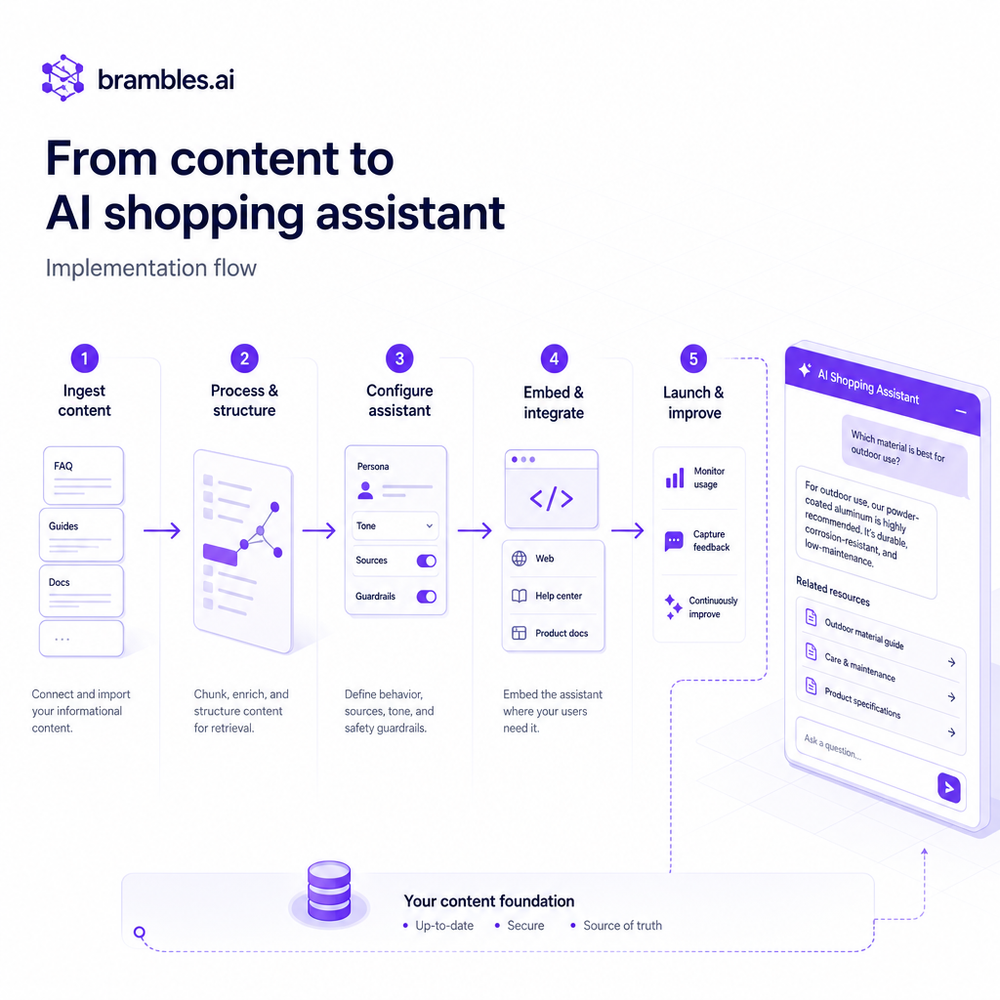
Start with a content audit. Flag posts with stable organic traffic and strong buyer-adjacent intent—how-tos, comparisons, setup guides. Map micro-intents per section. In a “budget home office” piece, for instance, we label segments as chair ergonomics, desk size constraints, power management, and cable cleanup—each tag cues different product logic. Install the Brambles.ai WordPress plugin and connect your catalog. We use normalized product attributes (dimensions, materials, voltage, compatible accessories) to prevent hallucinated fits. Configure templates: inline 2–3 product tiles, a mini-comparison card, and a gentle CTA to “Ask about fit or budget.” Add rules that respect seasonality and inventory; a sold-out hero SKU should gracefully fallback, not dead-end. Finally, wire event tracking. Fire assistant_engaged, product_viewed, add_to_cart, and purchased_with_assist events with content IDs so analytics can attribute lift to specific articles. In our experience, this instrumentation is the difference between a neat demo and a repeatable channel.
Practitioner note: on a 100k-session/month apparel blog, we tagged five evergreen posts and launched a conservative assistant (max two recommendations per section). In week two, we saw a 42% lift in assisted revenue versus the four-week preperiod baseline and a 9% reduction in exits from those pages. No discounts needed; clarity carried the sale.
Measuring ROI and the KPIs that actually matter
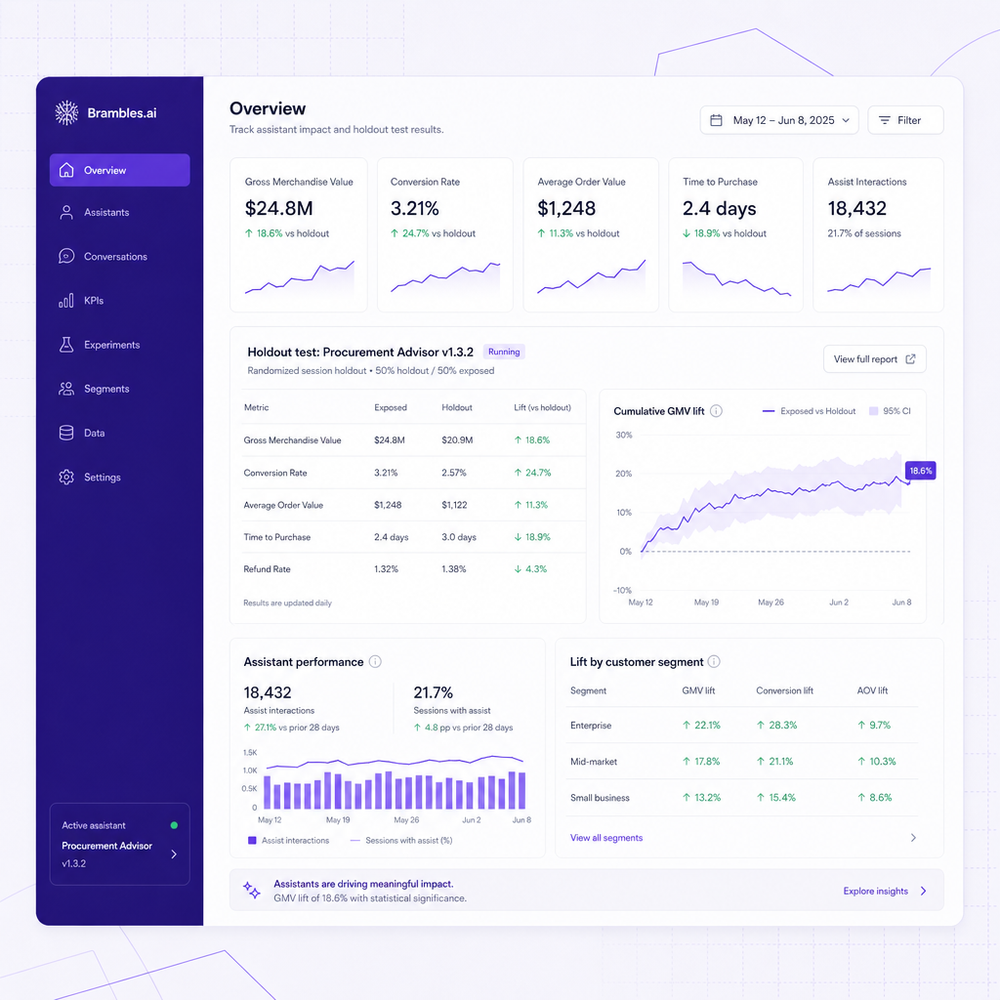
Track assisted revenue rigorously. Create an attribution dimension for assistant-influenced sessions and compare against a holdout cohort. If you can, run a within-site split: 50% of eligible posts with the assistant, 50% without, rotating weekly to correct for seasonality. Key metrics: assistant engagement rate (unique users who interact), attach rate (sessions that add to cart after engaging), time-to-first-cart from content, AOV uplift on assisted orders, and cross-sell yield (accessories attached per order). For editorial health, also watch scroll depth and dwell time to ensure monetization doesn’t tank readability. We’ve used a 14-day rolling view with Bayesian uplift estimates to avoid overreacting. Salesforce’s Connected Customer research reinforces that trust drives conversion; monitor “I found what I needed” ratings after interactions. For finance teams, expose contribution margin on assisted orders. An assistant that nudges higher-margin alternatives without harming satisfaction is gold.
Practitioner note: one DIY publisher with 250k monthly organic sessions added the assistant to their top ten guides. A geo-holdout (US vs. CA) showed a 17% increase in attach rate and a 6% AOV bump in the test region over three weeks. They used a simple success signal—“Did this recommendation work for you?”—and found a 4.7/5 helpfulness rating correlated with lower return rates later.
First-party data, transparency, and trust
Assistants earn trust when they feel like helpful editors, not ad widgets. Label the component clearly—“Buying help”—and disclose affiliate relationships where relevant. Offer choice: a one-tap way to hide commerce suggestions for that session and a visible control to switch between budget/performance picks. Collect only what you need (contextual intent is plenty) and store preference signals as first-party data with clear retention windows. Google UX research repeatedly shows that control and clarity increase perceived usefulness; we’ve seen this in practice as well. On a recipe site, adding a “Don’t recommend out-of-season produce” toggle increased assistant engagement 22% without hurting conversion. McKinsey’s work on personalization leaders emphasizes reciprocity: when users see value, they’ll share data. Treat the assistant like a trustworthy host—accurate, fast, and never creepy. Publish your criteria: why a product is recommended (fit, price, reviews, availability) and when a cheaper alternative is suggested.
Common pitfalls we’ve fixed (so you don’t repeat them)
Latency sinks conversions. Anything over 600ms before the first recommendation appears feels broken on mobile. Precompute candidate sets per article and lazy-load details to stay snappy. Stale catalogs are another trap—cache invalidation must listen to inventory changes to avoid recommending ghosts. Overeager copy (“Only 3 left!” everywhere) erodes credibility; instead, use scarcity sparingly and pair with a back-in-stock option. Avoid generic chat that answers everything and sells nothing; constrain domains to buying tasks on that page. Finally, don’t route every click to a product page. For simple variations (size, voltage), let users add to cart inline and confirm in a bottom sheet. Baymard’s patterns on reducing context switches align with what we see: fewer tab hops, smoother carts. Our early apparel test failed until we cut recs from five to two per section and added a fit-check question; engagement doubled and complaints vanished.
Future outlook: assistants that know your catalog (and your voice)
The next leap isn’t flashier chat—it’s deeper product understanding and editorial tone control. We’re moving from keyword matching to attribute-verified reasoning: dimensions, compatibility, certifications, and real-world constraints like doorway widths and power standards. Expect assistants to auto-generate comparison tables that editors can approve in seconds, then keep them fresh as prices and stock shift hourly. On the business side, dynamic contribution margin can guide recommendations toward profitable bundles without betraying user trust. And yes, multi-lingual, multi-region logic will matter as content travels. None of this works without clean product data and a clear editorial north star. The teams that win will treat assistants as an extension of their brand’s judgment—fast, helpful, and honest—supported by transparent controls and continuous A/B learning.
Ready to test this on one post that already earns traffic? Start small, instrument obsessively, and iterate weekly. You can deploy in under an hour on WordPress and connect carts without changing your theme. If you want an opinionated stack that bakes in guardrails, templates, and analytics, we built ours to slot into your workflow.
Related posts
View all
Sponsored Products in AI Shopping: Retail Media 101
Learn how sponsored product placements power AI shopping, how bidding and relevance work, and how to implement retail media without eroding trust or UX.
Why Furniture Shoppers Need View in Room Before They Buy
Furniture buyers abandon carts when scale and style feel risky. See why "View in Room" cuts returns, boosts conversion, and how to launch it with Brambles.ai
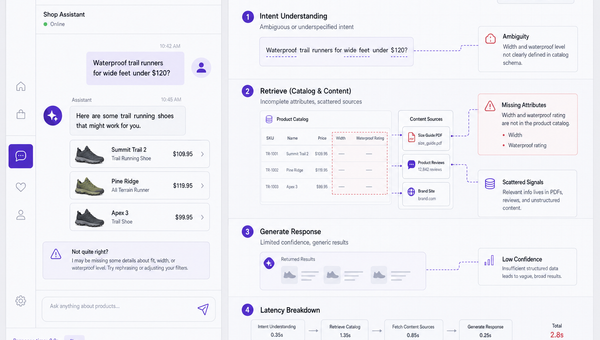
Why Good AI Shopping Agents Are Hard—and How Brambles Helps
Most AI shopping bots fail on data quality, UX, and trust. See why agents break in the wild and how Brambles.ai fills the gaps with measurable features.
Explore Brambles.ai
Learn more about our AI-powered agentic commerce platform, agentic shopping, and shopping assistance solutions.
Explore More Insights
Discover more articles on AI, automation, and business innovation
View All Articles