How Long to Launch Agentic Commerce with Brambles.ai?
Pressed for time? Here’s a realistic, week-by-week timeline to launch agentic commerce with Brambles.ai—from sandbox to A/B-tested go‑live—plus pitfalls, KPIs.
We stood up agentic commerce for a mid-market furniture brand in 14 calendar days and saw a 19% lift in assisted conversion within the first week. On a 120k-session publisher, we shipped in nine days; RPM from commerce content rose 34% after we enabled proactive prompts on high-intent articles. The throttle wasn’t code—it was feed quality and approval loops. If your catalog or affiliate IDs are tidy, you’ll move fast. If not, the schedule slides while teams clean data and align disclosures.
This guide gives a no-nonsense timeline—what happens each week, who needs to weigh in, and what can derail you. Expect 2–4 weeks to go live for most teams, with sandbox running day one. If you’ve already deployed a tag manager and own your feeds, the shorter end is realistic. If legal reviews disclosures or you need SSO for order lookup, budget extra days.
Quick Answer
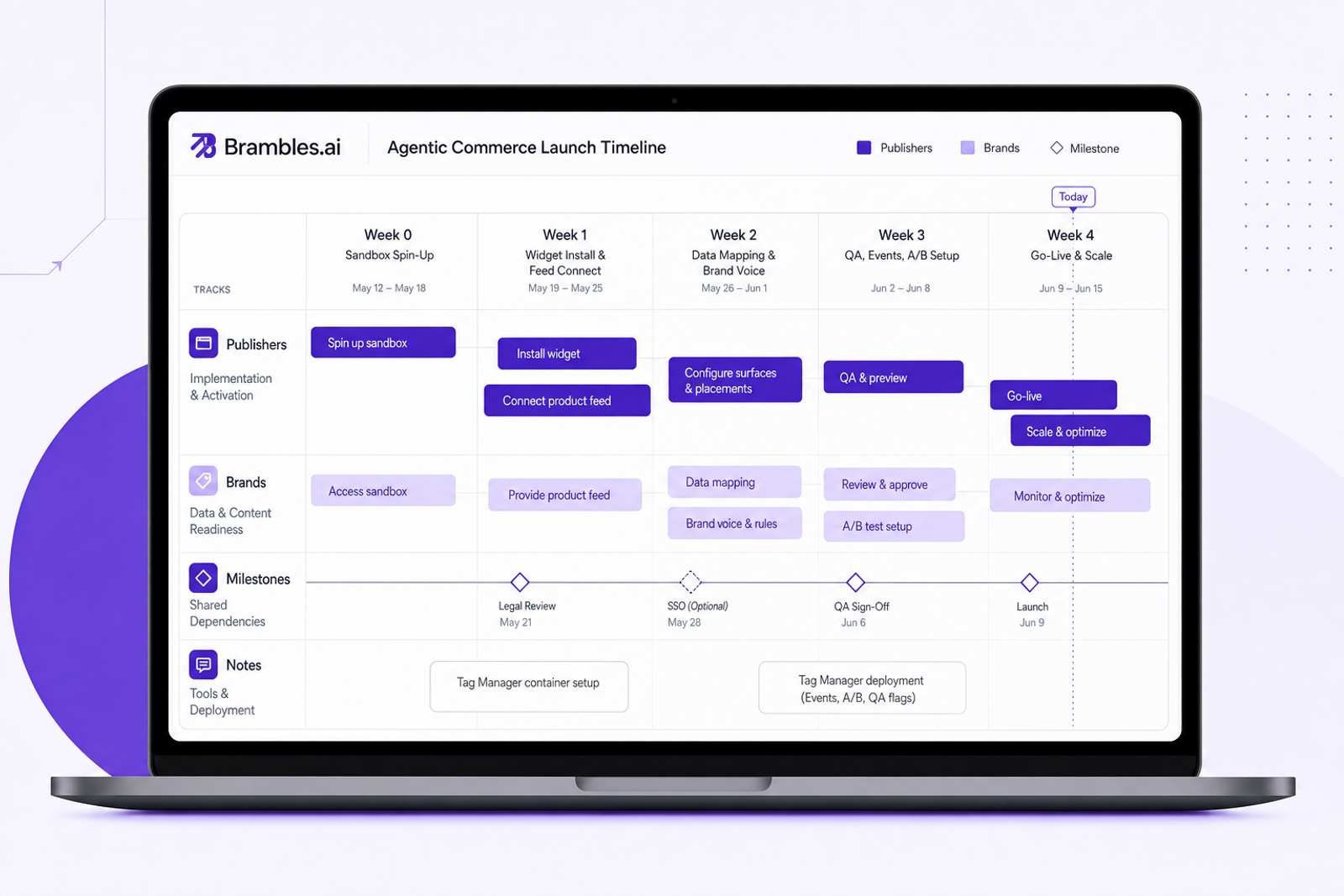
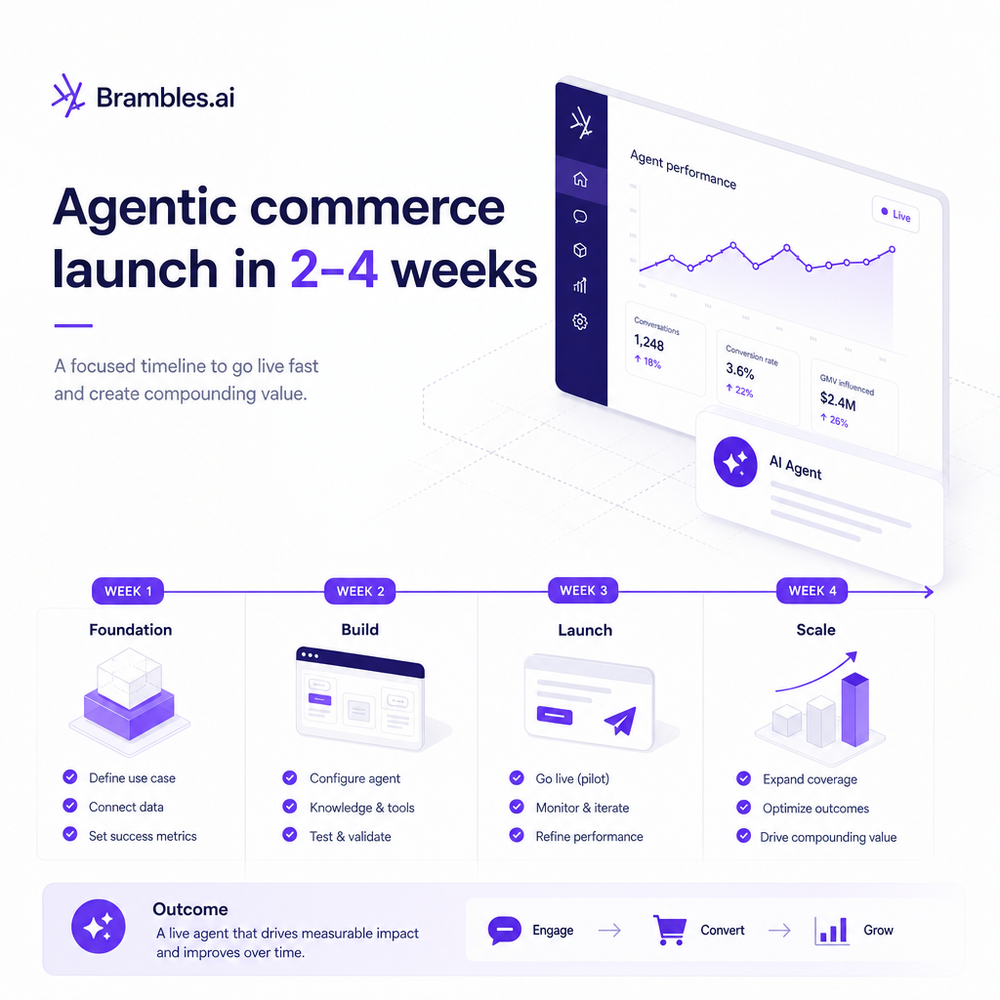
Most teams launch agentic commerce in 2–4 weeks with a same-day sandbox. Week 1: install the widget, connect a basic feed, and run internal QA. Weeks 2–3: map attributes, tune prompts, train brand voice, and set up tracking. Week 4: A/B test, verify disclosures, and roll out progressively. Publishers often ship faster than retailers because there’s no checkout or order-lookup workstream. Complex catalogs, legal review, and SSO can add 1–2 weeks.
What a Realistic Launch Timeline Looks Like (2–4 Weeks)
Week 0 (Day 0–1): Spin up sandbox. You’ll preview the chat and inline experiences against a sample catalog. This is where stakeholders see flows and agree on goals.
Week 1: Install the Agentic Commerce Module and connect a simple feed. Most teams drop a single script via tag manager or CMS. WordPress and Shopify accelerators can shave days off.
Week 2: Map attributes (price, availability, variants), set eligibility rules, and configure brand voice. Start drafting your A/B plan and wire up analytics. Publishers also add affiliate IDs and link domains.
Week 3: QA. Validate edge cases, disclosure messaging, and fallback behavior. Configure proactive prompts on top landing pages. Prepare go/no-go criteria and a rollback plan.
Week 4: A/B test and scale. Roll out to 25–50% of traffic, confirm KPI lifts, then graduate to 100%. For brands, enable direct add-to-cart and (optionally) order lookup once the recommender is stable.
What’s Broken Today (and Why Timelines Slip)
Timelines rarely slip because of JavaScript—they slip because the data is messy or stakeholders aren’t aligned. If a product feed lacks availability or variant mapping, the assistant hedges and conversions fall. Legal reviews can stall on disclosure copy. And if success metrics aren’t defined, A/B tests drag on without decisions.
Two quick anecdotes: On an apparel catalog with 40% missing size data, we lost a week to mapping and saw only a 6% lift until content gaps were fixed. Conversely, a review site that pre-tagged buyer-intent articles shipped in eight days and realized a 28% RPM gain after enabling proactive prompts on those pages. Prep matters.
How It Works (and Where Brambles.ai Saves Time)
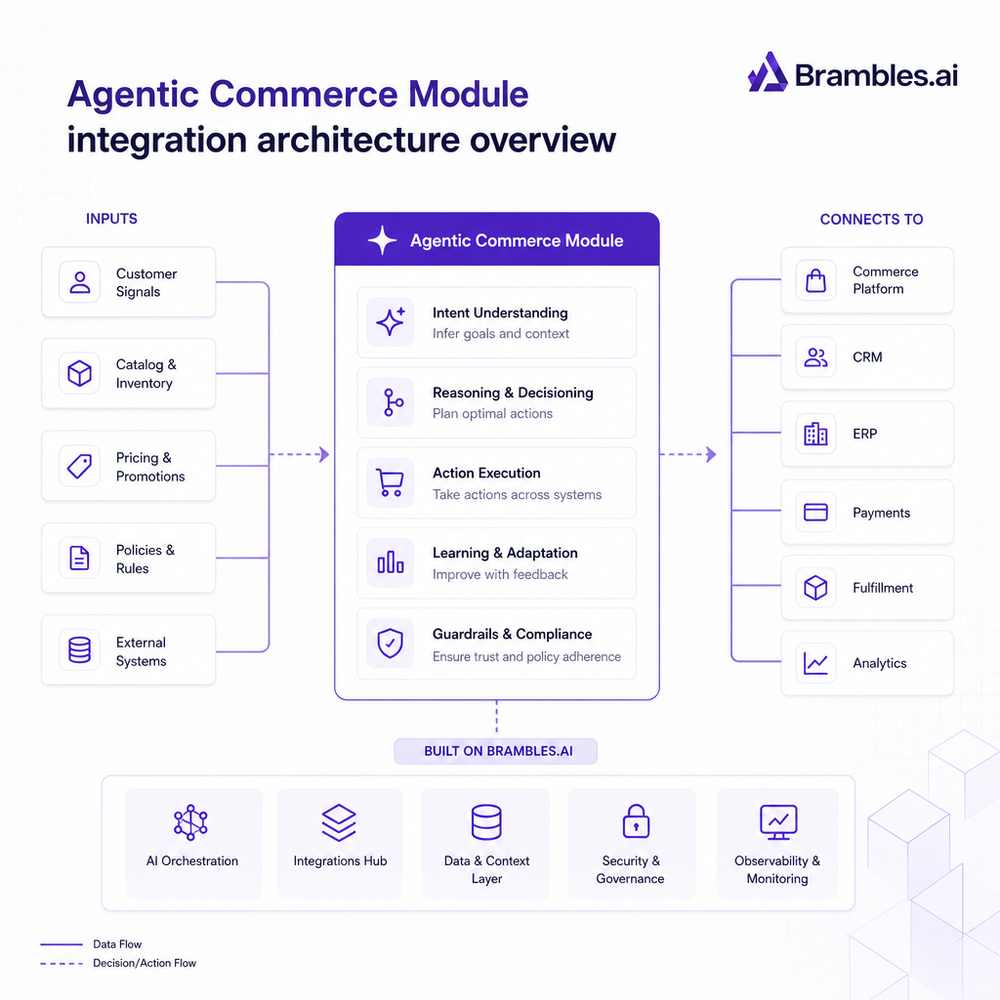
Brambles.ai reduces time-to-live by simplifying integration and automating the repetitive work. Four features carry most of the load:
AI product discovery: shoppers ask in natural language and get ranked, explainable results. It understands constraints like budget, use case, and style from the conversation, not just filters.
Content intelligence: our indexer crawls your site and catalogs to power precise, context-aware answers. This reduces manual curation and speeds launch because gaps are flagged early in QA.
Proactive engagement: the assistant suggests relevant products based on the page a user is on, lifting CTR without extra layout work. You control triggers and frequency caps in config.
Direct add-to-cart: for brands and retailers, qualified picks can be added to cart from chat, shortening funnels. This is enabled once tracking is verified and QA passes edge cases.
Implementation Guide: Step-by-Step
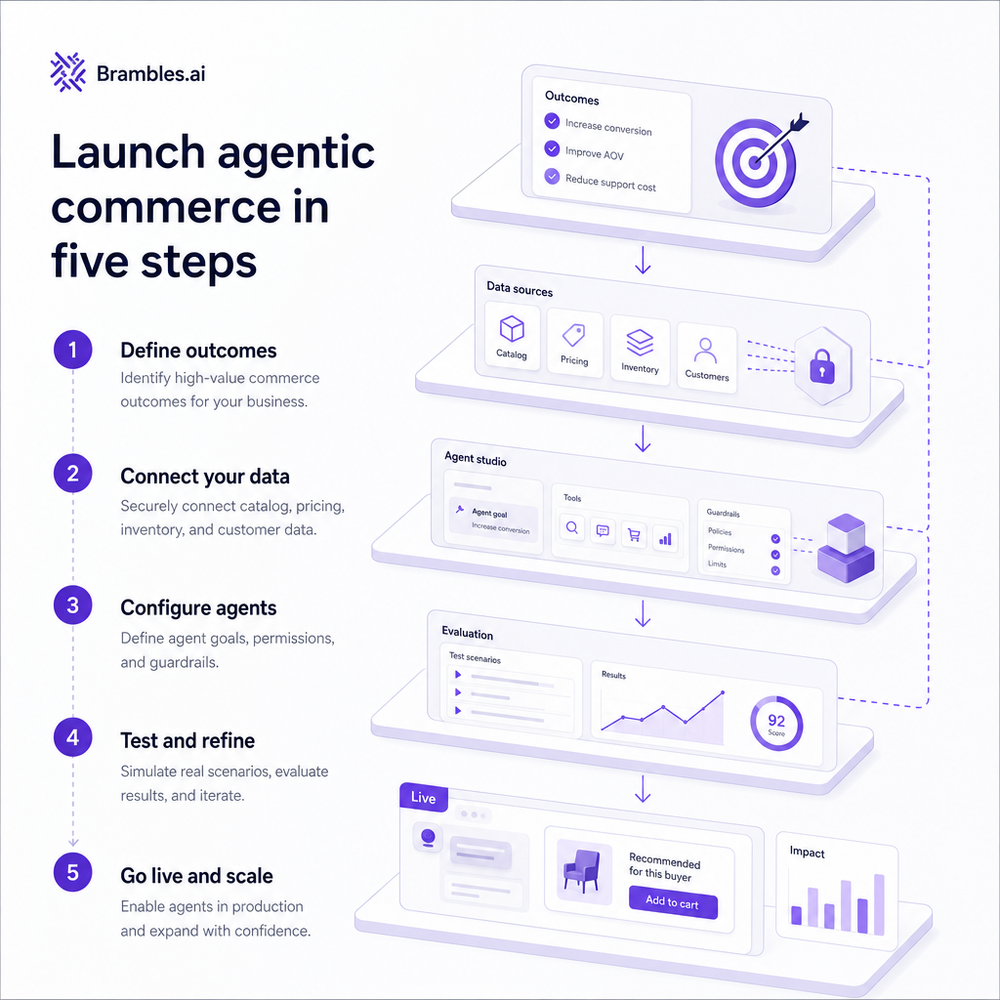
1) Create your project and launch sandbox. Use the sample catalog to align stakeholders on the experience and define KPIs early (conversion rate, CTR, RPM, AOV).
2) Install the script. Most teams add the Agentic Commerce Module via tag manager or CMS and validate it in dev/staging. WordPress and Shopify accelerators simplify this step.
3) Connect data. Provide a clean product feed or affiliate catalog. Include price, inventory, images, variants, and canonical URLs. If you’re a publisher, add your network IDs and domain mapping.
4) Configure answers and brand voice. Set tone, guardrails, and visual styling. Add proactive prompts to top landing pages and test 2–3 variations per page.
5) Wire events. Fire view, click, add-to-cart, and conversion events to your analytics. Define assisted vs last-click attribution in your reporting. Set up a clean experiment framework.
6) QA the long tail. Test ambiguous queries, out-of-stock redirects, and variant handling. Run mobile-first tests; Baymard’s research shows small mobile friction multiplies drop-off.
7) Launch a 25–50% A/B. Holdout should mirror traffic mix. Watch leading indicators first (CTR, time-to-first-pick) before calling conversion. Validate disclosure placement and copy.
8) Scale and extend. For brands, enable direct add-to-cart after results stabilize. For publishers, add retail media placements once RPM lifts are confirmed.
If you need SSO for orders or bespoke SLAs, spin up with enterprise support. That keeps the timeline tight while meeting security and uptime requirements.
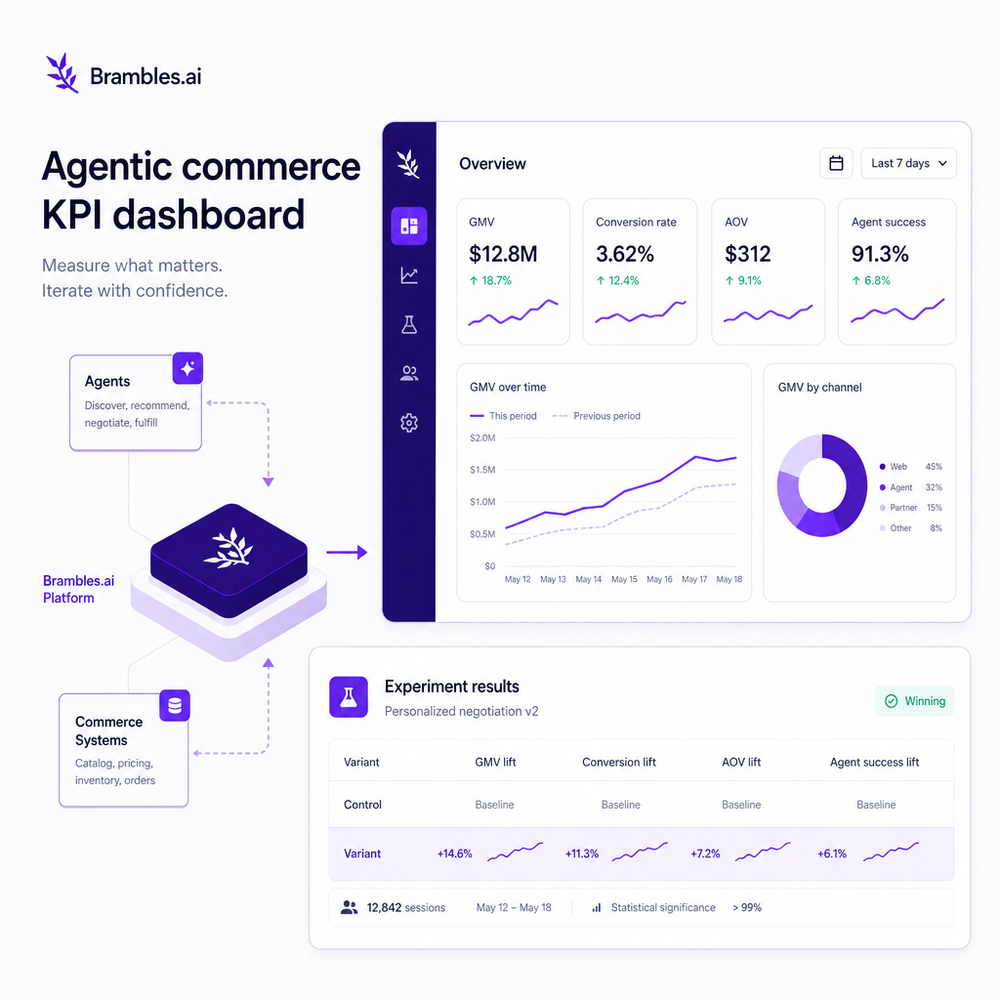
Measuring ROI & KPIs (Call Your Win Fast)
Decide what “good” looks like before launch. For brands, target uplift in assisted conversion, AOV, and add-to-cart rate. For publishers, focus on RPM, CTR on product suggestions, and click quality (bounce, dwell).
Anecdote: a home goods brand saw a 42% lift in assisted conversion and a 9% AOV increase after enabling direct add-to-cart from chat. A gadget review site added 0.7 RPM within 72 hours by turning on proactive prompts only on top-20 landing pages. Start narrow, then scale.
Instrumentation checklist: confirm event names, verify affiliate attribution parameters, segment assisted vs non-assisted sessions, and use a 14-day lookback for considered purchases. McKinsey and Salesforce studies both note faster purchase decisions when guidance is contextual—measure that with time-to-first-pick and time-to-cart.
First-Party Data, Disclosures, and Trust
Trust accelerates launches. Keep data flows simple and disclosures obvious. For publishers, transparent affiliate language prevents rework. For brands, minimize PII scope until value is proven; bring order lookup later.
Brambles.ai supports clear, configurable disclosures and consent logic out of the box, plus content indexing that avoids over-collecting data. That keeps legal happy and timelines intact while preserving UX momentum.
Common Pitfalls (and How to Avoid Them)
- Dirty feeds: missing price, inventory, or images. Fix feeds first; it’s the #1 delay.
- Undefined metrics: agree on KPI deltas before tests.
- Over-scoped v1: skip SSO and complex flows until the assistant proves lift.
- Quiet rollouts: don’t bury the assistant; promote it on high-intent pages.
- Legal last: draft disclosure copy in Week 1, not during go-live.
Rollout Checklist (One Page)
- Script installed and firing only once
- Product/affiliate feeds validated; redirects resolved
- Brand voice and UI tuned to guidelines
- Proactive prompts configured on top landing pages
- Events mapped (view, click, add-to-cart, conversion)
- A/B plan approved with go/no-go thresholds
- Disclosure copy approved and visible
- Fallback behaviors tested (OOS, vague queries)
- Rollback plan documented and tested
Future Outlook: Visual Try-On and Spatial Context
Once the assistant is proving lift, visuals compress decision time. Apparel and beauty teams add try-on, while home and decor teams lean on spatial preview. Roll these after the recommender stabilizes to avoid mixing test variables.
If you’re a publisher, upgrade monetization as volume grows—contextual CPC and retail media from the same surface—and keep disclosures tight. The same assistant can serve commerce, service, and discovery without adding widgets everywhere.
Ready to ship? Start in sandbox, lock KPIs, and target a 2–4 week launch. If you need help, lean on enterprise onboarding. Pricing is transparent and you can install the module on any CMS or front end.
FAQ
How long does a typical Brambles.ai launch take?
Two to four weeks for most teams. Day-one sandbox, week-one widget and feed, weeks two to three mapping and QA, week four A/B and scale. Complex catalogs or SSO add 1–2 weeks.
What slows down timelines the most?
Messy feeds, unclear KPIs, and late legal reviews. Clean price/inventory/variant data and pre-approved disclosure copy keep things on track.
Can publishers and brands launch at the same speed?
Publishers typically launch faster because there’s no checkout or order-lookup scope. Brands add direct add-to-cart and, later, customer service flows once results are stable.
Do I need engineering resources?
Minimal. It’s a single-script install plus data feed. Most work is analytics mapping and approvals. WordPress and Shopify accelerators reduce dev time further.
When should I add try-on or spatial preview?
After the recommender proves lift. Add visual features in phase two to isolate their impact on conversion and AOV.
Related resources on Brambles.ai
If you are implementing this, start with Brambles.ai, about Brambles.ai, developer docs, video discovery.
Related posts
View all
Contextual Ads in AI Shopping: Higher CTR, Better UX
Contextual ads inside AI shopping chats lift CTR and conversion while improving UX. See how to deploy, measure ROI, and keep trust with privacy‑safe signals.
Natural Language Product Search Converts 3–5x Better
See why natural language product search outperforms keyword boxes, lifting conversion 3-5x. With examples, KPIs, and a practical guide to implementing it fast.
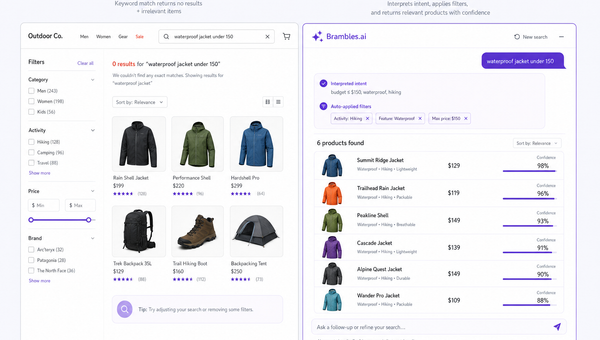
AI Product Discovery: Why Search Bars Fail Shoppers
Most shoppers don't think in keywords. Learn why legacy search bars miss intent, how AI product discovery converts more, and how to implement it safely.
Explore Brambles.ai
Learn more about our AI-powered agentic commerce platform, agentic shopping, and shopping assistance solutions.
Explore More Insights
Discover more articles on AI, automation, and business innovation
View All Articles