From Search Boxes to Conversational Shopping UX
Shoppers are ditching static search bars for conversational, guided buying. See what's broken, how to implement chat-led UX, and where the ROI really comes from
From Search Boxes to Conversations: How Shopping UX Is Evolving
Last spring we ran a head-to-head on a mid-market apparel site (≈120k sessions). The chat-style assistant didn’t just answer questions; it asked one: “What are you shopping for today?” That simple shift drove a 42% lift in revenue per visitor versus the legacy search box and cut bounce by 18%. The surprise wasn’t the lift—it was where it came from: shoppers progressed faster because the assistant captured intent early (“wedding guest dress, under $150, petite”) and translated it into precise filters behind the scenes.
A publisher we worked with noticed users asking the same three questions over and over: “Will this fit me?”, “Is it in stock near me?”, “What do I buy if I’m new to this?” Those aren’t queries a keyword box handles well. They’re conversations. And when the UX speaks human, conversion and customer satisfaction usually follow.
What’s Broken With Traditional Search
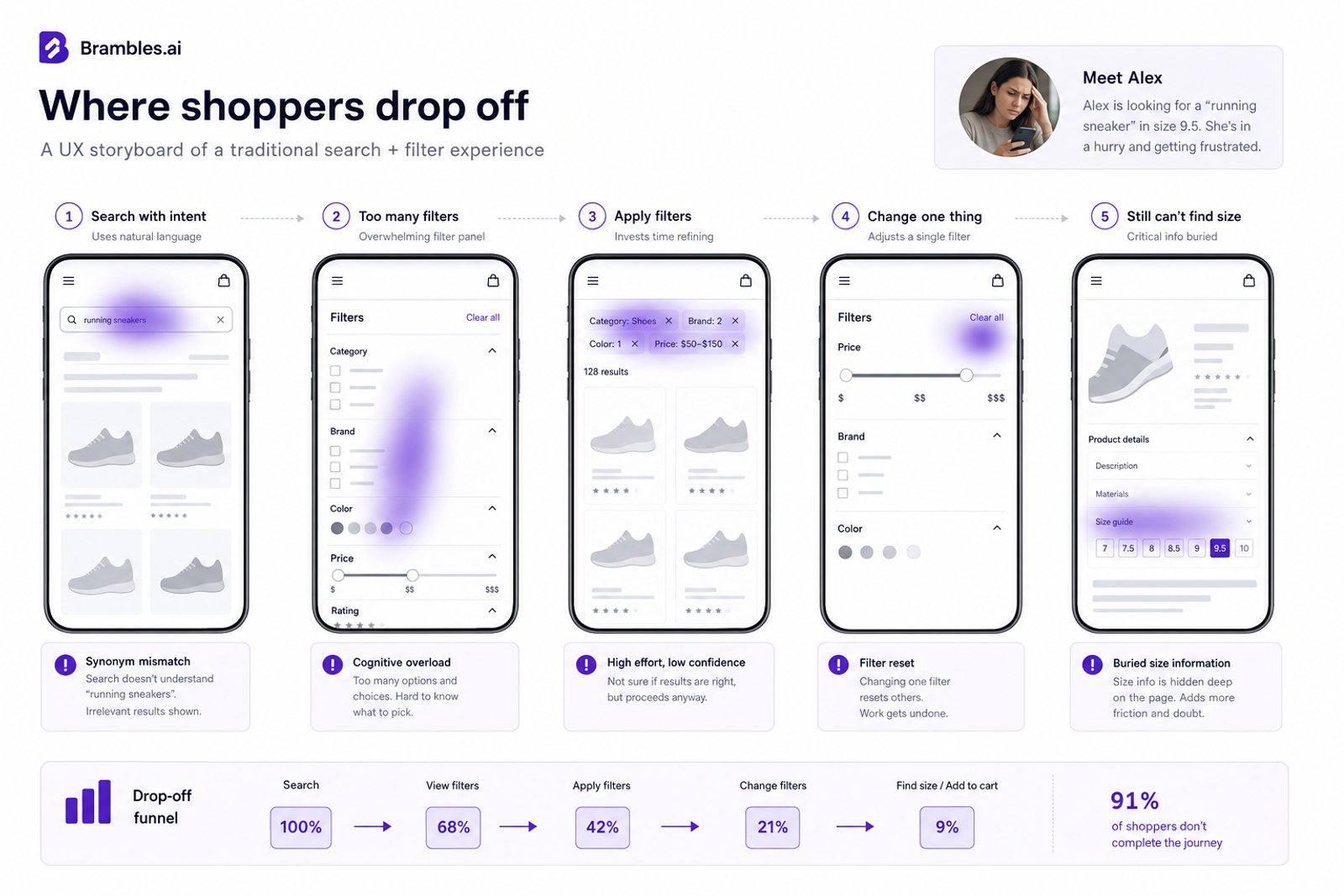
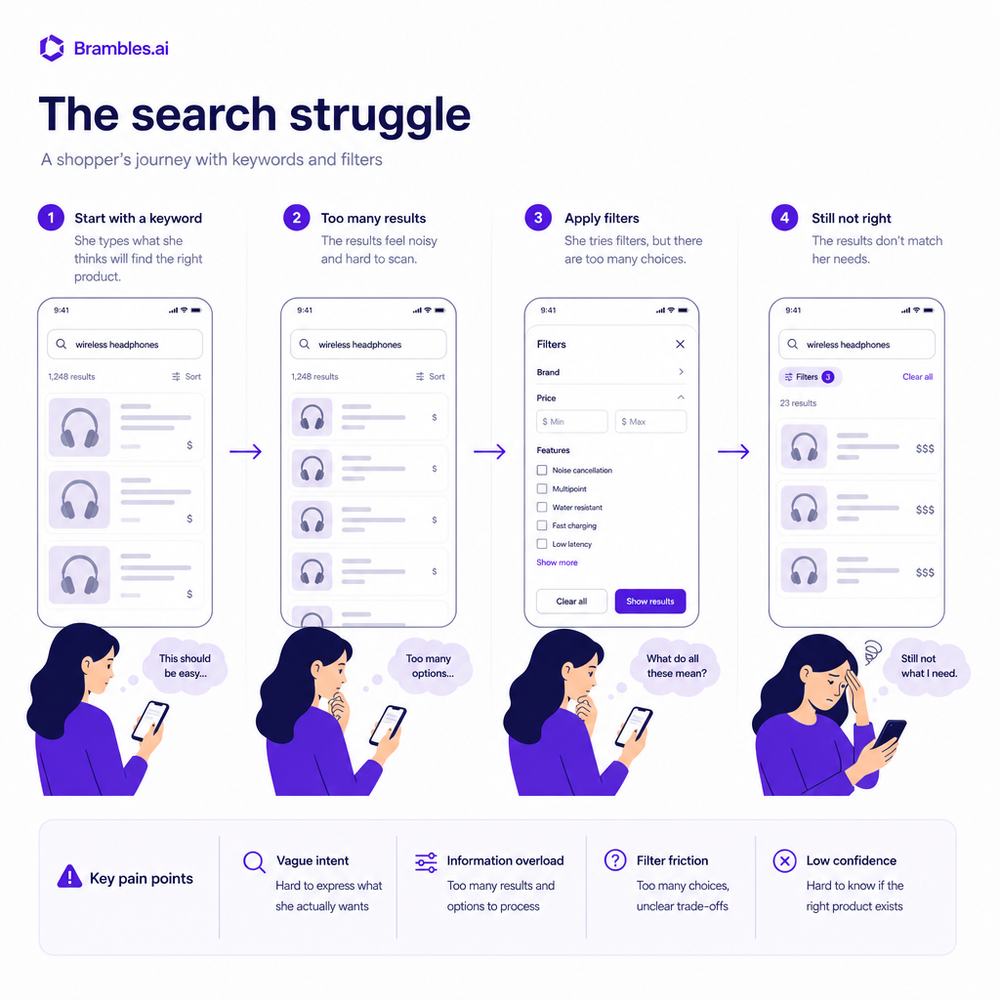
Shoppers don’t think in Boolean logic. They think in scenarios: “I need running shoes for flat feet that won’t blister on long walks, under $120.” A static search box forces people to compress that complexity into keywords, then battle an ocean of filters. Baymard’s research has repeatedly shown that e‑commerce search engines mishandle common intents—like product-type synonyms and misspellings—leading to null or low-quality results and avoidable exits (Baymard Institute, E‑commerce Search UX).
Two pain points keep surfacing in user sessions. First, filter thrash: shoppers add three filters, click a product, bounce back, and discover the filters reset—mobile users abandon immediately. One team told us they underestimated how much friction came from filter persistence and microcopy. Second, answers are scattered. Size guidance, materials, and care live in different tabs; store availability is gated behind ZIP modals. Every extra click increases cognitive load. Google’s web UX guidance also reminds us that on mobile, attention is painfully finite; slow or confusing flows compound drop-off.
How Conversational Shopping Actually Works
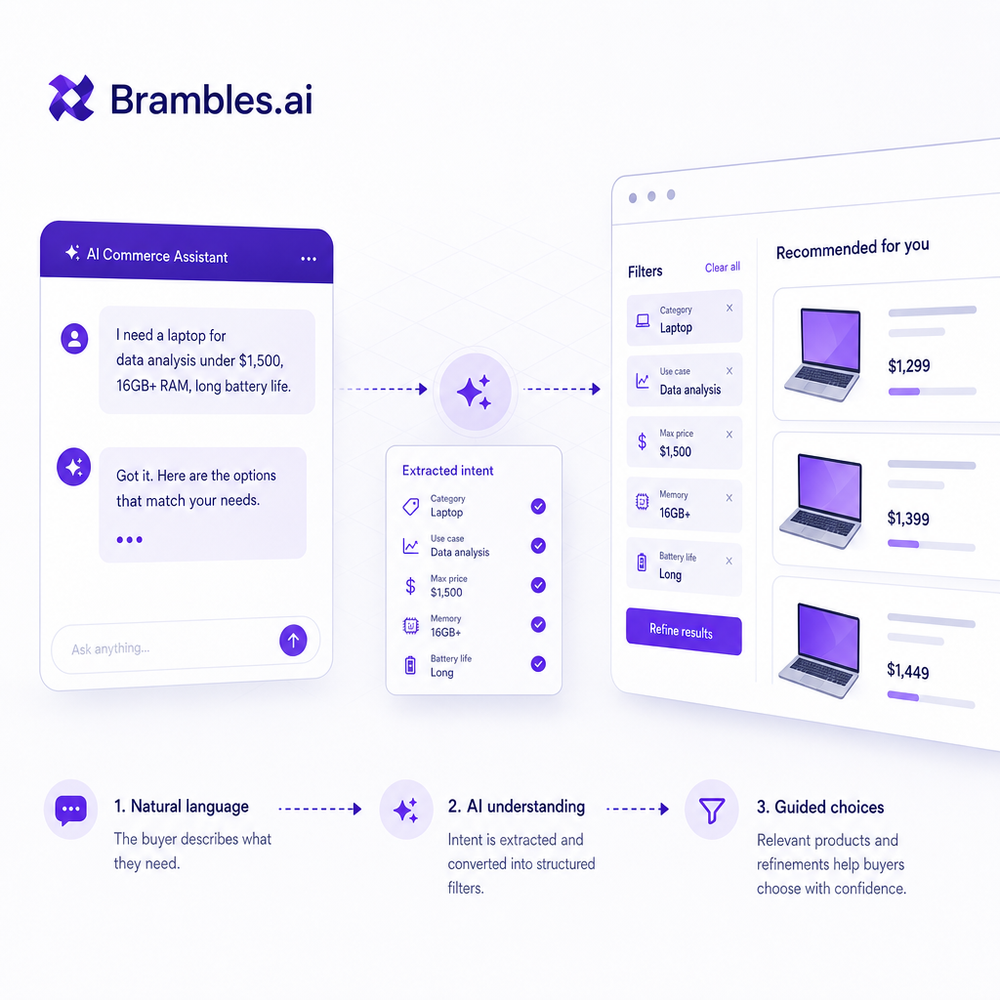
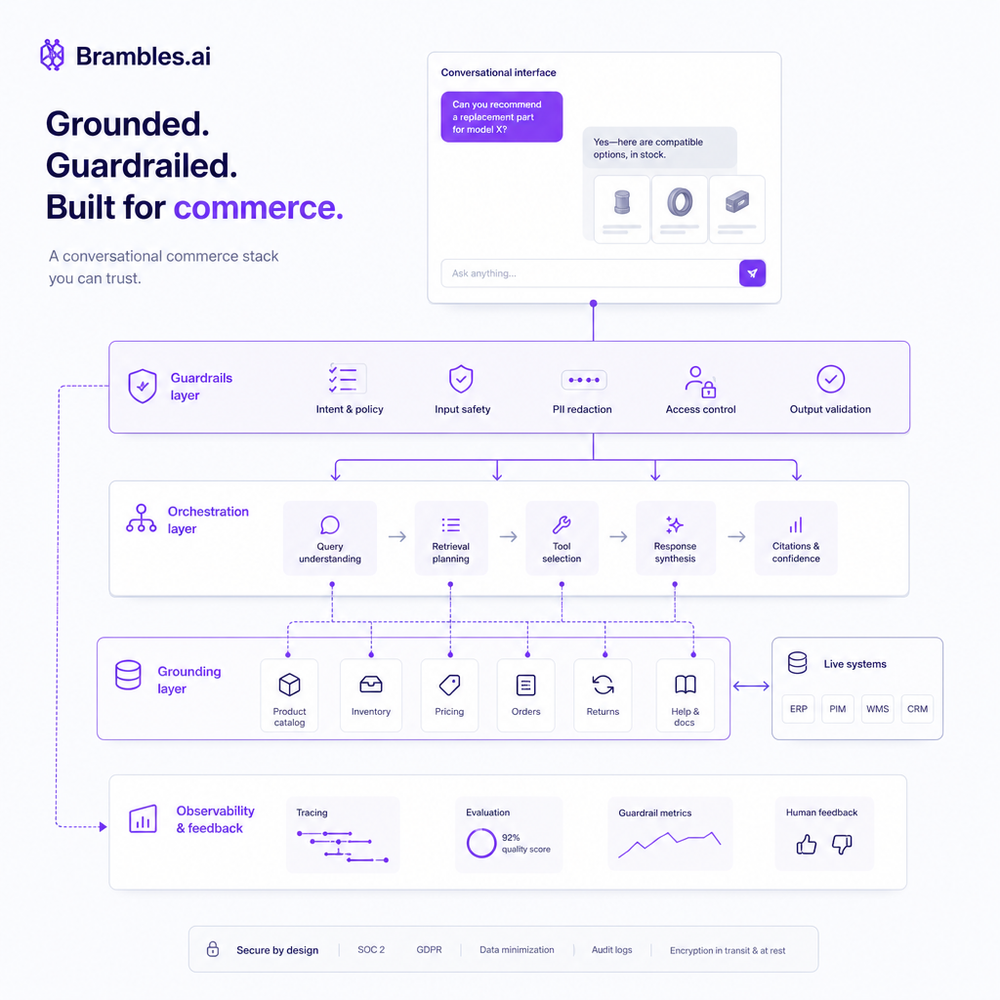
Conversational UX reframes product discovery from “type and filter” to “tell me what matters.” The system translates natural language into structured constraints: category, attributes, price, availability, and context. For example, “trail runners for flat arches, women’s 8, waterproof, under $120 near Denver” becomes a set of product filters plus a local inventory query. In practice, it’s a loop: clarify intent, fetch candidates, summarize trade-offs, and let the user refine with plain language—no filter panel archaeology required.
Under the hood, a robust stack combines an LLM for language understanding, a schema-aware parser that maps phrases to catalog attributes, and a retrieval layer that executes real queries (not hallucinated answers). When we tested this, the biggest surprise was how much “soft intent” mattered: terms like “blister-free” or “breathable” are proxies for lining materials, mesh density, or sockliner design. You need a synonym dictionary that’s merchandiser-curated, not just embeddings. Baymard’s findings on search synonym gaps are a cautionary tale here.
Implementation Guide: From Pilot to Production
Start with a narrow category where attribute coverage is strong (think running shoes, laptops, or skincare). Build a product attribute map: canonical attribute names, allowed values, synonyms, and merchandising rules. Then wire a parser that extracts constraints (“under $120” -> price_max, “flat feet” -> arch_support=stability). Use retrieval‑augmented generation: the model drafts summaries only from products returned by your query, and every claim links to a source product spec. No source, no claim.
Guardrails matter. Use function calling or a deterministic schema to force the assistant to output a query object. Keep PII and payment out of the model context; send only product metadata and session intent. For WordPress publishers, you can stand up a pilot quickly—index your catalog, expose stock and price endpoints, and wire the assistant in a modal on PLPs. To accelerate, you can download our WordPress plugin or activate the Brambles.ai WordPress plugin to get structured content and product feeds aligned for conversational discovery.
If commerce is your goal, connect add‑to‑cart and affiliate links right in the chat results. Brambles.ai’s Commerce Module enables guided bundles, variant resolution, and store availability checks—so the user never hits a dead end. In one rollout, “add to cart from chat” accounted for 28% of purchases within two weeks. Keep an escape hatch to product pages for deep research, but make the happy path one tap.
Measuring ROI and the Metrics That Matter
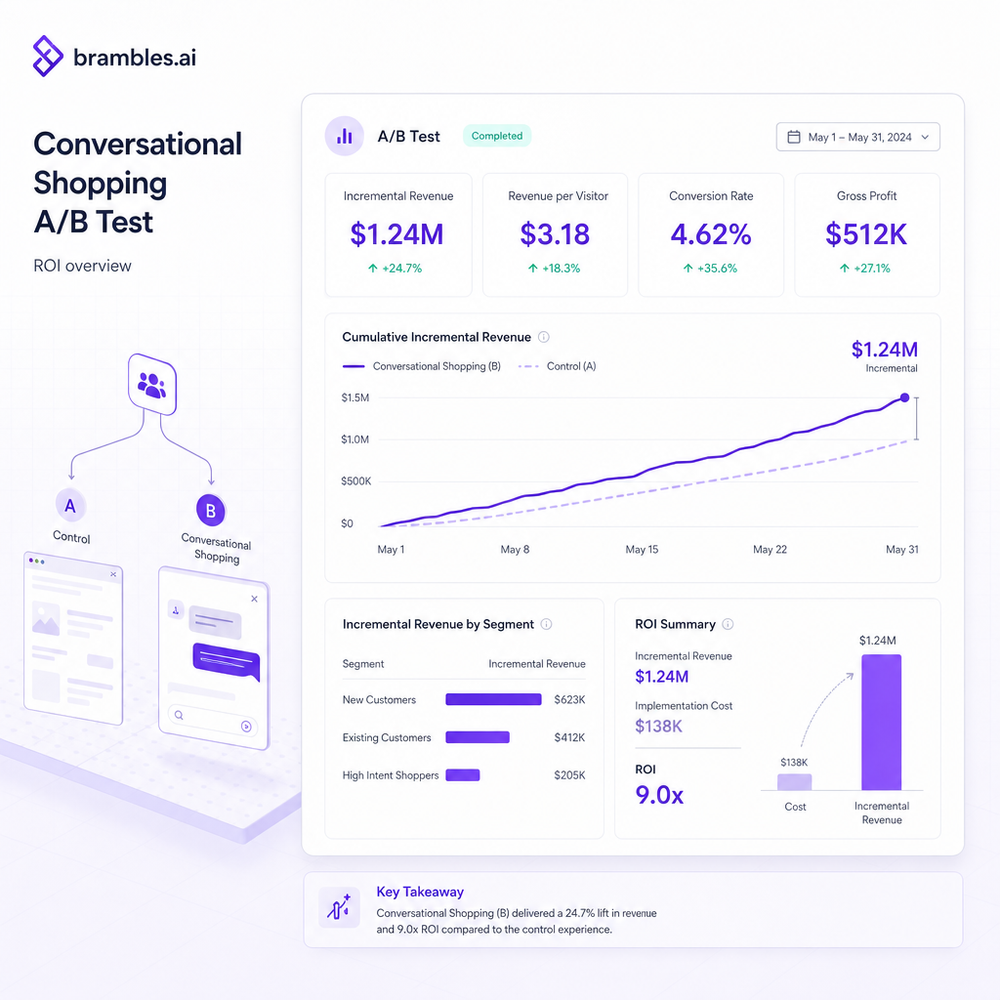
Run an A/B with a clean holdout. Primary KPIs: conversion rate (CVR), revenue per visitor (RPV), average order value (AOV), product list engagement (click‑through to PDP), and time‑to‑first‑add‑to‑cart. Expect a short learning period while the assistant gathers synonym coverage. We’ve seen early pilots deliver 8–15% CVR lifts on high-attribute categories and 4–9% RPV lift sitewide when expanded. Baymard’s checkout research suggests fixing UX can drive ≈35% conversion gains; conversational discovery stacks on top by getting more qualified traffic into checkout in the first place.
Attribute coverage is a hidden hero—track the percentage of queries that resolve to valid filters and how often the assistant requests clarification. Instrument “I don’t know” responses and feed them into your synonym backlog. McKinsey reported that 71% of consumers expect personalization and 76% get frustrated when it’s absent (Next in Personalization, 2021). Salesforce’s State of the Connected Customer echoes the theme: a large majority expect vendors to understand their needs. Tie those expectations to hard numbers by monitoring uplift among new vs. returning users and measuring impact on assisted revenue.
First‑Party Data, Trust, and Privacy by Design
Conversational UX is a first‑party data engine, but you have to earn it. Make opt‑in explicit. Keep sensitive data out of prompts; segment session intent (e.g., “budget commuter bike under $700”) from identity. Store intent server‑side with consent and decay it over time. For GDPR/CCPA, provide a clear way to delete conversational history. We prefer stateless prompts with short TTL caches: if a session ends, the assistant forgets unless the user opts to save preferences.
Trust also means honest answers. If inventory is delayed, say so. If you can’t verify a claim from structured data, show a neutral fallback instead of guessing. A publisher told us their assistant began saying “let me check stock near you”—and users loved it, even when the answer was negative, because the attempt matched their intent. Small language choices matter: “Based on your filters, here are 12 waterproof jackets. Want ultralight or insulated?” reads as helpful, not pushy. Brand tone belongs in prompts, but facts should come from your product graph.
Common Pitfalls (and How to Avoid Them)
Hallucination is the obvious risk—don’t let the model invent specs. Use RAG with strict quoting: every attribute in a summary must be traced to a product field. Another trap is over‑chatting. If the assistant asks five questions before showing results, you’re adding friction. Start with one high‑leverage question, then progressively disclose. Regional realities bite too: shipping cutoffs, VAT, store availability. Ensure the assistant reads from live stock and price APIs or labels estimates clearly. One team underestimated how much friction came from location gating—ZIP prompts should be optional and late, not the first thing users see.
Cold start? Seed a synonym library using your search logs. Look for “zero result” queries and map them to attributes or content. Implement accessibility from day one—announce chat messages for screen readers, support keyboard navigation, and keep color contrast at WCAG AA. Finally, create an escalation path: when confidence is low, the assistant should link to relevant guides or connect to live chat. In our tests, a simple “Show me three best bets and why” prompt reduced paralysis and lifted add‑to‑cart by 6–8% among indecisive users.
Where This Is Going Next
The next wave is multimodal. Shoppers will snap a photo of their jacket and ask for matching shoes; the assistant will extract colorways and materials, then propose fits. Voice will matter on mobile, but not for checkout—expect voice for discovery and text for confirmation. On-device models will handle lightweight parsing, with server‑side retrieval for truth. Expect micro‑interfaces too: assistant cards embedded in category pages, PDP fit checks, and checkout helpers that confirm size or compatibility before payment, reducing returns.
For teams starting now, keep scope tight and instrumentation ruthless. Pair merchandisers with data folks to maintain the synonym map and attribute completeness. If you’re on WordPress and want a shortcut, you can download our WordPress plugin or enable the Brambles.ai WordPress plugin, then add guided product discovery via the Commerce Module. It’s the same pattern: ask one smart question, show three great options, and let the user refine in plain language.
Related posts
View all
Brand-Consistent AI Chats Build Trust and Conversions
When AI mirrors your brand voice, shoppers relax—questions get answered, carts grow, and support load drops. Learn the playbook to align tone, trust, and ROI.
Sponsored Products in AI Shopping: Retail Media 101
Learn how sponsored product placements power AI shopping, how bidding and relevance work, and how to implement retail media without eroding trust or UX.

How Context-Aware AI Recommendations Lift CTR
See how context-aware AI recommendations lift CTR by 25–60% with intent signals, page context, and history. Practical steps, KPIs, and implementation tips.
Explore Brambles.ai
Learn more about our AI-powered agentic commerce platform, agentic shopping, and shopping assistance solutions.
Explore More Insights
Discover more articles on AI, automation, and business innovation
View All Articles