Death of Third‑Party Cookies, Rise of On‑Site Commerce
Third‑party cookies are fading. Here's how publishers and brands turn on‑site commerce into a durable growth engine with first‑party data and real metrics.
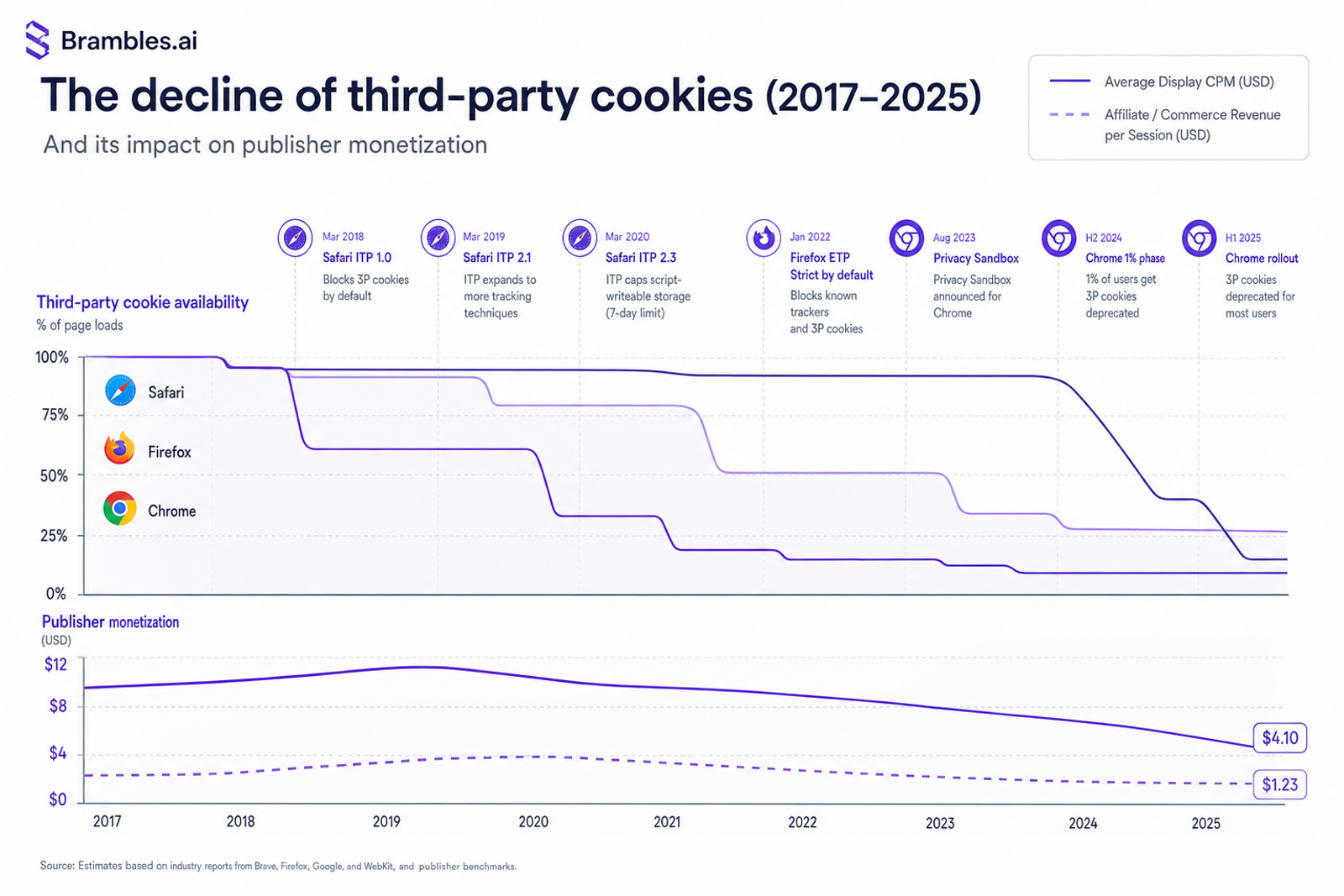
Two weeks after Chrome started restricting third‑party cookies for a 30% slice of traffic, an outdoor gear publisher I work with saw retargeting RPMs sink 27%. Yet the same month, a simple “shop the gear in this story” module drove a 19% lift in revenue per session. That contrast has repeated across clients: programmatic softens as identifiers vanish; on‑site commerce with inline shopping grows when the buying moment lives directly inside content.
Anecdote #1: on a 100k‑session apparel blog, replacing generic sidebar affiliate banners with context-matched product cards inside articles increased commerce CTR through retail media by 62% and RPS by 38% in 21 days. Anecdote #2: a niche B2B publisher added comparison tables plus “buy from vendor” buttons on evergreen guides. Their newsletter EPMV rose 24% when those on‑site elements were featured, even with zero cookie‑based targeting. These aren’t outliers; they’re the playbook for a cookieless web.
What’s Broken: Cookie‑Based Monetization
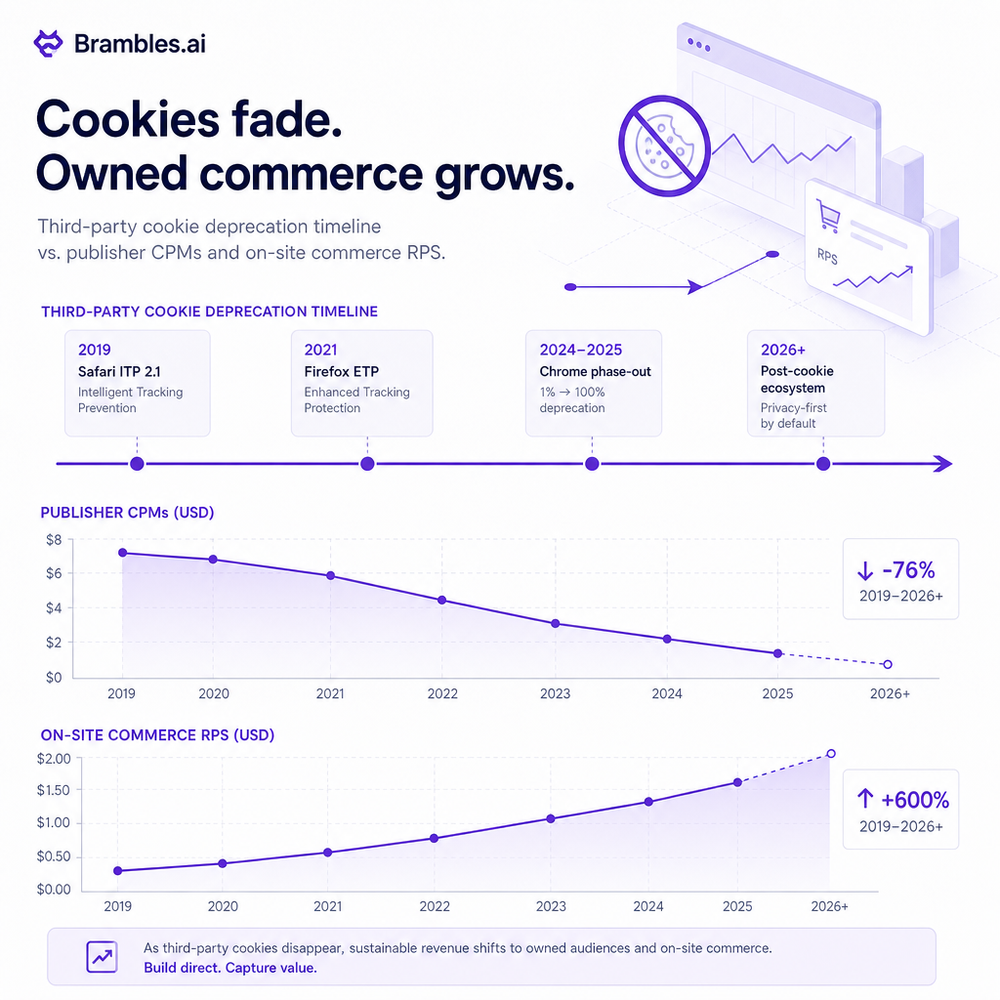
The economic model that propped up content for a decade relied on easy audience stitching: third‑party cookies, retargeting pools, and cheap lookalikes. With Safari and Firefox blocking years ago and Chrome now phasing out support, addressable reach is shrinking and CPMs are whipsawing. The IAB and agency holding companies have telegraphed this for years; we’re now living it in dashboards. The result: fewer high‑intent impressions, less frequency control, and more waste. Meanwhile, user expectation for relevance is higher than ever—Salesforce’s Connected Customer research shows over 70% expect connected experiences across channels. You can’t connect much when your identifier disappears mid-session. Programmatic still has a seat, but it can’t be the chair. What fills the gap is value created on your own property: product discovery that maps to intent, transparent merchandising with content intelligence, and transactions or high‑intent clicks for affiliate revenue that don’t depend on third‑party IDs. Baymard Institute’s usability research repeatedly finds that friction, not interest, kills commerce (their latest benchmark pegs average cart abandonment near 70%). Reduce friction where interest starts: on the page that convinced the reader to care.
How On‑Site Commerce Actually Works
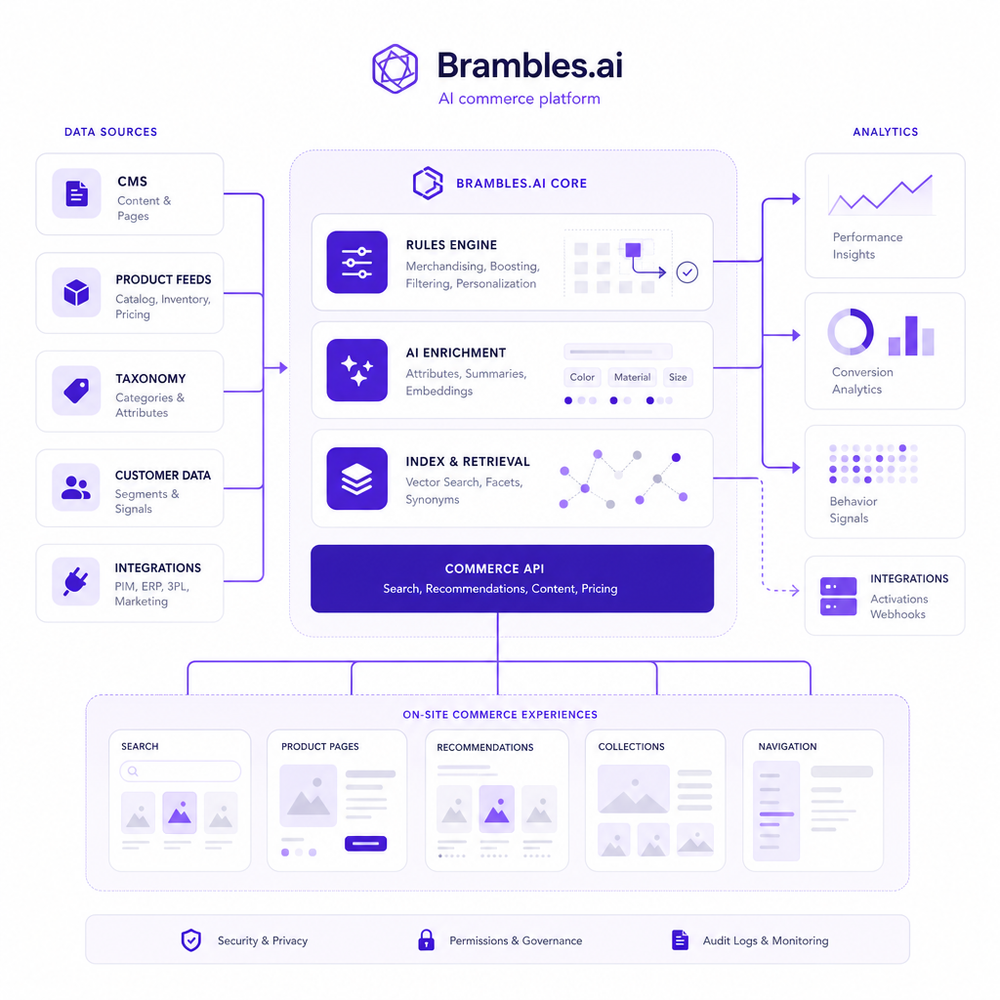
On‑site commerce turns content into the storefront. It’s not “throw in an affiliate link.” It’s structured product surfaces that match the reader’s task and context. For a hiking boot review, show three SKUs with fit notes, price history, and an honest “best for” badge. For a how‑to guide, use a parts list with real inventory and delivery ETAs. The system behind this is straightforward: a product feed (affiliate, marketplace, or your own catalog), a rules engine to match content topics to SKUs, and UI components that render product cards, comparison tables, and checkout or outbound routes. Personalization uses first‑party signals you already own—on‑site behavior, consented email, location, and session device. No third‑party cookies required. When a reader engages, you log events like view_product_card, click_out, add_to_cart, and purchase (server‑side if possible). That data enriches your first‑party graph and feeds optimization: reorder modules by predicted utility, rotate in in‑stock variants, and cap exposures to avoid banner fatigue. McKinsey has shown that strong personalization can drive 10–15% revenue lift; in commerce content, that lift compounds with intent already present on the page.
Implementation Guide: From Audit to Launch
Start with an intent audit. Pull your top 200 landing pages and classify them by job-to-be-done: choose, compare, learn, repair, or buy. For “choose” and “compare,” add comparison tables and price/availability badges. For “learn,” add a parts list with tools and materials. Map each page template to 1–2 commerce modules max; clutter kills. Mark up product elements with schema.org/Product and Offer so search engines understand context. Instrument analytics: fire view_product_card when 50% of a card is visible, click_out when a user clicks merchant CTA, add_to_cart on your own cart, and purchase with revenue and merchant ID (use server‑side tracking to improve fidelity). Set a test plan: A/B test module placement below H1 vs mid‑article; test 2 vs 3 products; test descriptive vs price-first CTA. Keep performance tight—Google’s UX research shows abandonment rises rapidly beyond a few seconds of load. On one WordPress site, lazy‑loading commerce assets cut LCP by 22% and increased click‑through 14%. Deploy in phases: start with 10 pages, expand to 100 after stabilizing data quality.
Measuring ROI & KPIs That Matter
Track revenue per session (RPS) and effective RPM for commerce exposure. Then layer micro‑conversions: commerce CTR, add‑to‑cart rate, merchant click quality (bounce time or session depth on merchant site), and attach rate from content to cart. Attribute properly: use UTMs and merchant sub‑IDs, and run geo or time‑split holdouts to measure incrementality. If you run your own checkout, track AOV, refund rate, and time to fulfill. Build a source‑of‑truth dashboard: sessions, exposure rate (percent of readers who see a module), engagement, outbound clicks, and revenue by template. Two field notes: after moving comparison tables above the first H2 on review pages, an electronics site saw a 31% lift in outbound conversion with no SEO loss. A news publisher tracking viewable impressions (50% in view for 1s) found that raising viewability from 53% to 68% via better placements yielded a 17% RPS gain. Measure weekly, not just monthly—the compounding effects show up fast.

First‑Party Data, Zero‑Party Signals, and Trust
The point of on‑site commerce isn’t to recreate surveillance with new IDs; it’s to earn permissioned signals by delivering value. Build a lightweight preference center: categories readers want, sizes, and brands they trust. Make it optional, explain the benefit, and honor it everywhere. Zero‑party inputs improve relevance dramatically. Use progressive profiling—ask one useful question at a time, not a form that feels like tax season. Respect consent: store it, display it, and make revocation obvious. If you ship a first‑party checkout, keep PII minimal and explain why each field exists. Salesforce reports that most consumers are more likely to share data for clear value; Baymard emphasizes that clarity and reassurance reduce drop‑off at forms. For logged‑in users, match content behavior to commerce recommendations; for anonymous users, use session context and page taxonomy. No third‑party cookies needed. A lifecycle view helps: someone who clicked “compare prices” yesterday should see price‑drop notes today, while repair‑guide readers respond better to parts availability than discounts.
Common Pitfalls (and Fixes)
Irrelevant products kill trust. Fix it with strict SKU‑to‑topic rules and inventory checks. Bloated scripts slow pages; defer affiliate libraries and lazy‑load images. Modal overkill hurts engagement; cap prompts and trigger after real intent signals (scroll depth plus time). Thin content with heavy commerce feels like a trap—strengthen the article first. Accessibility gets ignored: keyboard‑navigable product cards, alt text on images, and sufficient contrast aren’t optional. Baymard’s research highlights microcopy clarity; label CTAs by outcome (“See price at Merchant”) instead of generic “Buy now.” Be careful with monetization cannibalization: if you run programmatic, test whether commerce placements steal viewable inventory from high‑performing ad slots. Finally, QA on mobile first; most commerce clicks land there, and tap targets under 44 px are a known friction point. When a publisher trimmed their product cards from five to three columns on mobile, thumb reach improved and CTR climbed 21%.
Future Outlook: Post‑Cookie Growth Loops
The near future favors properties that turn intent into outcomes without chasing users around the web. Google’s Privacy Sandbox reduces cross‑site precision; that pushes value creation on‑site. Expect tighter merchant integrations (real‑time pricing and stock), checkout‑anywhere patterns for trusted brands, and retail media partnerships that pay for proven influence instead of hazy reach. Product data will act like content—versioned, annotated, and personalized. The growth loop looks like this: useful content drives qualified sessions; on‑site commerce captures high‑intent interactions; first‑party signals improve recommendations; performance funds more content. Rinse, refine, repeat. If you’re on WordPress, start with a plugin‑based integration to ship fast, then graduate to a modular commerce layer as volumes justify. Keep your measurement honest with holdouts, keep your UX light, and you won’t miss third‑party cookies much.
Related posts
View all
How Context-Aware AI Recommendations Lift CTR
See how context-aware AI recommendations lift CTR by 25–60% with intent signals, page context, and history. Practical steps, KPIs, and implementation tips.

How AI Handles Order Lookup, Returns, and Shipping 24/7
See how AI resolves order lookups, returns, and shipping questions 24/7, deflects tickets, and lifts CSAT—plus a step‑by‑step guide to implement it safely.
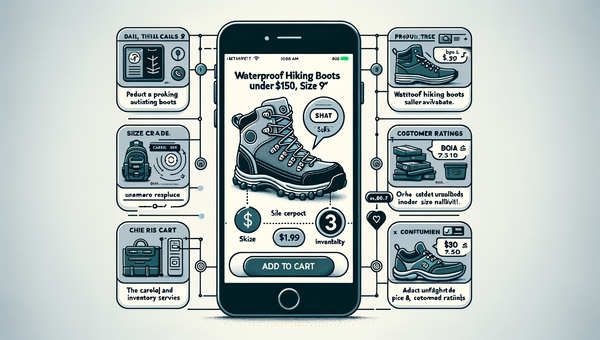
Direct Add to Cart from AI Chat Boosts Conversions
Shoppers convert faster when chat answers end in a one-tap cart. Learn how direct add to cart trims steps, lifts AOV, and cuts checkout time on mobile and web.
Explore Brambles.ai
Learn more about our AI-powered agentic commerce platform, agentic shopping, and shopping assistance solutions.
Explore More Insights
Discover more articles on AI, automation, and business innovation
View All Articles